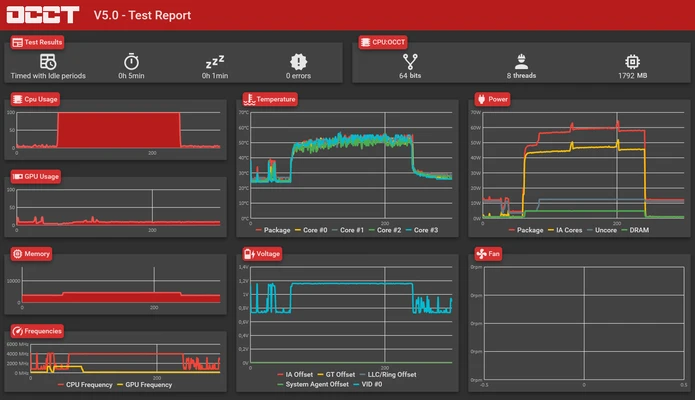
OCCT (OverClock Checking Tool) is a powerful PC stability testing and hardware monitoring utility designed to stress-test CPUs, GPUs, memory, and power supplies.
Originally developed for overclockers, OCCT is now widely used by gamers, hardware enthusiasts, and IT professionals to diagnose system stability issues, overheating problems, and hardware failures.
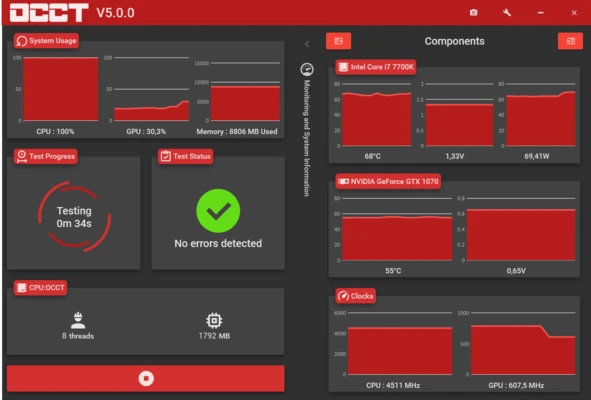
The software provides real-time monitoring of temperatures, voltages, fan speeds, and performance data while running customizable stress tests.
Features
CPU Stress Test
Tests processor stability under heavy workloads, including multi-core CPU testing.
GPU Stress Test
Checks graphics card stability with DirectX-based GPU workloads.
Power Supply Test
Combines CPU and GPU loads to evaluate PSU stability under maximum system power consumption.
Memory Testing
Performs intensive memory operations to detect RAM instability and errors.
Real-Time Monitoring
Displays CPU, GPU, motherboard temperatures, voltages, fan speeds, and other hardware information.
Customizable Tests
Users can adjust test duration, workload intensity, CPU cores, memory usage, and other parameters.
Error Detection
Automatically detects calculation errors and system instability during stress tests.
Benchmark Tools
Includes performance benchmarks for evaluating CPU, GPU, latency, and bandwidth.
Hardware Compatibility
Supports Intel and AMD processors, as well as NVIDIA and AMD graphics cards.
Detailed Reports
Generates graphs and reports showing system behavior during testing.
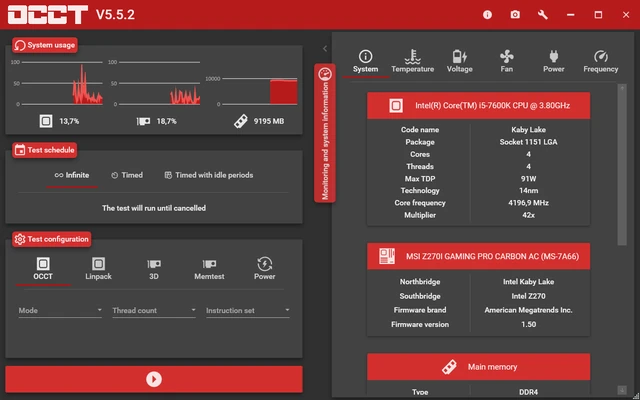
User Interface
OCCT features a modern and easy-to-use interface.
The main dashboard provides quick access to CPU, GPU, Power, and Memory tests. Each test module includes configuration options and real-time monitoring charts.
Beginners can start testing with default settings, while advanced users can customize detailed parameters for overclocking and hardware diagnostics.
Installation and Setup
- Download and install OCCT for Windows.
- Launch the application.
- Allow OCCT to detect your hardware automatically.
- Select a test type (CPU, GPU, Memory, or Power).
- Configure test settings and start the stress test.
How to Use
- Open OCCT.
- Select the hardware component you want to test.
- Adjust test duration and workload settings.
- Click Start to begin testing.
- Monitor temperatures, voltages, and performance data.
- Review generated reports after the test completes.
For safety, stop testing if temperatures reach unsafe levels.
FAQ
Can OCCT damage my PC?
OCCT is designed for safe stress testing, but prolonged maximum-load testing can increase temperatures. Ensure your cooling system is adequate.
Is OCCT free?
Yes. OCCT offers a free version with essential testing features. A premium version provides additional functions.
How long should I run an OCCT test?
Short tests of 10-30 minutes are useful for quick checks. Longer tests can provide more reliable stability results.
Does OCCT support overclocking tests?
Yes. It is commonly used to verify system stability after CPU or GPU overclocking.
Does OCCT support multi-core processors?
Yes. It can test modern multi-core Intel and AMD CPUs.
Alternatives
Prime95 – A popular CPU stability testing tool for overclocking.
FurMark – A GPU stress testing utility focused on graphics card performance and temperatures.
AIDA64 Extreme – A complete hardware diagnostic and benchmarking tool.
MemTest86 – A dedicated memory testing solution.
Pricing
OCCT provides a free version with core testing and monitoring features.
Premium Version: €10/year
Additional features include:
- Advanced testing options
- Enhanced monitoring functions
- Additional GPU testing capabilities
- Extended diagnostics features
System Requirements
- Operating System: Windows 7, 8, 10, 11 (64-bit recommended)
- Processor: Intel or AMD CPU
- Graphics: NVIDIA or AMD GPU (for GPU tests)
- RAM: 2 GB minimum (4 GB recommended)
- Storage: 100 MB free disk space
PROS
- Comprehensive CPU, GPU, memory, and PSU testing
- Real-time hardware monitoring
- Detailed reports and graphs
- Supports modern Intel, AMD, and NVIDIA hardware
- Customizable stress test settings
- Regular updates
CONS
- Stress testing can generate high temperatures
- Advanced features require a premium license
- Not necessary for casual users
Conclusion
OCCT is one of the best free tools for testing PC stability and monitoring hardware performance.
With powerful CPU, GPU, memory, and power supply stress tests combined with real-time monitoring, OCCT is an excellent choice for overclockers, gamers, and users who need to verify system reliability.
Its easy interface makes it suitable for beginners, while advanced configuration options provide enough control for professional hardware testing.