

Plex Media Server is media server software that lets you organize and stream your personal collection of movies, TV shows, music, photos, and other media from a central computer.
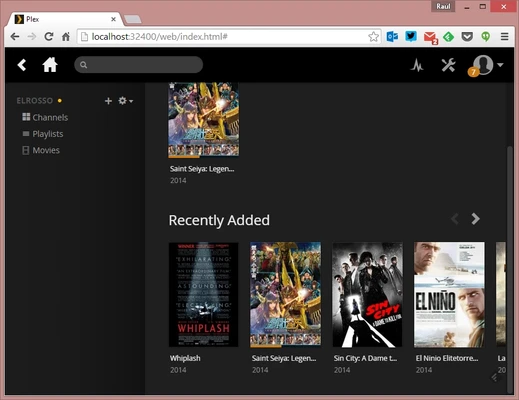
After installing Plex Media Server on a Windows PC, you can add folders containing your media files and let Plex automatically organize the library with titles, artwork, descriptions, genres, and other metadata. The content can then be accessed from compatible computers, smartphones, tablets, smart TVs, streaming devices, and other supported platforms.
Plex is particularly useful for users who want to build a personal media library and access it from multiple devices.
What's New
- Improved media library management and metadata handling.
- Better playback compatibility for modern video and audio formats.
- Performance and stability improvements.
- Improved remote streaming and server connectivity.
- Updates to transcoding and hardware acceleration.
- Various bug fixes and security improvements.
Features
Media Library Management
Organize movies, TV shows, music, photos, and other media into separate libraries with automatically generated artwork and metadata.
Automatic Metadata
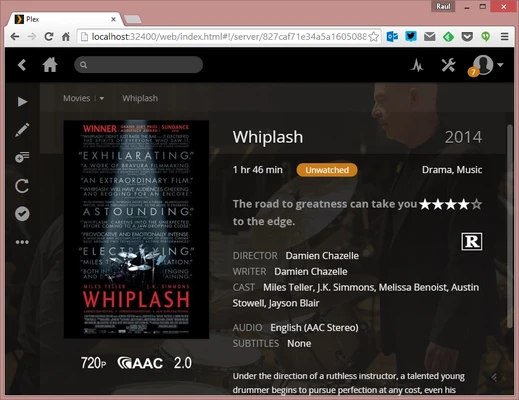
Plex can identify supported media files and retrieve information such as posters, descriptions, cast information, genres, ratings, and release dates.
Multi-Device Streaming
Access your media library from computers, mobile devices, smart TVs, and other supported streaming devices.
Remote Access
Configure remote access to stream content from your home server while away from your local network.
Video Transcoding
Plex can convert media into a compatible format when the playback device does not support the original file format or resolution. Transcoding performance depends on the server hardware.
Subtitle Support
Supports subtitles and provides options for selecting and managing subtitle tracks during playback.
Multiple Users
Create separate users and share selected libraries with family members or other authorized users.
Live TV and DVR
With compatible hardware and supported services, Plex can provide live TV and DVR functionality.
Hardware-Accelerated Streaming
Supported hardware can be used to improve transcoding performance and reduce CPU usage. Some hardware transcoding features require a Plex Pass subscription.
Installation and Setup
- Download and install Plex Media Server on the computer that will host your media library.
- Sign in with a Plex account.
- Choose the folders containing your movies, TV shows, music, or photos.
- Create the appropriate media libraries.
- Allow Plex to scan the folders and retrieve metadata.
- Install a Plex client on the device you want to use for playback.
- Enable remote access if you want to access the server from outside your home network.
Once configured, Plex Media Server normally runs in the background and automatically monitors your media folders for changes.
How to Use
Add Media
Create a library and select the folder containing your media files.
Organize Your Library
Use separate folders and consistent file names for movies, TV shows, and music to improve metadata matching.
Play Media
Open Plex on a supported device, browse the library, and select a title to start playback.
Manage Subtitles
Select an available subtitle track from the playback controls.
Enable Remote Access
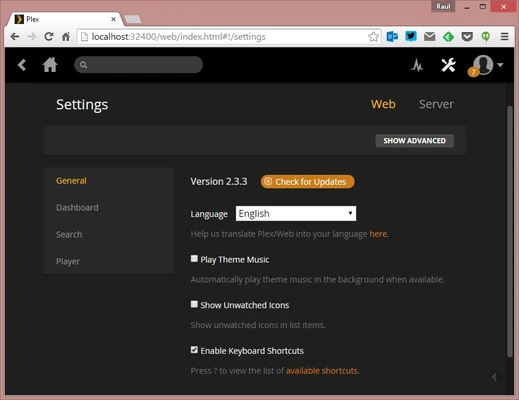
Configure remote access in the server settings if you want to stream your library outside your local network.
Monitor Server Activity
The server dashboard provides information about active streams, connected users, and current playback activity.
FAQ
Is Plex Media Server free?
The basic Plex Media Server is free to use. Some advanced features require a Plex Pass subscription.
Can Plex play 4K video?
Yes. Plex can manage and stream 4K media, although playback and transcoding performance depend on the server and playback device.
Can I access Plex without an internet connection?
Local streaming can work without an active internet connection in some configurations, but internet access is required for certain account, metadata, remote access, and online features.
Can I share my Plex library with other people?
Yes. Plex allows users to share selected libraries with other authorized Plex users.
Does Plex support subtitles?
Yes. Plex supports subtitle tracks and provides subtitle selection and configuration options.
Does Plex require a powerful computer?
Not necessarily. Direct playback requires relatively little processing power, while transcoding high-resolution video can require considerably more CPU or GPU resources.
What is Plex Pass?
Plex Pass is a paid subscription that unlocks additional features such as hardware-accelerated transcoding, downloads, DVR functionality, and other premium features.
Alternatives
- Emby – Media server software with library management, streaming, and live TV features.
- Jellyfin – Free and open-source media server focused on personal media collections.
- Kodi – Media center software designed primarily for local media playback and library management.
- MediaPortal – Windows-based media center software with support for TV and multimedia features.
Pricing
Free
The basic Plex Media Server is available for free and provides core media library and streaming functionality.
Plex Pass
Plex Pass is a paid subscription that adds additional features such as hardware-accelerated transcoding, downloads, DVR functionality, and other premium capabilities. Pricing may vary by region and subscription type.
System Requirements
- Operating System: Windows 10 or Windows 11
- Processor: Intel or AMD processor
- RAM: 2 GB minimum; 4 GB or more recommended
- Storage: Additional storage required for your media library
- Network: Reliable network connection for streaming
For users who plan to transcode multiple 1080p or 4K streams simultaneously, a more powerful CPU or supported hardware-accelerated transcoding setup is recommended.
PROS
- Easy media library organization
- Automatic metadata and artwork
- Supports many media formats
- Streaming across multiple devices
- Remote access support
- Supports subtitles and transcoding
- User and library sharing features
CONS
- Some advanced features require Plex Pass
- Transcoding can require significant hardware resources
- Remote access may require additional network configuration
- Large libraries can take time to scan and organize
Conclusion
Plex Media Server is a versatile solution for organizing and streaming a personal media collection. It combines automatic library management, metadata, multi-device playback, remote access, and transcoding in a single platform.
For users with a large collection of movies, TV shows, music, or photos, Plex provides a convenient way to turn a Windows PC into a centralized home media server.