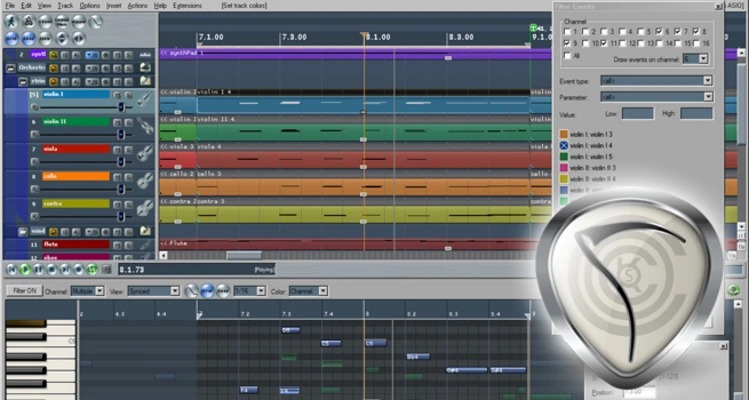
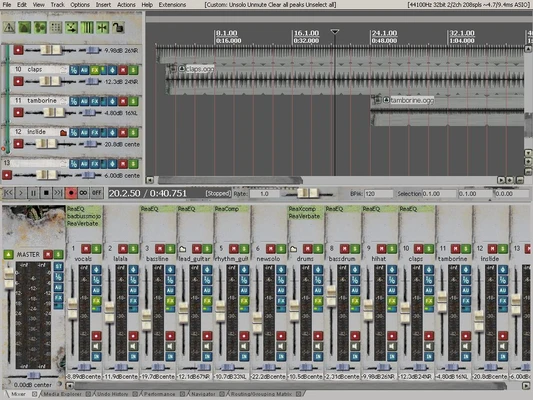
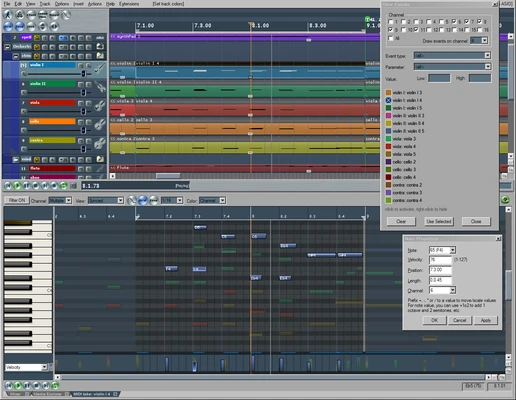
REAPER is a professional digital audio workstation (DAW) for recording, editing, mixing, mastering, and producing music and other audio projects. Developed by Cockos, it combines multitrack recording, MIDI editing, flexible routing, automation, scripting, and extensive plugin support in a lightweight application.
Key Features
-
Multitrack Recording – Record and edit multiple audio and MIDI tracks.
-
MIDI Editing – Includes piano roll editing, MIDI routing, and controller support.
-
Plugin Support – Supports VST, VST3, and JS plugins on Windows.
-
Flexible Audio Routing – Create complex signal paths for recording, mixing, and effects processing.
-
Automation – Automate volume, pan, effects, and other track parameters.
-
Scripting and Customization – Supports Lua, EEL, and Python scripting for workflow customization and automation.
-
Audio Editing – Provides non-destructive editing, trimming, splitting, fades, and other common tools.
-
Video Support – Includes basic video capabilities for audio synchronization and scoring.
-
Portable Installation – Can be installed as a portable application and run from external storage.
-
Regular Updates – Receives ongoing feature improvements and bug fixes.
User Interface
REAPER uses a customizable workspace built around the track panel, mixer, transport controls, MIDI editor, and FX browser. Users can customize layouts, shortcuts, toolbars, and themes to create a workflow suited to their needs.
Installation and Setup
Run the Windows installer and choose a standard or portable installation. After installation, configure the audio device, sample rate, buffer size, MIDI hardware, and plugin paths. Third-party VST or VST3 plugins can then be added to the appropriate plugin directories.
How to Use
-
Create a new project and configure the sample rate and audio settings.
-
Add audio or MIDI tracks.
-
Select an input and arm tracks for recording.
-
Record audio or MIDI using the transport controls.
-
Edit recordings using split, trim, move, and fade tools.
-
Add effects and instruments through the FX system.
-
Adjust volume, panning, routing, and automation.
-
Use File > Render to export the finished project.
System Requirements
-
Operating System: Windows 7, 8, 10, or 11
-
Processor: 1 GHz or faster
-
RAM: 4 GB minimum; more recommended for larger projects
-
Storage: About 100 MB for the application, plus additional space for projects and audio files
-
Audio Hardware: ASIO-compatible audio interface recommended for low-latency recording
Pros
-
Lightweight and efficient
-
Extensive customization options
-
Flexible routing and automation
-
Strong third-party plugin support
-
Advanced scripting capabilities
-
Portable installation option
-
Suitable for both simple and complex audio projects
Cons
-
Steep learning curve for beginners
-
Default interface can feel dated
-
Some users may prefer dedicated DAWs for advanced MIDI workflows
-
Built-in instruments and content are less extensive than some competing DAWs
Conclusion
REAPER is a highly flexible DAW that provides professional recording, editing, mixing, MIDI, routing, and automation tools without requiring a large amount of system resources. Its extensive customization and plugin support make it suitable for musicians, producers, engineers, and home recording users who want more control over their audio workflow.