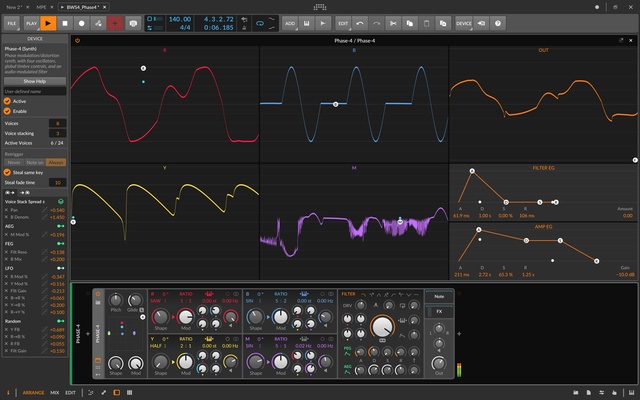
Bitwig Studio is a professional digital audio workstation (DAW) for music production, recording, editing, mixing, sound design, and live performance. Developed by Bitwig GmbH, it combines traditional timeline-based arrangement with clip launching, advanced modulation, modular sound design, and flexible audio and MIDI workflows.
It is suitable for electronic music producers, musicians, composers, performers, and sound designers who need detailed control over instruments, effects, automation, and routing.
Key Features
Flexible Arrangement – Combine traditional timeline-based arrangement with clip-based workflows for composition, experimentation, and live performance.
Advanced Modulation – Modulate instruments, effects, and other parameters using LFOs, envelopes, step modulators, and other modulation sources.
The Grid – A modular environment for building custom synthesizers, effects, sequencers, and other audio devices.
Hybrid Tracks – Combine audio and MIDI content within the same track, providing a flexible approach to arranging and editing.
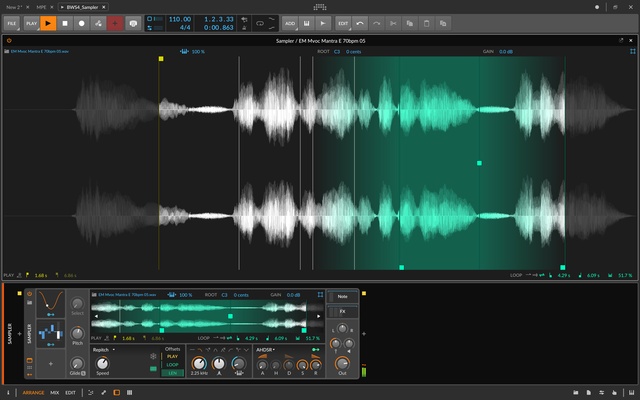
Built-in Instruments and Effects – Includes synthesizers, samplers, drum machines, audio effects, and other production tools.
Plugin Support – Supports VST2, VST3, and CLAP plugins for integrating third-party instruments and effects.
MPE Support – Supports MIDI Polyphonic Expression for compatible controllers and expressive performance workflows.
Hardware Integration – Connect MIDI controllers, synthesizers, drum machines, audio interfaces, and other external equipment.
Cross-Platform Support – Available for Windows, macOS, and Linux.
User Interface
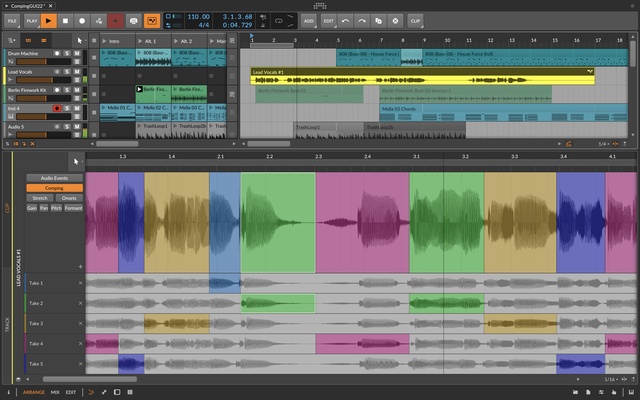
Bitwig Studio uses a modular interface designed around different stages of music production. The main workspace provides access to arrangement, clip launching, editing, mixing, devices, and project information.
The Arranger View provides a traditional timeline for arranging songs, while the Clip Launcher is designed for loops, experimentation, and live performance. The device panel provides access to instruments, effects, modulation, and signal routing.
The interface can be customized to suit different production workflows, although users new to DAWs or modular sound design may need some time to become familiar with its features.
Installation and Setup
-
Download Bitwig Studio for Windows from the official website.
-
Run the installer and follow the on-screen instructions.
-
Sign in to your Bitwig account and activate the software.
-
Open the audio settings and select your preferred audio driver or ASIO device.
-
Connect and configure MIDI controllers or external hardware if required.
-
Configure plugin locations and scan for installed VST or CLAP plugins.
-
Create a new project or open a demo project to begin exploring the software.
How to Use
Creating a Project – Start a new project and configure the audio and MIDI settings.
Adding Tracks – Create audio, instrument, hybrid, effect, or other supported track types.
Recording Audio and MIDI – Connect an audio interface or MIDI controller and record performances directly into the project.
Using the Clip Launcher – Create clips and scenes for experimenting with loops, patterns, and live arrangements.
Arranging a Song – Move recorded clips into the Arranger View and organize them into a complete composition.
Adding Effects and Instruments – Use Bitwig's built-in devices or install compatible third-party plugins.
Using Modulation – Add modulators to parameters to create evolving sounds and automated effects.
Mixing and Exporting – Adjust levels, routing, effects, and automation before exporting the finished project.
FAQ
Is Bitwig Studio free?
No. Bitwig Studio is commercial software, but a trial version is available for users who want to evaluate its features before purchasing.
Does Bitwig Studio support VST plugins?
Yes. It supports VST2, VST3, and CLAP plugins, allowing users to install third-party instruments and effects.
Does Bitwig Studio support Windows?
Yes. Bitwig Studio is available for Windows as well as macOS and Linux.
Can Bitwig Studio be used for live performance?
Yes. The Clip Launcher provides a flexible environment for launching loops, scenes, and musical ideas during live performances.
Does Bitwig Studio support MIDI controllers?
Yes. It supports MIDI controllers and external hardware, including devices that provide MPE capabilities.
Is Bitwig Studio suitable for beginners?
Yes, although its extensive modulation and modular sound-design features can take time to learn. Beginners can start with the standard arrangement and recording tools before exploring more advanced features.
Alternatives
Ableton Live – A popular DAW with powerful clip launching, arrangement, music production, and live performance features.
Cubase – A comprehensive DAW with extensive MIDI, recording, mixing, and composition tools.
REAPER – A highly customizable and relatively lightweight DAW suitable for recording, editing, mixing, and production.
FL Studio – A popular music production platform known for its pattern-based workflow, instruments, and electronic music production features.
Pricing
Bitwig Studio is commercial software and requires a license for full access. Bitwig offers different editions and licensing options, while pricing and available plans may vary by version and region.
A trial version is available for users who want to test the software before purchasing.
System Requirements
-
OS: Windows 10 or Windows 11
-
Processor: 64-bit Intel or AMD processor
-
RAM: 4 GB minimum; 8 GB or more recommended
-
Storage: Several GB of free space recommended for the application and sound content
-
Audio Hardware: ASIO-compatible audio interface recommended
-
Internet: Required for activation and certain online features
Pros
-
Powerful modulation and automation system
-
Flexible audio and MIDI workflow
-
Advanced modular sound design with The Grid
-
Supports VST2, VST3, and CLAP plugins
-
Strong hardware and MIDI integration
-
Available for Windows, macOS, and Linux
-
Suitable for both studio production and live performance
Cons
-
Advanced features can be difficult for beginners
-
The modular workflow requires additional learning
-
More expensive than some entry-level DAWs
-
Large projects can require substantial CPU and RAM resources
Conclusion
Bitwig Studio is a versatile DAW that combines conventional music production tools with advanced modulation, clip launching, and modular sound design. Its hybrid tracks, The Grid, extensive device system, and support for third-party plugins make it particularly useful for electronic music production and sound design.
It is a strong choice for users who want more flexibility than a traditional linear DAW provides. Beginners may need some time to learn its advanced features, but the software offers enough conventional recording, editing, arrangement, and mixing tools to support a wide range of production workflows.
Note: The trial version may have limitations compared with the full licensed version.