

Coolmuster Android Backup Manager Download for Windows 11/10 (Free Trial)
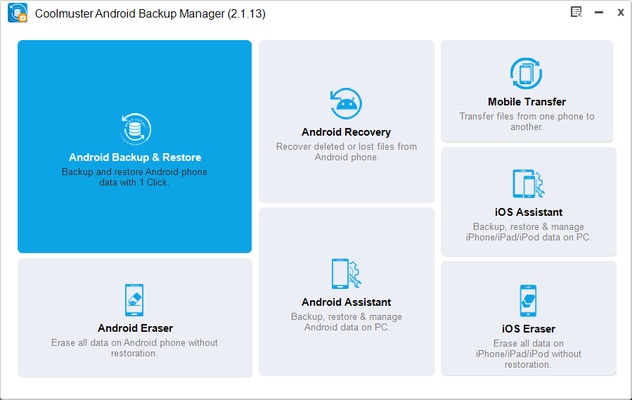
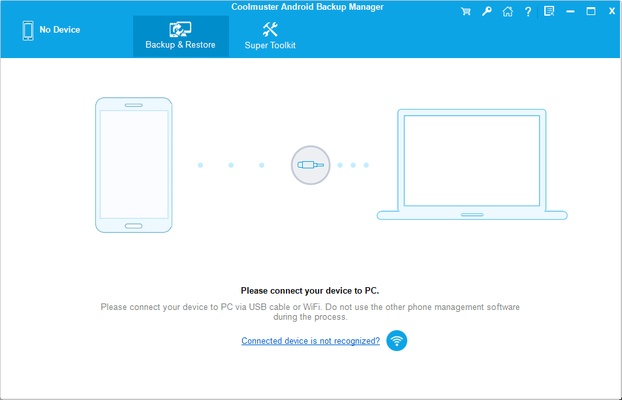
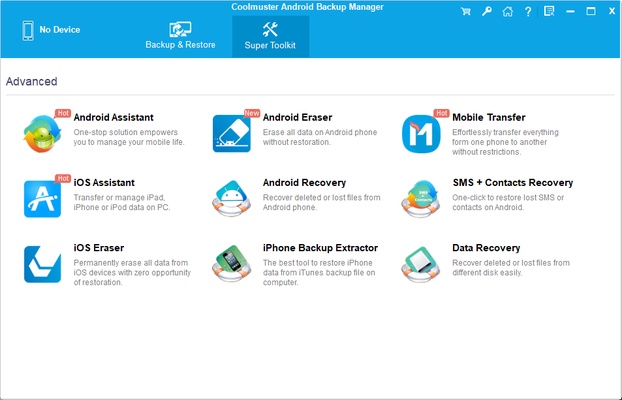
Coolmuster Android Backup Manager is a reliable Android backup and restore software that enables users to back up Android phones and tablets to a Windows PC with just one click. It provides a fast, secure, and easy way to protect important data, including contacts, SMS messages, call logs, photos, videos, music, documents, apps, and more.
Whether you're upgrading to a new Android device, protecting your files before a factory reset, or creating regular backups for peace of mind, Coolmuster Android Backup Manager offers a simple solution without requiring cloud storage or complicated configurations.
Supporting USB and Wi-Fi connections, the software works with nearly all Android smartphones and tablets from Samsung, Google Pixel, Xiaomi, Huawei, Motorola, OnePlus, OPPO, vivo, Sony, LG, and many other manufacturers. With its intuitive interface and high-speed transfer engine, users can safely back up and restore Android data while preserving the original file quality and structure.
If you're looking for one of the best Android backup software for Windows, Coolmuster Android Backup Manager delivers reliable performance with one-click backup, fast restoration, and broad device compatibility.
Key Features
One-Click Android Backup
Back up your entire Android phone or tablet to your Windows PC with a single click, protecting your valuable files from accidental loss.
One-Click Android Restore
Quickly restore previously created backups to the same Android device or a new compatible Android phone whenever needed.
Multiple Data Types Supported
Back up and restore contacts, SMS messages, call logs, photos, videos, music, documents, apps, and other essential Android data.
USB & Wi-Fi Connection
Connect your Android device through either a USB cable or Wi-Fi, allowing flexible and convenient backup and restoration.
Fast & Secure Data Transfer
Transfer files quickly using a read-only process that keeps your original data safe without modifying existing content.
Broad Android Compatibility
Compatible with thousands of Android phones and tablets, including devices running the latest Android versions.
Preserve Original Data Quality
Maintain original file formats, metadata, folder structures, and media quality throughout the backup and restore process.
Clean & User-Friendly Interface
Designed with beginners in mind, the intuitive interface makes Android backup and restoration simple for users of all experience levels.
Why Choose Coolmuster Android Backup Manager?
- One-click Android backup and restore
- Backup Android to PC safely
- Supports USB and Wi-Fi connections
- Fast backup and restoration speed
- Compatible with most Android brands
- Supports photos, contacts, SMS, videos, apps, and documents
- Lightweight and easy to use
- Compatible with Windows 11 and Windows 10
What's New
- Improved compatibility with Android 16 and Android 15 devices.
- Enhanced backup stability for newer Android smartphones.
- Faster data transfer performance.
- Better USB device detection.
- Optimized Wi-Fi connection reliability.
- Improved Windows 11 compatibility.
- Fixed minor bugs and enhanced overall performance.
How to Use
- Download and install Coolmuster Android Backup Manager.
- Launch the application.
- Connect your Android phone via USB cable or Wi-Fi.
- Enable USB Debugging if prompted.
- Select Backup or Restore.
- Choose the data categories you want to process.
- Click Back Up or Restore to complete the operation.
- Wait for the transfer to finish safely.
Frequently Asked Questions
Is Coolmuster Android Backup Manager free?
A free trial is available with limited functionality. The full version unlocks complete backup and restore features.
What data can I back up?
You can back up contacts, SMS, call logs, photos, videos, music, documents, apps, and other supported Android data.
Does it support wireless backup?
Yes. The software supports both USB and Wi-Fi connections, depending on your device configuration.
Can I restore backups to a new Android phone?
Yes. Previously created backups can be restored to compatible Android devices with just a few clicks.
Is it compatible with Windows 11?
Yes. It fully supports Windows 11, Windows 10, Windows 8.1, Windows 8, and Windows 7.
Best Alternatives
- Samsung Smart Switch
- Google One Backup
- MobileTrans
- Syncios Data Transfer
- MobiKin Backup Manager for Android
- Dr.Fone Android Backup & Restore
- AirDroid Personal
- MyPhoneExplorer
System Requirements
Operating System: Windows 11, Windows 10, Windows 8.1, Windows 8, Windows 7 (32-bit & 64-bit)
Android Version: Android 6.0 or later (including Android 16)
Processor: Intel or AMD processor, 1 GHz or faster
Memory: 1 GB RAM recommended
Storage: 200 MB available disk space
Connection: USB cable or Wi-Fi network
Pros
- One-click Android backup and restore
- Supports contacts, SMS, photos, videos, music, and apps
- Fast transfer speed
- USB and Wi-Fi connectivity
- Beginner-friendly interface
- Broad Android device compatibility
- Preserves original data quality
- Compatible with Windows 11
Cons
- Free trial has restore limitations
- Some advanced features require the full version
- USB Debugging must be enabled for most devices
Conclusion
Coolmuster Android Backup Manager is one of the best Android backup software for Windows, offering an easy and secure way to back up and restore Android phones and tablets. With one-click operation, support for multiple data types, USB and Wi-Fi connectivity, and compatibility with the latest Android devices, it provides an excellent solution for protecting valuable mobile data.
Whether you're switching to a new Android phone, creating regular backups, or restoring lost files after a factory reset, Coolmuster Android Backup Manager delivers a fast, reliable, and user-friendly backup experience for Windows users.
Note: The trial version allows users to test the software, while restoring backups and certain premium features require activation of the full version.