

RogueKiller is an anti-malware and anti-rootkit utility for Windows designed to detect and remove malware, suspicious processes, malicious services, unwanted startup entries, browser hijacks, and other system modifications.
It can be useful as a second-opinion security scanner when a computer shows signs of malware infection, unusual system behavior, unwanted browser changes, or persistent malicious processes. RogueKiller combines malware scanning with several specialized tools for investigating and repairing compromised Windows systems.
Key Features
Malware Detection and Removal: Detects and removes various threats, including malware, spyware, adware, and other potentially malicious software.
Anti-Rootkit Detection: Searches for hidden processes, malicious hooks, modified system components, and other indicators associated with rootkits.
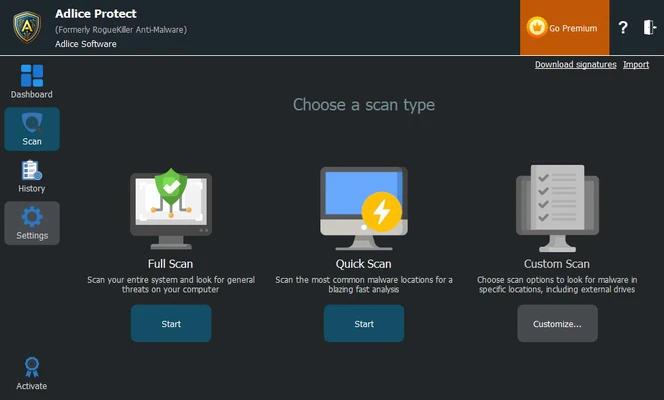
Advanced Scanning: Performs deeper system scans to identify threats that may be difficult to detect with conventional scanning methods.
Custom Scans: Allows users to select specific areas, files, folders, or system components for scanning.
Process Management: Identifies suspicious processes and provides tools for terminating malicious processes.
Startup Entry Detection: Checks Windows startup locations, scheduled tasks, and registry entries for suspicious or malicious autostart components.
System Hijack Detection: Can identify potentially malicious changes involving DNS settings, proxy settings, hosts files, registry associations, and other Windows configuration areas.
Malicious DLL Detection: Helps identify suspicious DLLs loaded into running processes.
MBR and System Repair: Provides specialized tools for detecting and repairing certain malicious modifications to the Master Boot Record and other system components.
Automatic Updates: Regular updates help keep malware detection capabilities current.
User Interface
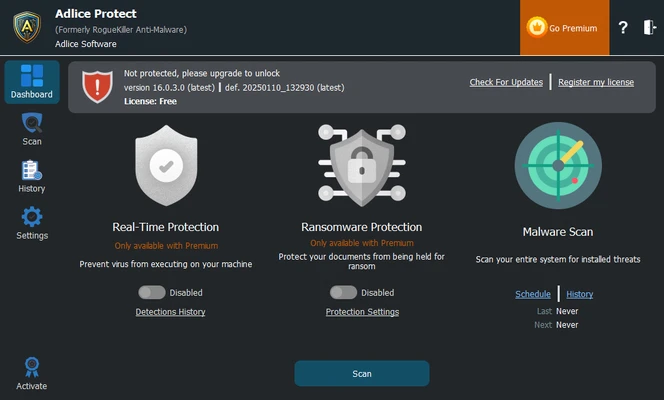
RogueKiller provides a straightforward interface centered around system scanning and threat detection. The main screen gives users access to scanning tools and displays detected items with information about their status and potential risk.
Advanced users can access additional tools for investigating processes, startup entries, system settings, and other areas commonly targeted by malware.
Installation and Setup
-
Download RogueKiller for Windows.
-
Run the installer and follow the setup instructions.
-
Launch the application after installation.
-
Allow the software to update its malware database if an update is available.
-
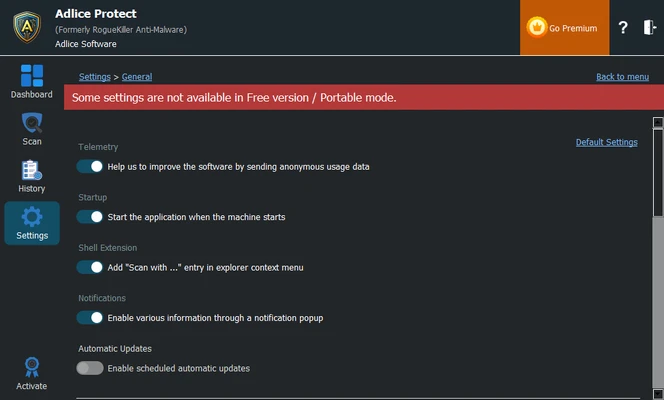
Review the available scanning and protection options.
-
Select the appropriate scan mode.
-
Start a system scan.
How to Use
Run a Scan: Launch RogueKiller and start a system scan to search for malware and suspicious modifications.
Review Detected Items: Examine the scan results before removing anything. Some advanced detections may require additional investigation.
Remove Threats: Select confirmed malicious items and use the removal or remediation option.
Check Suspicious Processes: Use the process management tools to investigate processes that appear suspicious.
Review Startup Entries: Check scheduled tasks, startup folders, and registry entries for unwanted programs.
Repair Hijacked Settings: Use the available repair tools to restore malicious changes to supported DNS, proxy, hosts, or other Windows settings.
FAQ
What is RogueKiller used for?
RogueKiller is designed to detect and remove malware and potentially unwanted system modifications. It also includes specialized anti-rootkit and system repair tools.
Is RogueKiller free?
A free version is available with core scanning and malware removal functionality. Paid editions provide additional protection and management features.
Can RogueKiller remove rootkits?
It includes anti-rootkit capabilities designed to detect hidden processes, hooks, modified system components, and other indicators of rootkit activity.
Can RogueKiller replace Windows antivirus software?
RogueKiller can be useful as a supplementary malware removal and diagnostic tool, but users should maintain a reputable primary security solution for ongoing protection.
Can RogueKiller run alongside another antivirus?
It can generally be used as a second-opinion scanner. However, users should avoid running multiple real-time security products simultaneously if they conflict with each other.
How often should I run RogueKiller?
There is no fixed schedule required. It can be useful for periodic second-opinion scans or when unusual system behavior suggests a possible malware infection.
Alternatives
Malwarebytes – A popular malware detection and removal tool with both free scanning and paid real-time protection.
HitmanPro – A lightweight second-opinion malware scanner that uses cloud-based threat analysis.
SUPERAntiSpyware – Focuses on detecting and removing spyware, adware, and other unwanted software.
Zemana AntiMalware – A lightweight malware scanning solution designed for detecting various types of threats.
Pricing
RogueKiller offers a free version for personal use with core malware scanning and removal capabilities.
Paid plans provide additional features such as real-time protection, ransomware protection, clipboard protection, automatic updates, and additional support.
System Requirements
-
Operating System: Windows 7, Windows 8, Windows 8.1, Windows 10, or Windows 11
-
Processor: Intel Pentium 4 or equivalent
-
RAM: 1 GB or more
-
Storage: At least 100 MB of free disk space
-
Internet Connection: Recommended for updates and online security features
PROS
-
Detects and removes a wide range of malware
-
Includes anti-rootkit capabilities
-
Advanced and customizable scanning
-
Provides process and startup management tools
-
Includes system hijack detection and repair tools
-
Free version available
-
Useful as a second-opinion security scanner
CONS
-
Some advanced protection features require a paid plan
-
Advanced system repair tools may be confusing for inexperienced users
-
Free edition has limited real-time protection
-
Some detections may require manual review before removal
Conclusion
RogueKiller is a capable Windows security utility that combines malware removal, anti-rootkit detection, process management, and system repair tools in one application.
It is particularly useful when dealing with persistent malware, suspicious startup entries, browser or network hijacking, and threats that may not be detected easily by standard antivirus software. The free version is suitable for on-demand scanning, while the paid editions add continuous protection and additional security features.