


Password Safe is a free and open-source password manager for Windows that helps users securely store and organize passwords, login credentials, notes, and other sensitive information. Developed from an original design by security expert Bruce Schneier, it uses encrypted password databases protected by a master password.
The software focuses on straightforward password management rather than cloud-based services, making it suitable for users who prefer to keep control of their encrypted password database.
What's New
Recent updates include improvements to database handling, font preference storage, error handling, application focus after unlocking, and Auto-Type behavior.
-
Database-specific options are reset when a database is closed.
-
Font preference changes are saved immediately.
-
Invalid system option values no longer cause duplicate error messages or crashes.
-
Application focus is restored correctly after unlocking in certain configurations.
-
Backslashes in passwords are passed correctly during Auto-Type.
Key Features
Encrypted Password Storage: Stores passwords and other sensitive information in an encrypted database protected by a master password.
Password Generator: Creates strong, random passwords to help users avoid weak or reused credentials.
Organized Database: Entries can be arranged into groups and folders for easier management.
Auto-Type: Automatically enters stored credentials into compatible applications and login forms.
Search: Quickly locate passwords and other stored entries using the built-in search function.
Import and Export: Supports importing data from various password-management formats and exporting database information when needed.
Backup: Allows users to create backups of their encrypted password database.
Password Expiration Management: Entries can include expiration information and reminders to help users keep credentials up to date.
Open Source: The source code is publicly available, allowing the software to be inspected and developed by the community.
User Interface
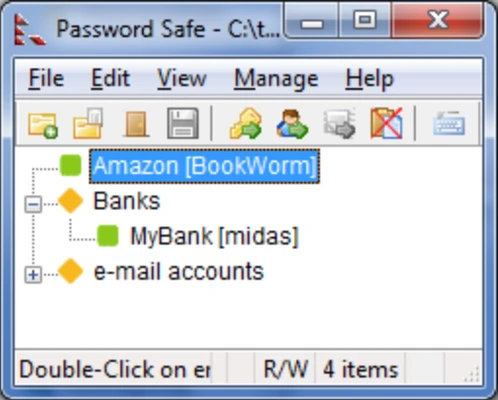
Password Safe uses a simple, traditional Windows interface centered around the password database. The main window displays groups and stored entries, while menus and dialogs provide access to database management, password generation, Auto-Type, and application settings.
The interface is functional rather than modern, which may appeal to users who prefer a lightweight and straightforward password manager.
Installation and Setup
Installation on Windows is straightforward. After installing Password Safe, create a new password database and choose a strong master password.
The master password is important because it protects access to the encrypted database. Users should choose a unique password that is difficult to guess and keep a secure backup of the database.
How to Use
Create a Database: Open Password Safe and create a new encrypted password database.
Set a Master Password: Choose a strong master password to protect the database.
Add Entries: Create entries for websites, applications, accounts, secure notes, and other credentials.
Organize Entries: Use groups and folders to keep related credentials organized.
Generate Passwords: Use the built-in password generator when creating new accounts or replacing weak passwords.
Use Auto-Type: Select an entry and use Auto-Type to enter compatible login credentials automatically.
Back Up the Database: Make regular backups of the encrypted database and store them in a secure location.
FAQ
Is Password Safe free?
Yes. Password Safe is free and open-source software.
Is Password Safe secure?
It is designed around encrypted password storage and a master-password-based database. As with any password manager, the security of your master password and database backups is also important.
Does Password Safe work on macOS or Linux?
The original Password Safe application is primarily designed for Windows. There are compatible or independently developed implementations for other platforms, but platform support should be checked separately for the specific version being used.
Can I import passwords from another password manager?
Yes. Password Safe supports importing data from a number of password-management formats, making it possible to migrate existing credentials.
Does Password Safe have Auto-Type?
Yes. Auto-Type can enter stored usernames and passwords into supported applications and login fields.
Does Password Safe require an online account?
No. It is designed around locally stored password databases, so users can manage their credentials without depending on a mandatory online account.
Alternatives
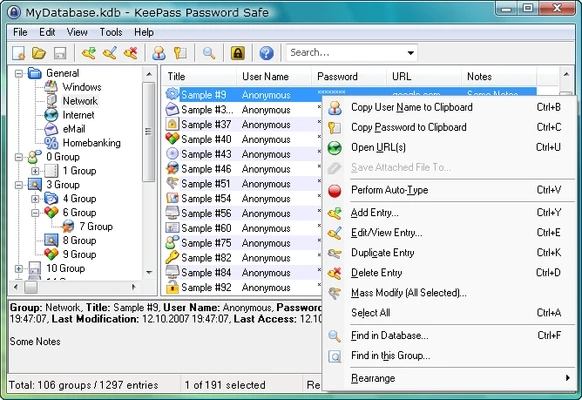
KeePass: A free and open-source password manager with extensive customization and plugin support.
1Password: A polished commercial password manager with strong cross-platform synchronization and additional account-management features.
Bitwarden: An open-source password manager offering cloud synchronization and support across a wide range of devices.
Dashlane: A commercial password manager focused on ease of use, synchronization, and additional security features.
Pricing
Password Safe is free and open-source. There is no subscription required to use the core password-management application.
System Requirements
-
Operating System: Windows 11, 10, 8.1, 8, or compatible Windows versions
-
RAM: 512 MB or more recommended
-
Storage: Approximately 20 MB of available disk space
Actual requirements may vary depending on the version and Windows configuration.
Languages
Password Safe supports multiple interface languages, including:
-
Arabic
-
Czech
-
Danish
-
Dutch
-
French
-
German
-
Hungarian
-
Italian
-
Korean
-
Latvian
-
Polish
-
Portuguese (Brazilian)
-
Russian
-
Simplified Chinese
-
Spanish
-
Swedish
-
Turkish
Pros
-
Free and open-source
-
Encrypted password database
-
Built-in password generator
-
Auto-Type support
-
Groups and folders for organization
-
Import and backup capabilities
-
Lightweight and relatively simple to use
Cons
-
Interface looks dated compared with many modern password managers
-
Primarily focused on local password management
-
Some advanced cloud and account-management features found in commercial password managers are not included
Conclusion
Password Safe is a practical free password manager for Windows users who want to store and organize credentials in an encrypted local database. Its open-source design, password generator, Auto-Type functionality, and straightforward interface make it a useful option for users who prioritize control and simplicity.
It does not offer the polished cloud-based ecosystem of some commercial password managers, but its lightweight design and no-cost model make Password Safe a solid choice for managing passwords locally.