SoftEther VPN Gate Client Plugin is a free and open-source VPN client extension that provides secure and anonymous internet access by connecting users to thousands of public VPN relay servers around the world.
Developed by the University of Tsukuba, VPN Gate extends the functionality of the SoftEther VPN Client, allowing users to easily connect to volunteer-operated VPN servers without registration or subscription fees.
With support for multiple VPN protocols, including SSL-VPN, OpenVPN, L2TP/IPsec, and SSTP, SoftEther VPN Gate provides a flexible solution for users who want to protect their online privacy, bypass network restrictions, and access region-limited content.
Unlike many commercial VPN services, VPN Gate is completely free and does not require account registration. Users can simply install the plugin, select a public VPN server, and establish a secure connection.
Key Features
Free Public VPN Network
Connect to thousands of volunteer-operated VPN relay servers worldwide.
No Registration Required
Use VPN Gate without creating an account or providing personal information.
Strong Encryption
Uses SSL-VPN technology with advanced encryption to protect internet traffic.
Multiple VPN Protocol Support
Supports SoftEther VPN, OpenVPN, L2TP/IPsec, and Microsoft SSTP protocols.
Firewall Bypass Capability
Designed to work through restrictive networks and difficult firewall environments.
Global Server Locations
Choose VPN servers from different countries and regions.
High-Speed VPN Performance
Optimized SoftEther protocol provides low latency and efficient data transfer.
Open Source Software
The SoftEther VPN project is publicly developed and available for inspection.
How VPN Gate Works
VPN Gate operates through a worldwide network of volunteer VPN servers.
The process works as follows:
- Volunteers provide VPN relay servers using their own computers.
- Users connect to available VPN Gate servers through the client plugin.
- Internet traffic is routed through the selected VPN server.
- Websites see the VPN server's IP address instead of the user's real IP address.
Because servers are operated by volunteers, available locations and connection speeds may change frequently.
Full Features
- Free and open-source VPN software
- Anonymous VPN connections
- SSL-VPN tunneling over HTTPS
- OpenVPN compatible mode
- L2TP/IPsec support
- Microsoft SSTP support
- Ethernet bridging and IP routing
- IPv4 and IPv6 support
- AES-256 encryption
- RSA certificate authentication
- Dynamic DNS support
- NAT traversal technology
- Firewall-resistant VPN connections
- Multi-language interface
- Low CPU and memory usage
- Long-term stable operation
- Remote access VPN support
- Site-to-site VPN support
Supported Platforms
SoftEther VPN technology supports:
- Windows
- Linux
- macOS
- FreeBSD
- Solaris
- Android
- iPhone
- iPad
User Interface
SoftEther VPN Gate Client Plugin uses a simple and practical interface.
The main window displays available VPN Gate relay servers with useful information such as:
- Country location
- Connection speed
- Ping latency
- Server uptime
- Number of users
Users can easily compare available servers and choose the most suitable VPN connection.
Installation and Setup
- Download and install SoftEther VPN Client.
- Install the VPN Gate Client Plugin.
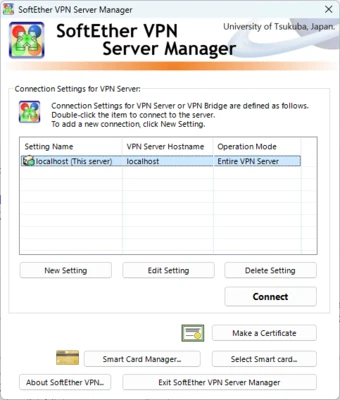
- Launch SoftEther VPN Client Manager.
- Open VPN Gate Public VPN Relay Servers.
- Select a VPN server from the list.
- Click Connect to the VPN Server.
- Confirm the connection and start browsing securely.
How to Use SoftEther VPN Gate
- Open SoftEther VPN Client Manager.
- Double-click the VPN Gate public server list.
- Select a server based on location and speed.
- Click the connect button.
- Wait for the VPN connection to establish.
- Your internet traffic will now pass through the selected VPN server.
FAQ
Is SoftEther VPN Gate Client Plugin free?
Yes. SoftEther VPN Gate Client Plugin is completely free with no subscription fees or registration requirements.
Is SoftEther VPN Gate safe?
SoftEther VPN uses strong encryption technologies. However, because VPN Gate servers are operated by volunteers, users should avoid transmitting highly sensitive information through unknown servers.
Does SoftEther VPN Gate work on Windows 11?
Yes. It supports Windows 7, Windows 8, Windows 10, and Windows 11.
Can I choose a VPN server by country?
Yes. The client provides a public server list sorted by country, speed, and latency.
Does VPN Gate have a mobile application?
The VPN Gate Client Plugin is mainly designed for Windows. Other platforms can use SoftEther VPN through manual configuration.
Alternatives
NordVPN – Premium VPN service with fast servers and advanced privacy features.
ExpressVPN – High-performance VPN with strong encryption and global coverage.
ProtonVPN – Privacy-focused VPN offering a free plan.
Windscribe – Provides free VPN access with limited bandwidth.
Pricing
SoftEther VPN Gate Client Plugin is:
- 100% Free
- No subscription required
- No account registration required
- No hidden fees
System Requirements
- Operating System: Windows 7, Windows 8, Windows 10, Windows 11
- Processor: 1 GHz or faster
- RAM: 512 MB minimum
- Storage: 100 MB free disk space
- Internet Connection: Required for VPN connections
PROS
- Completely free VPN solution
- Open-source technology
- No registration required
- Supports multiple VPN protocols
- Large global server network
- Strong encryption support
- Easy server selection
CONS
- Server quality depends on volunteers
- Connection speed may vary
- No dedicated commercial support
- Not recommended for highly sensitive activities
- Limited mobile user experience
Conclusion
SoftEther VPN Gate Client Plugin is one of the most powerful free VPN solutions available for Windows users.
Its combination of open-source technology, strong encryption, multiple protocol support, and worldwide volunteer VPN servers makes it an excellent choice for users who need basic privacy protection or want to access content from different regions.
However, because VPN Gate relies on public volunteer servers, connection stability and privacy levels may vary. Users handling sensitive information should consider professional VPN services with dedicated infrastructure.
For everyday browsing, privacy protection, and bypassing network restrictions, SoftEther VPN Gate remains a practical and reliable free VPN option.