


SmartFTP is a powerful FTP client for Windows that allows users to transfer files between a local computer and remote servers. It supports FTP, FTPS, SFTP, WebDAV, Amazon S3, Google Drive, OneDrive, Backblaze B2, and other storage services.
It is suitable for website management, server administration, file synchronization, backups, and transferring large numbers of files.
What's New
The latest versions of SmartFTP focus on improving compatibility, transfer performance, security, stability, and support for modern Windows systems and cloud storage services.
Key Features
• Supports FTP, FTPS, SFTP, WebDAV, and multiple cloud storage services.
• Secure transfers using TLS/SSL encryption.
• Multiple simultaneous connections for faster file transfers.
• File synchronization and automated transfer tasks.
• Drag-and-drop file management.
• Transfer queue for managing multiple files and operations.
• Bandwidth control for managing network usage.
• Integrated file editor for modifying remote files.
• Thumbnail previews for supported image files.
• Support for large file transfers and advanced file management.
User Interface
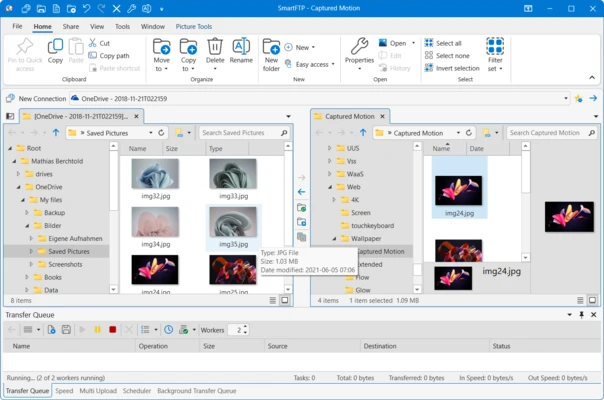
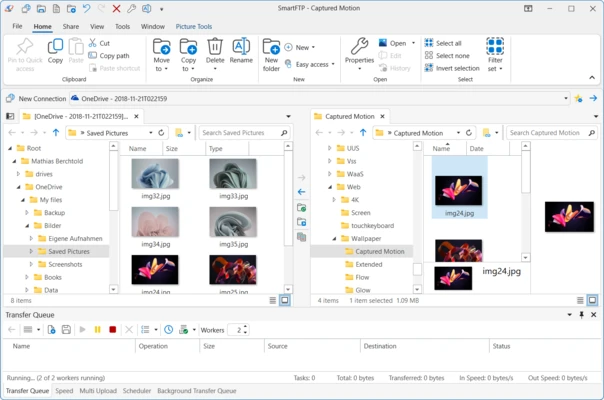
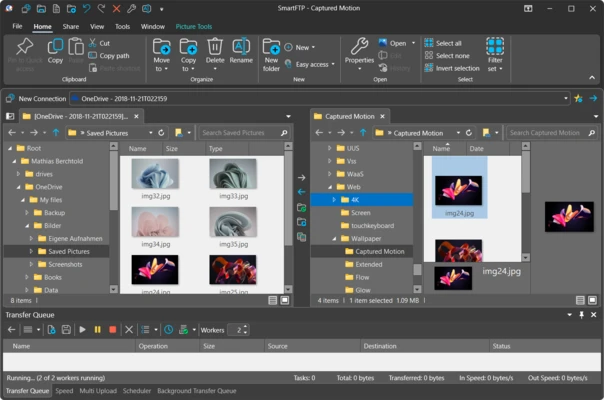
SmartFTP uses a tabbed interface with a layout similar to Windows Explorer. Users can manage local and remote folders, open multiple connections, and transfer files using drag-and-drop operations.
The interface provides access to transfer queues, connection settings, synchronization tools, and other advanced functions without requiring separate applications.
Installation and Setup
Download and install SmartFTP on a compatible Windows computer. After installation, launch the application and create a new connection.
Enter the server address, username, password, and port number required by your FTP, SFTP, or other supported service. Once connected, the local and remote file systems can be accessed from the main interface.
How to Use
-
Launch SmartFTP.
-
Create a new connection.
-
Select the required protocol.
-
Enter the server address and login credentials.
-
Browse the local and remote folders.
-
Drag and drop files to upload or download them.
-
Use the transfer queue to manage multiple operations.
-
Use synchronization or automation features when needed.
FAQ
Is SmartFTP free?
SmartFTP provides a 30-day trial. Continued use requires a paid license.
Does SmartFTP support SFTP?
Yes. SmartFTP supports SFTP as well as FTP, FTPS, WebDAV, and other protocols.
Can SmartFTP connect to cloud storage?
Yes. It supports services such as Amazon S3, Google Drive, OneDrive, and Backblaze B2.
Is SmartFTP suitable for beginners?
The basic file transfer functions are relatively easy to use, but some advanced features may require additional learning.
Does SmartFTP support secure file transfers?
Yes. FTP over TLS/SSL and SFTP can be used for secure file transfers.
Can SmartFTP automate file transfers?
Yes. SmartFTP provides automation, scheduling, and synchronization features.
Alternatives
FileZilla – A free and open-source FTP client suitable for basic file transfers.
WinSCP – A free file transfer client with strong SFTP, SCP, and scripting support.
Cyberduck – A simple file transfer client with support for FTP, SFTP, and various cloud storage services.
Pricing
SmartFTP is commercial software with a 30-day trial. A paid license is required after the trial period.
System Requirements
• Operating System: Windows 10 or Windows 11
• Architecture: 64-bit
• Processor: 1 GHz or faster
• RAM: 2 GB or more
• Free Storage: Approximately 200 MB
Pros
• Supports many file transfer protocols and cloud services.
• Secure transfer options.
• Advanced synchronization and automation features.
• Supports multiple simultaneous connections.
• Powerful file management tools.
Cons
• Requires a paid license after the trial period.
• Advanced features may be complicated for beginners.
• Free alternatives are available for users with basic FTP requirements.
Conclusion
SmartFTP is a feature-rich Windows FTP client designed for users who need more than basic file transfers. Its support for multiple protocols, cloud storage, synchronization, automation, and secure connections makes it suitable for website management, server administration, backups, and large file transfers.
Users who only need basic FTP functionality may prefer free alternatives such as FileZilla or WinSCP.
Note: 30-day trial version.