Go to Windows platform Display platforms icon
Go to Windows platform Go to Mac platform Go to Android platform
Universal Media Server 15.8.0 icon

Universal Media Server 15.8.0

15.8.0
Subjunk
5.0
165 MB size

Media server capable of serving videos, audio and images

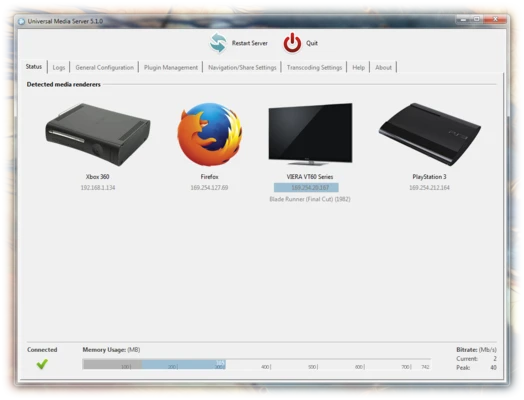
Universal Media Server (UMS) is a free and open-source media server for streaming and transcoding videos, music, and other media files to TVs, smartphones, gaming consoles, and computers.

It supports DLNA and UPnP-compatible devices and can transcode media in real time when the target device does not support the original format. Universal Media Server is available for Windows, macOS, and Linux.

Key Features

  • Stream videos, music, and photos over a local network

  • Support for DLNA and UPnP-compatible devices

  • Real-time media transcoding

  • Support for a wide range of video and audio formats

  • Share media folders from your computer

  • Automatic subtitle support

  • Web-based interface for browsing and playback

  • Metadata support for organizing media libraries

  • Compatible with TVs, game consoles, smartphones, and other devices

  • Free and open-source

How to Use

  • Install Universal Media Server on your computer.

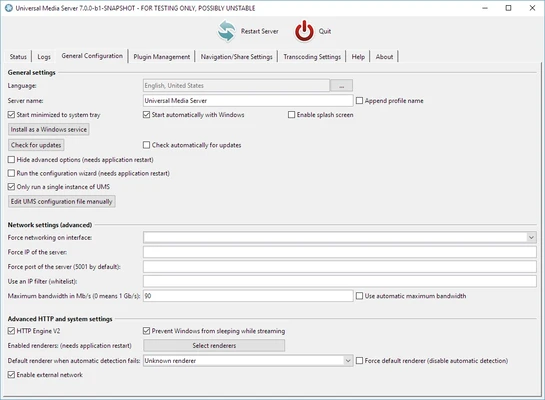
  • Launch the application and configure your network settings.

  • Add your media folders under Shared Folders.

  • Start the media server.

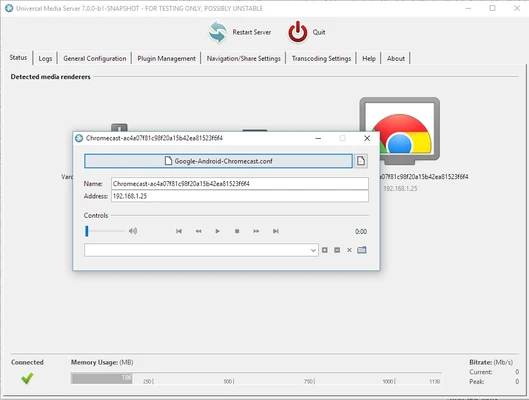
  • Open the UMS web interface or use a compatible DLNA device.

  • Browse your media library and select a video, music file, or photo to play.

  • Adjust transcoding and subtitle settings if necessary.

FAQ

What is Universal Media Server?

Universal Media Server is a free media server that allows you to stream and transcode media files from your computer to compatible devices over a network.

Does Universal Media Server support DLNA?

Yes. UMS supports DLNA and UPnP-compatible devices, including many smart TVs, game consoles, and media players.

Does UMS support transcoding?

Yes. It can transcode media in real time when a connected device cannot play the original file format.

Can I use UMS on Windows?

Yes. Universal Media Server supports Windows as well as macOS and Linux.

Can UMS stream media over the Internet?

UMS is primarily designed for streaming over a local network. Remote access requires additional network configuration.

Alternatives

Plex – A popular media server with a polished interface, library management, and remote streaming features.

Emby – A media server with extensive customization options, media management, and support for multiple devices.

System Requirements

  • Operating System: Windows 7, 8, 10, or 11

  • Processor: Dual-core CPU or better

  • RAM: 1 GB minimum

  • Storage: Sufficient free space for the application and media files

  • Java: Java Runtime Environment may be required depending on the version

PROS

  • Free and open-source

  • Supports many media formats

  • DLNA and UPnP support

  • Real-time transcoding

  • Works with a wide range of devices

  • Simple media library sharing

CONS

  • Interface is less polished than some competitors

  • Initial configuration may require some technical knowledge

  • Primarily designed for local network streaming

Conclusion

Universal Media Server is a reliable free media server for streaming videos, music, and photos from a computer to TVs, smartphones, game consoles, and other compatible devices. Its DLNA support, broad format compatibility, and real-time transcoding make it a practical choice for users who want a simple way to access their media collection across devices.

Information about Universal Media Server 15.8.0

License Open Source
Op. System Windows
Category Internet
Language English + more
Author Subjunk
permission icon Permissions Not applicable
Date 2026-08-24
Size 165 MB
File type Official Website

Apps recommended for you

Mozilla Firefox Beta icon
Try the latest features in the Mozilla browser
GainTools OLM Converter Software icon
Professional Solution for Converting Mac Outlook OLM files
WeChat icon
Download WeChat for Windows and enjoy seamless messaging, voice, and video calls right from your desktop.
WhatsApp Desktop icon
WhatsApp Desktop for Windows allows users to send messages, make calls, and sync chats directly from their desktop with a seamless connection to the mobile app.
Telegram for Desktop 7.1.1 icon
Speedy alternative to WhatsApp. Send Telegrams from any device!
Brave Browser icon
Brave Browser for Windows is a fast, privacy-focused browser that blocks ads and trackers by default, enhancing browsing speed and security.
Opera GX 132.0.5905.82 (64-bit) icon
The gaming browser built for gamers with RAM and CPU limiters!
Mailbird icon
A powerful email client for Windows
V2rayN 7.24.8 icon
A GUI client for PC, support Xray core and v2fly core and others
Telegram for Desktop 7.1.1 icon
Speedy alternative to WhatsApp. Send Telegrams from any device!
SoftEther VPN Gate Client Plugin 2026.08.22 build 9807 icon
Create a high-performance Virtual Private Network and hide your IP address!
Vivaldi 8.1.4087.70 (64-bit) icon
An advanced browser made with the power user in mind
Linphone 6.2.1 icon
A complete, secure and interoperable SIP software solution!
Directory Opus 13.25 icon
For home users who need a simple, high-performance PC file manager
Coc Coc 156.0.190 icon
Free web browser focused on the Vietnamese market
Microsoft Edge 151.0.4129.101 icon
A fast and secure way to get things done on the Web!
V2rayN 7.24.8 icon
A GUI client for PC, support Xray core and v2fly core and others
HideMy.name VPN icon
Protect your online privacy and access the internet securely with HideMy.name VPN for Windows, the fast VPN software with encrypted connections and anonymous browsing.
WhatsApp Desktop icon
WhatsApp Desktop for Windows allows users to send messages, make calls, and sync chats directly from their desktop with a seamless connection to the mobile app.
Vivaldi 8.1.4087.70 (64-bit) icon
An advanced browser made with the power user in mind
Speedify icon
Browse without barriers
Firefox Developer Edition 154.0b4 (64-bit) icon
Get the latest features, fast performance, and the development tools!
VNC Server icon
VNC Server for Windows allows users to remotely access and control their computer from another device over a network or the internet.
Studio 3T 2026.11.0 icon
The Professional Client, IDE and GUI software for MongoDB!