

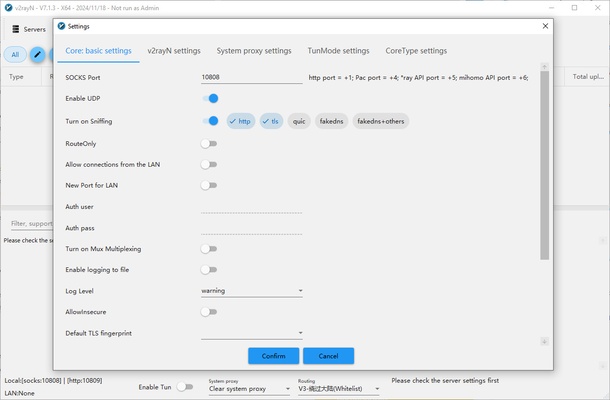
V2rayN is an open-source Windows networking utility that provides a graphical interface for managing connections based on V2Ray and Project V. It allows users to import and manage server profiles, configure routing rules, switch between servers, and monitor network traffic from a single desktop application.
Designed primarily for technically experienced users, V2rayN provides extensive configuration options while avoiding the need to manage everything through a command-line interface. It can be used to manage proxy connections, customize traffic routing, and configure different network profiles.
Key Features
Server Management – Import, add, edit, and switch between multiple server profiles.
Advanced Routing – Create custom routing rules to control how different types of network traffic are handled.
Flexible Configuration – Configure protocols, server addresses, ports, transport settings, and other connection parameters.
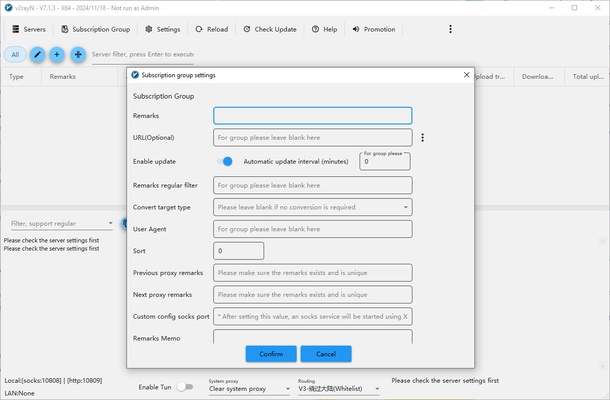
Subscription Management – Import and update server configurations through supported subscription links.
Network Testing – Test server connectivity and measure network performance.
Traffic Monitoring – View connection status, traffic usage, logs, and other network information.
Open Source – The project is open source and can be inspected, modified, and distributed according to its license.
User Interface
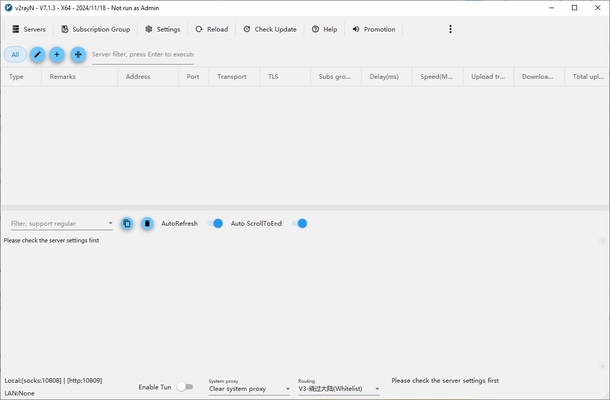
V2rayN provides a clean and practical Windows interface designed for managing multiple network configurations.
The main window provides access to server profiles, subscriptions, routing options, service controls, and settings. Users can quickly switch between servers and modify connection configurations without manually editing configuration files.
Because the application exposes many advanced networking options, beginners may need some time to understand the available settings.
Installation and Setup
- Download V2rayN and extract or install the application.
- Make sure the required .NET Desktop Runtime is installed.
- Launch V2rayN on Windows.
- Add a server configuration manually or import a supported subscription.
- Select the desired server profile.
- Configure routing and connection settings if necessary.
- Start the service and connect through the selected profile.
How to Use
Add a Server – Import a configuration or manually enter the required server information.
Manage Subscriptions – Add supported subscription sources and update server profiles when needed.
Select a Server – Choose a server from the available list and make it the active configuration.
Configure Routing – Adjust routing rules to determine how different network traffic should be handled.
Test Connections – Use the available network testing tools to check server connectivity and performance.
Monitor Traffic – Check connection status, traffic statistics, and logs from the application interface.
Adjust Settings – Configure application behavior, system proxy settings, routing options, and other advanced features.
FAQ
What is V2rayN?
V2rayN is a Windows graphical client for managing V2Ray and Project V-based network connections. It provides tools for configuring servers, routing traffic, managing subscriptions, and monitoring connections.
Is V2rayN free?
Yes. V2rayN is free and open-source software.
Is V2rayN a VPN?
V2rayN is better described as a proxy and network connection management client rather than a traditional VPN service. It can manage several protocols and routing configurations depending on the installed core and server setup.
Is V2rayN easy to use?
Basic server management is relatively straightforward, but its advanced routing and protocol configuration options are primarily intended for users with some networking knowledge.
Can V2rayN manage multiple servers?
Yes. You can maintain multiple server profiles and switch between them as needed.
Does V2rayN work on Windows 11?
Yes. Current versions are designed for modern Windows systems. The exact supported Windows versions depend on the specific V2rayN release and its runtime requirements.
Alternatives
Shadowsocks – A lightweight proxy solution focused on simple configuration and encrypted connections.
OpenVPN – A widely used open-source VPN solution with extensive platform and configuration support.
Clash Verge Rev – A graphical proxy client offering advanced routing and profile management.
Pricing
V2rayN is completely FREE and open source. There is no subscription fee for the application itself.
However, users may need to obtain or operate their own compatible servers or network services, which can involve separate costs.
System Requirements
- Operating System: Windows 10 or later recommended
- Processor: 1 GHz or faster
- RAM: 1GB or more
- Storage: Approximately 100MB or more
- Runtime: Microsoft .NET Desktop Runtime may be required depending on the version
- Internet Connection: Required for network connections
PROS
- Free and open source
- Powerful server management
- Advanced routing capabilities
- Supports multiple connection protocols
- Subscription and profile management
- Traffic monitoring and network testing
- Highly customizable
CONS
- Steep learning curve for beginners
- Advanced configuration can be complicated
- Requires compatible server configurations
- Not a traditional VPN service
- Some features depend on the selected core and configuration
Conclusion
V2rayN is a powerful and highly configurable Windows networking client for managing V2Ray and Project V-based connections. Its graphical interface makes server management, subscription updates, routing configuration, and connection monitoring much easier than working entirely from the command line.
It is particularly suitable for advanced users who want detailed control over network routing and connection settings. Beginners may find the extensive configuration options overwhelming at first, but users who are familiar with proxy and networking concepts will find V2rayN to be a flexible and capable tool.
Note: V2rayN is a client application, not a standalone VPN service. Users need compatible server configurations or subscriptions to establish connections.