Opera GX is a gaming-oriented web browser designed for users who want to browse the web while keeping system resources available for games and other demanding applications.
Based on the same core browser technology as Opera, Opera GX adds gaming-focused tools such as GX Control, Twitch integration, customizable themes, built-in ad blocking, video pop-out, and integrated messaging services.
What's New
Recent versions of Opera GX continue to improve performance, gaming features, security, and customization.
-
Performance and stability improvements.
-
Updates to GX Control for managing browser resource usage.
-
Improvements to tab and memory management.
-
Enhanced security and privacy features.
-
Updates to the built-in ad blocker and tracker protection.
-
Improvements to video pop-out and media features.
-
Continued improvements to themes, wallpapers, and browser customization.
-
Updates to integrated gaming and social features.
Key Features
-
GX Control lets you limit how much CPU and RAM the browser can use.
-
RAM Limiter helps prevent the browser from consuming excessive memory while gaming.
-
CPU Limiter restricts browser CPU usage so more processing power can remain available for games.
-
Network Limiter can control how much network bandwidth the browser uses.
-
Twitch integration provides quick access to followed channels and live-stream notifications.
-
GX Corner provides gaming news, new game releases, deals, and other gaming-related information.
-
GX Sound adds optional browser sound effects.
-
Customizable design supports colors, themes, wallpapers, and visual effects.
-
Integrated messengers provide convenient access to supported messaging services from the sidebar.
-
Video Pop-Out lets videos remain visible in a floating window while browsing other pages.
-
Video over Game keeps supported video content visible over other applications, including games.
-
Built-in ad blocker blocks many advertisements and pop-ups without requiring an additional extension.
-
Browser VPN provides an integrated VPN feature for supported browsing activities.
-
Extension support allows users to add additional functionality, including compatibility with many Chrome extensions.
-
Synchronization allows supported bookmarks, settings, passwords, and other browser data to be synchronized between devices.
User Interface
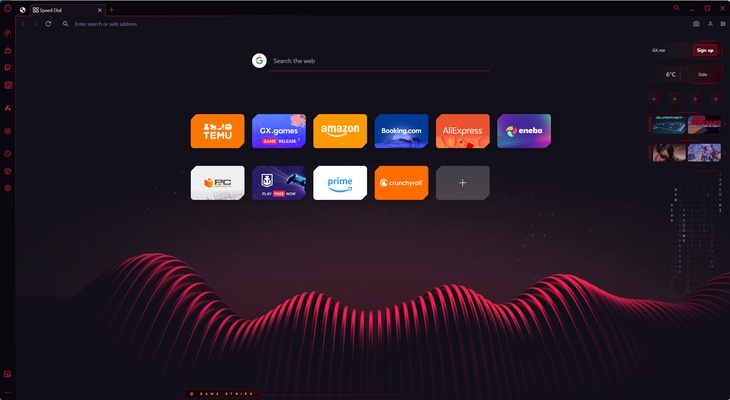
The Opera GX interface is designed around a gaming aesthetic, with customizable colors, wallpapers, themes, and visual effects.
A sidebar provides quick access to features such as GX Control, GX Corner, Twitch, messaging services, and other browser tools. The interface can be customized to match different gaming setups and personal preferences.
Despite its gaming-focused appearance, the browser retains a conventional tabbed browsing interface, making it suitable for everyday web use.
Installation and Setup
Installing Opera GX on a compatible Windows PC is straightforward.
-
Download the Opera GX installer.
-
Run the installer and follow the on-screen instructions.
-
Launch Opera GX after installation.
-
Choose a theme, color scheme, and wallpaper.
-
Configure GX Control if you want to limit CPU, RAM, or network usage.
-
Enable or disable sidebar integrations according to your preferences.
-
Sign in to an Opera account if you want to synchronize supported browser data.
-
Install additional extensions if required.
How to Use
-
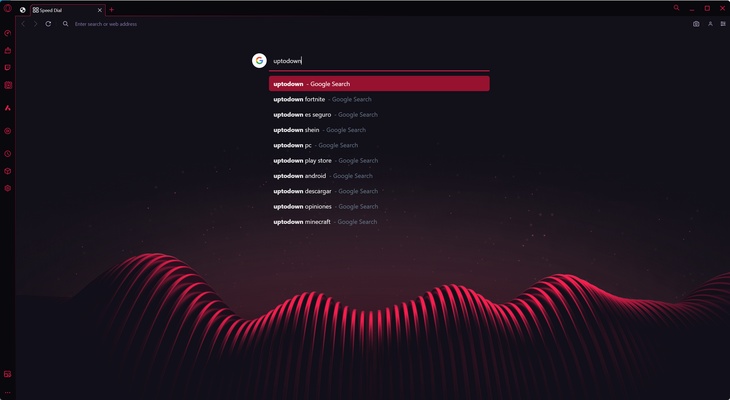
Browse the web: Enter a website address or search term in the address bar.
-
Manage resources: Open GX Control and configure CPU, RAM, and network limits.
-
Customize the browser: Use the Easy Setup options to change themes, wallpapers, colors, and other appearance settings.
-
Use Twitch: Enable Twitch from the sidebar to monitor followed channels and live streams.
-
Check GX Corner: Open GX Corner to view gaming news, releases, and deals.
-
Watch floating videos: Use Video Pop-Out to keep supported videos visible while browsing other pages.
-
Block advertisements: Enable the built-in ad blocker from the browser settings.
-
Use messaging services: Configure supported messengers from the sidebar for quick access.
-
Install extensions: Add extensions through the browser's extension system or compatible Chrome extensions.
-
Sync browser data: Sign in to an Opera account to synchronize supported bookmarks, passwords, settings, and other data between devices.
FAQ
What is Opera GX?
Opera GX is a web browser designed with gamers in mind. It provides resource controls, gaming-related content, customization options, media tools, and integrations with services such as Twitch.
Is Opera GX free?
Yes. Opera GX is free to download and use.
Can Opera GX limit CPU and RAM usage?
Yes. GX Control includes CPU and RAM limiters that allow users to control how much system resources the browser can consume.
Does Opera GX have a network limiter?
Yes. GX Control includes a network limiter that can help restrict the browser's bandwidth usage.
Does Opera GX support Twitch?
Yes. Twitch can be integrated into the browser sidebar, allowing users to access followed channels and monitor live streams.
Does Opera GX support extensions?
Yes. Opera GX supports its own extension ecosystem and is compatible with many extensions designed for Chromium-based browsers.
Does Opera GX include an ad blocker?
Yes. The browser includes a built-in ad-blocking feature that can be enabled or disabled through the browser settings.
Does Opera GX include a VPN?
Yes. Opera GX includes an integrated browser VPN feature. Its availability and behavior may vary depending on the browser version and region.
Can I synchronize Opera GX between devices?
Yes. Signing in with an Opera account allows supported browser data such as bookmarks, passwords, and settings to be synchronized between compatible devices.
Is Opera GX only for gaming?
No. It can be used as a regular web browser for browsing, streaming, messaging, work, and other everyday activities. Its additional resource controls and gaming features are particularly useful for gamers.
Alternatives
Opera – A general-purpose browser with many built-in productivity, privacy, and customization features.
Google Chrome – A widely used Chromium-based browser with extensive extension support and strong website compatibility.
Mozilla Firefox – A customizable browser with a strong focus on privacy and open web technologies.
Microsoft Edge – A Chromium-based browser with strong Windows integration and Microsoft services.
Brave – A privacy-focused browser with built-in ad and tracker blocking.
Pricing
Opera GX is free to download and use. The standard browser does not require a subscription.
System Requirements
-
Windows 7, Windows 8, Windows 8.1, Windows 10, or Windows 11
-
64-bit operating system
-
Intel Core 2 Duo, AMD Athlon 64, or equivalent processor
-
2 GB of RAM
-
Approximately 500 MB of available disk space
-
Graphics hardware supporting DirectX 9.0c or later
-
Display resolution of at least 1024 × 768
Actual requirements may vary depending on the browser version, installed extensions, open tabs, and web applications.
Pros
-
Designed with gamers in mind
-
CPU, RAM, and network usage controls
-
Highly customizable interface
-
Twitch and other sidebar integrations
-
Built-in ad blocker
-
Video Pop-Out and Video over Game features
-
Supports many Chromium extensions
-
Free to use
Cons
-
Gaming-focused interface may not appeal to everyone
-
Can still consume considerable resources with many tabs and extensions
-
Some integrated features may be unnecessary for users who do not game
-
Resource limits can affect browser performance when configured too aggressively
Conclusion
Opera GX is a good choice for gamers who want a browser that can remain open while they play games without completely ignoring system resource usage. Its main advantage is GX Control, which provides CPU, RAM, and network controls that are not typically found in conventional browsers.
It also combines gaming-oriented features such as Twitch integration and GX Corner with practical browsing tools including ad blocking, extensions, synchronization, and floating video playback.
For users who want a conventional browser with gaming-specific controls and customization, Opera GX offers a useful combination of everyday browsing and gaming-focused features.