

RustDesk is an open-source remote desktop application designed to provide secure and straightforward remote access solutions for individuals and organizations. Developed with a focus on simplicity and privacy, the utility serves as a lightweight and efficient alternative to proprietary remote desktop tools, emphasizing strict data privacy by allowing users to deploy their own servers to host remote connections.
By utilizing self-hosted infrastructure, organizations can maintain absolute data sovereignty, strengthen network security by keeping traffic within internal firewalls, and optimize connection performance and reliability compared to traditional third-party SaaS platforms.
Overview and Key Features
-
Open-Source Architecture: Completely open-source codebase allowing users to review, modify, and audit the software for maximum transparency.
-
End-to-End Encryption: Features robust security protocols that encrypt all data, inputs, and video feeds during active remote sessions.
-
Custom Server Deployment: Supports self-hosting options where users can set up an independent relay server for total privacy and control over the network environment.
-
Cross-Platform Synchronization: Available across multiple desktop environments and mobile platforms, enabling cross-device terminal control.
-
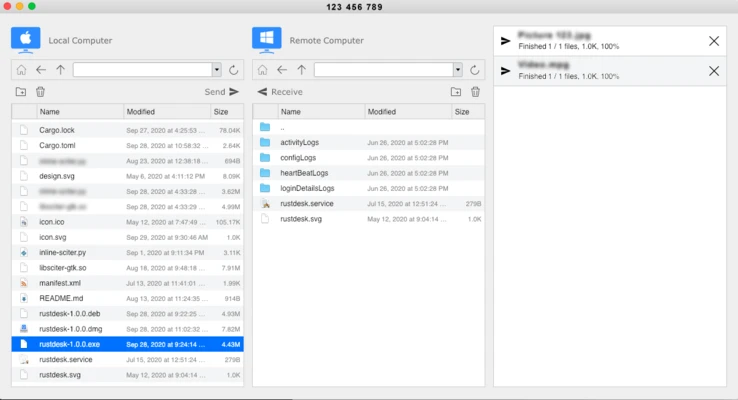
Integrated File Transfer: Features built-in file sharing mechanics and clipboard synchronization to pass data seamlessly between local and remote machines.
-
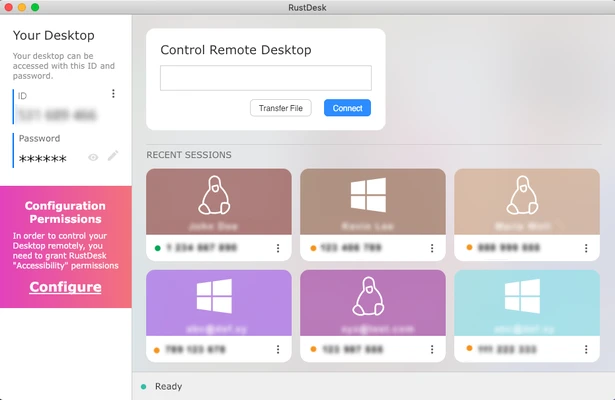
Minimalist User Interface: Displays local connection IDs and dynamic passwords on a clean dashboard, allowing immediate connection initialization by entering a target device ID.
-
Organized Session Sidebar: Provides a modular layout with quick access to recent connections, specialized file transfer modules, and granular network configuration settings.
How to Use
-
Download the installer package and run the executable file to complete the setup process.
-
Launch the application to reveal your unique local connection ID and automatically generated security password.
-
Share the local ID and password with a remote operator to grant them access to your desktop environment.
-
Establish an outbound connection by entering the target device ID into the main input field and clicking Connect.
-
Provide the target device's password when prompted by the security authentication window.
-
Access the top control bar during an active session to manage file transfers, toggle clipboard sharing, or adjust video quality parameters.
-
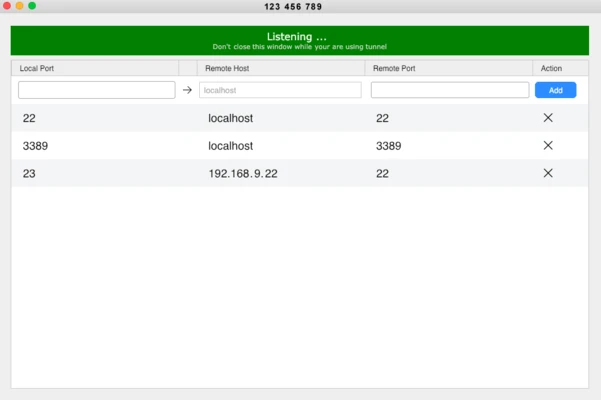
Navigate to the network settings menu to configure custom IP addresses and port keys if utilizing a self-hosted relay server.
Pros and Cons Pros
-
Free and open-source model with zero commercial license restrictions or trial limitations.
-
Supports complete self-hosting to ensure absolute data privacy and corporate sovereignty compliance.
-
Lightweight, minimal system resource footprint with no bundled bloatware or background service heavy tracking.
-
Secure end-to-end encryption handles sensitive system-level administrative tasks.
-
Clean user interface allows novice users to connect instantly without complex network mapping. Cons
-
Setting up custom relay servers for optimal performance requires technical server administration knowledge.
-
Relies heavily on network bandwidth quality when utilizing the default public infrastructure servers.
-
Advanced administrative grouping and user permission features require deeper manual configuration.
Top Alternatives
-
AnyDesk: A highly popular commercial remote desktop application known for its low-latency video streaming and proprietary codec engine.
-
TeamViewer: An industry-standard enterprise remote support suite featuring comprehensive device management and cloud collaboration tools.
-
UltraVNC: A powerful, open-source legacy VNC platform optimized specifically for advanced Windows network administration and remote control.
-
Remmina: A versatile, open-source remote desktop client tailored for Linux environments supporting a wide range of network protocols.