Go to Windows platform Display platforms icon
Go to Windows platform Go to Mac platform Go to Android platform
KakaoTalk for Windows 26.8.1.5315 icon

KakaoTalk for Windows 26.8.1.5315

26.8.1.5315
Kakao Corp
5.0
79.85 MB size

Offers a convenient sync between your Windows PC and mobile device

KakaoTalk is a free instant messaging and VoIP application for Windows developed by Kakao Corporation. The desktop version extends the mobile app to your PC, allowing users to exchange messages, share files and media, make voice calls, and stay synchronized across devices.


Key Features

  • Free Messaging – Send text messages, voice messages, photos, videos, and other content.

  • Voice Calls – Make internet-based voice calls from your Windows PC.

  • Group Chats – Create and participate in group conversations with customizable chat settings.

  • Device Synchronization – Keep conversations and account data synchronized between mobile and desktop devices.

  • File Sharing – Share documents, images, videos, and other supported files.

  • Multimedia Support – View images, preview links, and interact with media directly in conversations.

  • KakaoTalk Calendar – Manage schedules and reminders through supported chat features.

  • Contact Management – Search, organize, and manage your KakaoTalk contacts.

  • Themes and Customization – Customize the appearance of chats with available themes and display options.

  • Screen Capture and Quick Memos – Capture screen content and create quick notes while using the desktop app.


User Interface

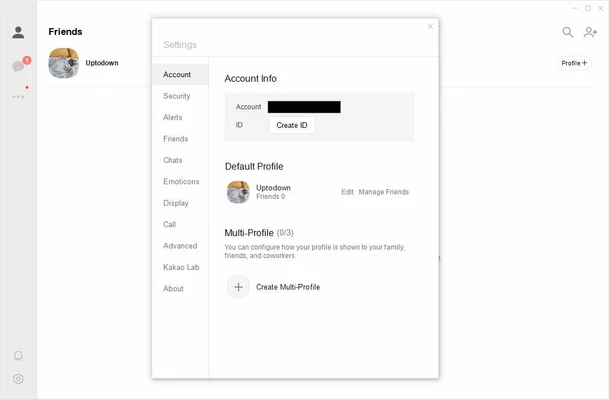
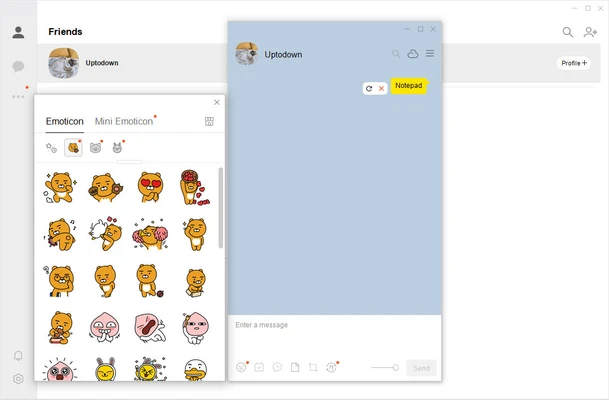
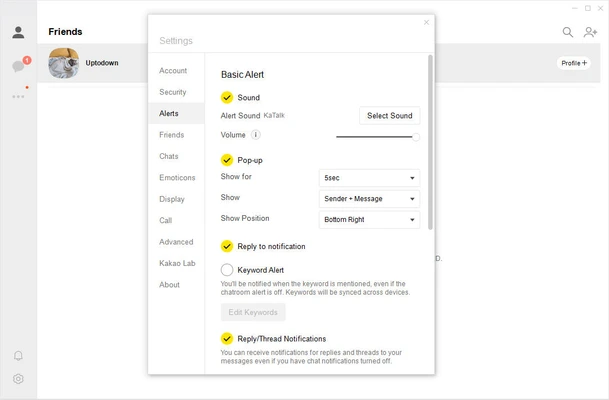
KakaoTalk for Windows uses a clean interface with contacts and conversations organized in a sidebar and the active chat displayed in the main window. The layout is familiar to users of the mobile application, making it easy to switch between devices.


Installation and Setup

  1. Download and install KakaoTalk for Windows.

  2. Launch the application and sign in with your Kakao Account.

  3. Complete the required account verification using the mobile KakaoTalk app.

  4. Allow the desktop application to synchronize your conversations and account data.

  5. Start chatting, making calls, and sharing files from your PC.


How to Use

Start a Chat – Select a contact and open a conversation, or use the new chat option to begin a message.

Group Conversations – Create or join group chats and manage available notification and chat settings.

Share Files – Drag and drop supported files into a conversation to send them.

Make Calls – Use the voice call controls to communicate with other KakaoTalk users.

Use Desktop Tools – Access features such as screen capture, quick memos, and chat customization from the desktop interface.


Pros

  • Free messaging and voice calls

  • Desktop and mobile synchronization

  • Group chat support

  • File and multimedia sharing

  • Clean and familiar interface

  • Useful desktop communication tools


Cons

  • Requires a KakaoTalk mobile account for initial desktop authentication

  • Some features may differ between desktop and mobile versions

  • Primarily associated with the Korean KakaoTalk ecosystem


Conclusion

KakaoTalk for Windows provides a convenient desktop companion to the mobile KakaoTalk service. It combines messaging, group chats, voice calls, file sharing, synchronization, and other communication tools in a straightforward Windows interface, making it useful for users who already use KakaoTalk on mobile devices.

Information about KakaoTalk for Windows 26.8.1.5315

License Freeware
Op. System Windows
Category Internet
Language English + more
Author Kakao Corp
permission icon Permissions Not applicable
Date 2026-09-20
Size 79.85 MB
File type Official Website

Apps recommended for you

Q-Dir 12.77 (64-bit) icon
Incredibly and Free multi-panel file explorer for Windows
Opera 134.0 Build 5954.46 (64-bit) icon
Opera browser brings you more speed, more discoveries and more safety
Google Chrome 151.0.7922.174 (64-bit) icon
The fast, free browser that's built for the modern web
DreamMail 6.26.7.5 icon
Manage many users at same time, and can set perfectly many mail accounts
Whale Browser 4.39.410.14 icon
Simple way to sync between a desktop and a mobile! Awesome new browser!
WhatsApp for Windows 2.2632.100.0 (64-bit) icon
Quickly send and receive WhatsApp messages right from your Windows PC
FileZilla Server icon
Transfer your files and don’t worry about privacy
Whale Browser icon
Whale Browser is a feature-rich web browser offering unique tools like a built-in messenger, video pop-out, and enhanced privacy settings for a better browsing experience.
Microsoft Edge 153.0.4234.46 icon
A fast and secure way to get things done on the Web!
Brave Browser 1.95.102 (64-bit) icon
Load web pages 3x to 6x faster, better privacy and protection!
Softros LAN Messenger 12.6.7.0 icon
Secure instant messaging desktop program for corporate LANs!
Remote Desktop Manager Enterprise 2026.3.5.0 icon
An application used to manage all your remote connections!
Firefox Developer Edition 157.0b2 (64-bit) icon
Get the latest features, fast performance, and the development tools!
Mullvad Browser 15.0.23 icon
A collaboration between Mullvad VPN and the Tor Project
Viber for Windows 28.9.0.0 icon
Make free calls to other users, on any device and network!
Element 1.12.28 icon
Group chat, VoIP & video calling, file transfer and bridge networks!
The Dude 7.24.2 icon
Scan your home network, make a layout map and start monitoring!
Softaken EML Duplicate Remover icon
Easily remove duplicate single or multiple EML files with Softaken.
Mailspring icon
Manage multiple email accounts efficiently with Mailspring for Windows, the fast and modern email client designed to improve productivity and communication.
Brave Browser 1.95.102 (64-bit) icon
Load web pages 3x to 6x faster, better privacy and protection!
X-VPN 77.5.3 icon
Secure and Free VPN tool for online privacy. Unblock all content you like!
SmartFTP 10.0.3326.0 (64-bit) icon
It allows you to transfer files between your local computer and a server
Rambox icon
Rambox for Windows is an all-in-one messaging and email app that consolidates multiple platforms like WhatsApp, Slack, and Gmail into a single interface.
SoftEther VPN Gate Client Plugin 2026.08.30 build 9807 icon
Create a high-performance Virtual Private Network and hide your IP address!