Go to Windows platform Display platforms icon
Go to Windows platform Go to Mac platform Go to Android platform
Opera 134.0 Build 5954.46 (64-bit) icon

Opera 134.0 Build 5954.46 (64-bit)

134.0 Build 5954.46
Opera Software
5.0
133 MB size

Opera browser brings you more speed, more discoveries and more safety

Opera is a fast and customizable web browser for Windows that focuses on speed, privacy, and productivity. It includes built-in tools such as a free VPN, ad blocker, AI assistant, tab management, and workspace features.

Based on the Chromium engine, Opera supports Chrome extensions and provides compatibility with modern websites while offering additional built-in features.

Features

  • Built-in free VPN and ad blocker
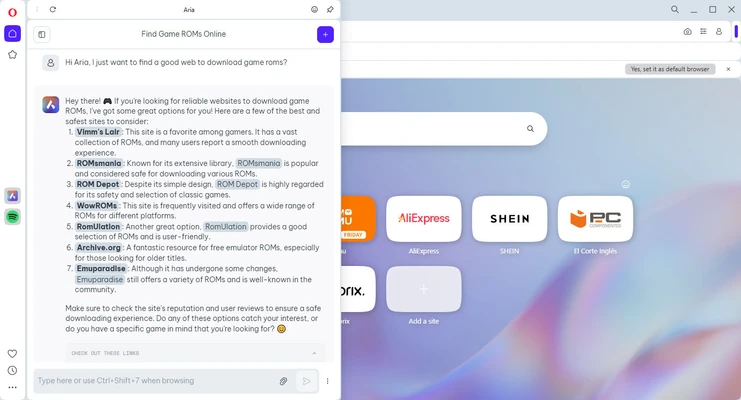
  • AI assistant (Aria)
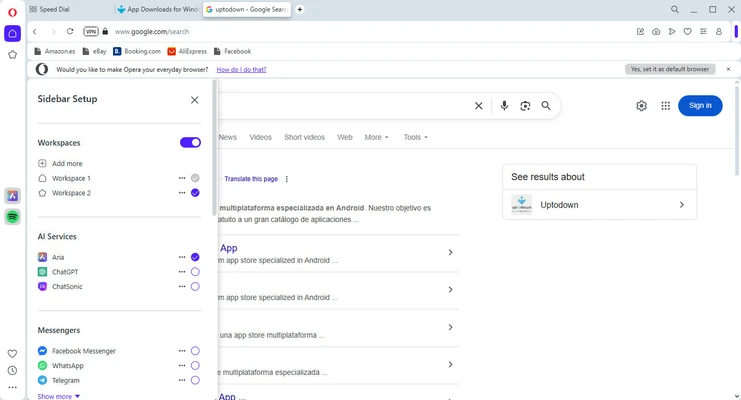
  • Tab Islands and Workspaces for better organization
  • Sidebar with messaging and social apps
  • Chrome extension support
  • Private browsing mode
  • Battery saver for laptops
  • Cross-device sync

How to Use

  1. Download and install Opera.
  2. Launch the browser and import bookmarks if needed.
  3. Customize the sidebar, themes, and privacy settings.
  4. Install extensions from Opera Add-ons or Chrome Web Store.
  5. Sign in to sync bookmarks and settings across devices.

FAQ

Is Opera free?

Yes. Opera Browser is completely free to download and use.

Does Opera include a VPN?

Yes. Opera includes a built-in free VPN feature for improved privacy.

Can Opera install Chrome extensions?

Yes. Opera supports most Chrome extensions.

Is Opera safe?

Opera includes security features such as tracker blocking, fraud protection, and private browsing.

Alternatives

  • Chrome - Fast and widely supported browser.
  • Firefox - Privacy-focused open-source browser.
  • Edge - Chromium-based browser integrated with Windows.
  • Brave - Browser focused on privacy and ad blocking.

System Requirements

  • Windows 11 / 10 / 8 / 7 (64-bit)
  • 1 GHz processor or faster
  • 512 MB RAM or more

Pros

  • Built-in VPN and ad blocker
  • Fast Chromium-based browsing
  • Supports Chrome extensions
  • Many productivity features

Cons

  • Less popular than Chrome and Edge
  • Some built-in features may not be needed by all users

Conclusion

Opera is a feature-rich browser that combines fast performance with privacy tools and productivity features. It is a good choice for users who want more built-in functionality than traditional browsers.

Information about Opera 134.0 Build 5954.46 (64-bit)

License Freeware
Op. System Windows
Category Internet
Language English + more
Author Opera Software
permission icon Permissions Not applicable
Date 2026-08-07
Size 133 MB
File type Official Website

Apps recommended for you

Easy Gamer Utility icon
Easy Gamer Utility for Windows is a performance optimization tool designed to enhance gaming experience by boosting system performance and managing resources.
Epic Privacy Browser icon
Epic Privacy Browser for Windows is a privacy-focused web browser that blocks trackers, ads, and enhances online security for anonymous browsing.
SoftEther VPN Gate Client Plugin 2026.06.14 build 9807 icon
Create a high-performance Virtual Private Network and hide your IP address!
Microsoft Teams icon
Un espacio integral para la comunicación y productividad de equipos.
Psiphon icon
Much more than just a VPN
Google Chrome 149.0.7827.156 (64-bit) icon
The fast, free browser that's built for the modern web
WhatsApp Desktop Beta icon
Enjoy the latest WhatsApp news on your PC
Cloudflare WARP icon
Cloudflare WARP for Windows is a VPN-like tool that secures and speeds up your internet connection while protecting your privacy.
Telegram for Desktop 7.0.9 icon
Speedy alternative to WhatsApp. Send Telegrams from any device!
IMVU 554.2 icon
Express yourself in the world`s largest 3D Chat and Dress-Up community
Advanced Renamer 4.24 icon
Perfect for any kind of file renaming including music and photo files
Telegram for Desktop 7.0.8 icon
Speedy alternative to WhatsApp. Send Telegrams from any device!
DuckDuckGo 0.168.2 icon
The privacy-focused web browser for your Windows PC
Pale Moon 34.3.2 (64-bit) icon
Super fast Goanna-based browser designed for the best possible performance
Firefox 153.0.3 (64-bit) icon
One of the World's Most Popular Web Browsers for Windows
Microsoft Edge 151.0.4129.59 icon
A fast and secure way to get things done on the Web!
Waterfox icon
Waterfox is a privacy-focused web browser based on Firefox, offering enhanced security and support for older extensions.
SABnzbd icon
SABnzbd for Windows is a free, open-source newsreader that automates the process of downloading and unpacking files from Usenet.
GainTools OLM Converter Software icon
Professional Solution for Converting Mac Outlook OLM files
WinGate icon
WinGate for Windows is a secure network management and proxy server software that controls internet access and enhances network performance.
Element icon
Element for Windows is a secure, open-source messaging app that supports end-to-end encryption and decentralized communication across multiple platforms.
Mailbird icon
A powerful email client for Windows
PalTalk 2.11.0.113138 icon
Free video chat, voice or text group chat with anyone on any device
Rambox icon
Rambox for Windows is an all-in-one messaging and email app that consolidates multiple platforms like WhatsApp, Slack, and Gmail into a single interface.