WhatsApp is an official desktop messaging application that allows Windows users to send messages, make voice and video calls, and share files directly from their computer.
The desktop version synchronizes with your mobile WhatsApp account, allowing you to continue conversations on a larger screen with support for native desktop notifications, keyboard shortcuts, and improved productivity.
Used by billions of users worldwide, WhatsApp provides fast communication combined with end-to-end encryption to help protect private messages, calls, and shared content.
Overview
WhatsApp for Windows brings the popular mobile messaging experience to desktop computers.
After linking your phone account through a QR code, you can access chats, send messages, share photos and documents, and make voice or video calls directly from your PC.
The latest versions support multi-device usage, allowing linked devices to work independently without requiring your phone to remain constantly connected.
WhatsApp Desktop is designed for Windows users who want a convenient way to stay connected while working, studying, or browsing on their computer.
Features
Instant Messaging
Send text messages to friends, family, and groups using your internet connection without SMS charges.
Voice and Video Calls
Make free voice and video calls with other WhatsApp users around the world.
Group Chats
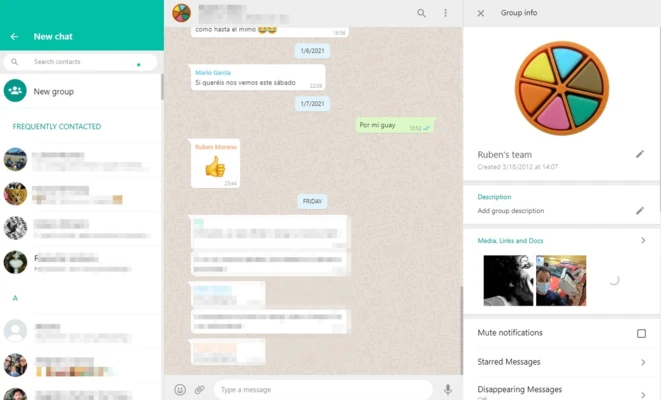
Create group conversations for family, friends, teams, or workplaces.
Group features include:
- Group messaging
- Photo and video sharing
- Custom notifications
- Group management tools
File Sharing
Share various types of files directly from your computer, including:
- Documents
- PDFs
- Images
- Videos
- Spreadsheets
- Presentations
End-to-End Encryption
WhatsApp uses end-to-end encryption to protect messages and calls, ensuring that conversations remain private between participants.
Multi-Device Support
Connect WhatsApp with multiple devices and use your account across desktop computers, tablets, and web browsers.
Desktop Notifications
Receive message alerts directly on Windows without constantly checking your phone.
Dark Mode Support
Use a dark interface that matches your Windows theme and reduces eye strain during extended use.
User Interface
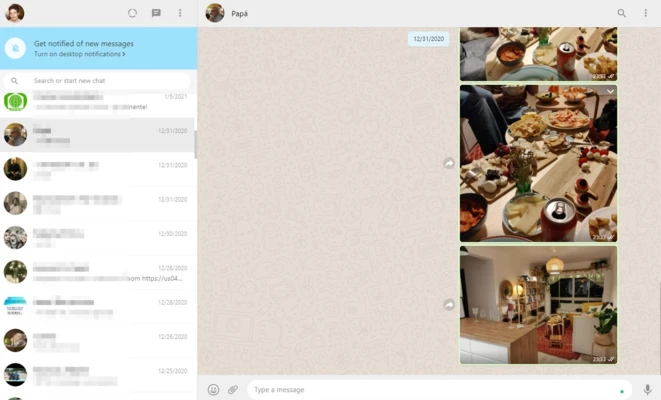
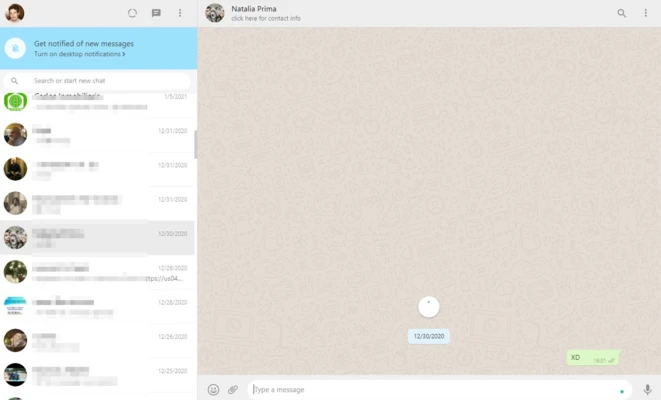
WhatsApp Desktop features a clean and simple interface similar to the mobile application.
The left panel displays chats and contacts, while the main area shows conversations and shared media.
The layout is easy to understand, making it suitable for both beginners and experienced users.
Keyboard shortcuts and desktop notifications improve efficiency when handling many conversations.
Installation and Setup
- Download WhatsApp Desktop for Windows.
- Install and launch the application.
- Open WhatsApp on your smartphone.
- Go to Linked Devices.
- Scan the QR code displayed on your computer.
- Wait for account synchronization.
- Start messaging and making calls from your desktop.
How to Use
Send Messages
- Select a contact or group.
- Type your message.
- Press Enter to send.
Share Files
- Click the attachment button.
- Select photos, videos, or documents.
- Send files directly from your PC.
Make Calls
- Open a conversation.
- Click the voice or video call button.
- Allow microphone and camera permissions when required.
Manage Linked Devices
- Open WhatsApp settings on your phone.
- Check connected devices.
- Remove unknown devices if necessary.
FAQ
Is WhatsApp for Windows free?
Yes. WhatsApp Desktop is completely free to download and use.
Can I use WhatsApp without a phone?
No. You need an active WhatsApp account registered on a smartphone to set up the desktop application.
Does WhatsApp Desktop support video calls?
Yes. Voice and video calls are supported on compatible Windows devices with a microphone and webcam.
Can I use WhatsApp when my phone is offline?
Yes. Modern multi-device support allows linked devices to continue working without requiring your phone to stay online.
Is WhatsApp Desktop secure?
Yes. WhatsApp uses end-to-end encryption to protect messages and calls.
How many devices can I link?
You can connect multiple linked devices, including computers and tablets, while keeping your account protected.
Alternatives
Telegram – A fast messaging platform focused on cloud storage, large groups, and cross-platform communication.
Signal – A privacy-focused messaging application with strong encryption and secure communication features.
Discord – A community communication platform offering text, voice, video chat, and file sharing.
Viber – A messaging and calling application with support for encrypted communication.
System Requirements
- Operating System: Windows 10 / Windows 11
- Processor: Intel or AMD processor
- RAM: 2GB or more
- Storage: Around 2GB free disk space
- Internet Connection: Required
- Webcam and Microphone: Required for video and voice calls
PROS
- Free messaging and calling
- Simple and easy-to-use interface
- End-to-end encryption
- Multi-device synchronization
- Supports file sharing
- Native Windows notifications
- Voice and video call support
CONS
- Requires a mobile WhatsApp account
- Internet connection required
- Limited advanced customization options
- Some features depend on mobile availability
Conclusion
WhatsApp Desktop is one of the most popular messaging applications available for Windows users.
With fast synchronization, secure communication, file sharing, and voice/video calling support, it provides a convenient way to stay connected without constantly using a smartphone.
For users who already rely on WhatsApp for daily communication, the Windows desktop application offers a smoother and more productive messaging experience.