


Camfrog Video Chat is a video chat and social networking application for Windows that allows users to communicate through live video, voice, and text.
The application combines one-to-one communication with group video chat rooms, allowing users to join public communities, participate in conversations, or communicate privately with other users. It is designed primarily for casual social interaction rather than business meetings.
What's New
Recent versions focus on improving video and audio communication, stability, compatibility, and the overall chat experience across supported devices.
Key Features
-
Video Chat Rooms: Join public rooms and participate in live video conversations.
-
Private Video Chat: Communicate privately with individual users.
-
Multi-User Video: View and interact with multiple webcam streams in supported rooms.
-
Text and Voice Chat: Communicate through text messages or voice without using a webcam.
-
Room Management: Room owners and moderators can manage participants and enforce room rules.
-
Virtual Gifts and Stickers: Send virtual items and stickers during conversations.
-
User Profiles: Create a profile and add other users to your contacts.
-
Cross-Platform Support: Available across Windows and other supported platforms.
-
User Controls: Block or report users when necessary.
User Interface
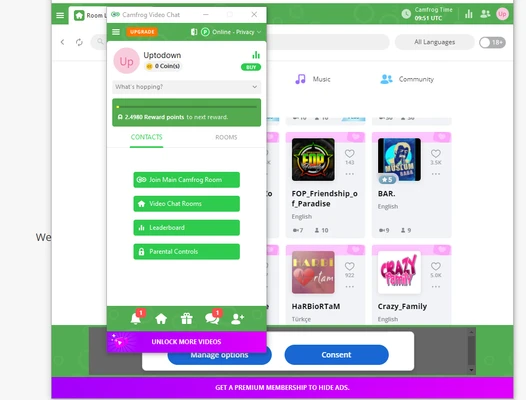
Camfrog uses a traditional chatroom-style interface with contact lists, room browsing, chat messages, and video feeds.
Video streams are displayed within chat rooms, while text conversations are available alongside the video interface. The design is relatively straightforward, although it may feel less modern than newer messaging and social platforms.
Installation and Setup
-
Download and install Camfrog Video Chat.
-
Launch the application.
-
Create a new account or sign in to an existing account.
-
Allow access to your webcam and microphone if you want to use video or voice chat.
-
Browse available chat rooms or start a private conversation.
How to Use
-
Sign in to your Camfrog account.
-
Browse the available public chat rooms.
-
Select a room to view its available video and text conversations.
-
Enable your webcam and microphone when you want to participate through video or voice.
-
Use the chat area to communicate with other participants.
-
Select a user to start a private conversation.
-
Add users to your contacts or use the available blocking and reporting tools when necessary.
FAQ
Is Camfrog free?
Yes. Camfrog offers free access to its basic communication features, while additional features are available through paid plans or in-app purchases.
Can I use Camfrog without a webcam?
Yes. You can participate in text or voice conversations without using a webcam.
Can I create my own chat room?
Yes. Camfrog supports user-created chat rooms and provides moderation tools for room management.
Does Camfrog support private conversations?
Yes. Users can communicate privately through individual text, voice, or video conversations.
Is Camfrog suitable for business meetings?
Camfrog is primarily designed for social video communication and online communities. Users looking for professional meetings may prefer dedicated conferencing software.
Is Camfrog safe to use?
Camfrog provides blocking, reporting, and moderation features, but public chat environments can contain unwanted or inappropriate interactions. Users should avoid sharing sensitive personal information and use the available safety controls.
Alternatives
Zoom: A video conferencing platform designed primarily for meetings, calls, and online collaboration.
Microsoft Teams: Provides video meetings, messaging, file sharing, and collaboration features for individuals and organizations.
Discord: A community-focused communication platform supporting text, voice, and video chat.
Paltalk: A social communication platform offering group chat rooms, video conversations, and private messaging.
Pricing
Camfrog provides free access to basic features, with optional paid plans and premium features for users who want additional functionality.
Premium options and pricing may vary depending on the platform, subscription type, and region.
System Requirements
-
Operating System: Windows 7, 8, 10, or 11
-
Processor: Intel or AMD dual-core processor or better
-
RAM: 2 GB or more
-
Camera: Required for video communication
-
Microphone: Required for voice communication
-
Internet: Broadband connection recommended
Pros
-
Large international user community
-
Supports public and private video chat
-
Text, voice, and video communication
-
User-created chat rooms
-
Room moderation tools
-
Free basic version
-
Available on multiple platforms
Cons
-
Public rooms can vary significantly in quality and moderation
-
Some features require payment
-
Users may encounter spam or inappropriate content
-
Interface feels dated compared with newer communication platforms
-
Better suited to social interaction than professional meetings
Conclusion
Camfrog Video Chat is a social video communication platform that combines traditional online chatrooms with live webcam interaction. It provides public and private video conversations, text and voice messaging, user-created rooms, and moderation tools.
It is a suitable choice for users interested in casual online communities and live video chat rather than formal meetings or professional collaboration.