
Telegram for Windows is a fast, secure, and feature-rich messaging application that lets you communicate with friends, family, teams, and online communities from your PC.
The desktop client synchronizes your conversations, contacts, media, and files with your other Telegram devices, allowing you to continue conversations seamlessly between your smartphone, tablet, and computer.
Telegram supports text messages, voice messages, photos, videos, documents, voice and video calls, groups, channels, stories, bots, and a wide range of other communication features. Its large group and channel capabilities also make it suitable for communities, organizations, and businesses.
What's New
Recent Telegram releases have introduced improvements across messaging, AI, stories, calls, profiles, and customization.
-
AI-powered tools for summarizing and processing content.
-
Improved Stories with additional reactions and interaction options.
-
Enhanced AI chatbot conversations with threading and streaming responses.
-
Live comments and reactions in group calls.
-
Passkey support for easier account login.
-
Private notes for contacts and suggested birthday information.
-
Additional profile color and gift customization options.
-
Improved interface consistency across desktop and mobile platforms.
-
New tools and improvements for bots and interactive buttons.
-
Ongoing performance, security, and usability improvements.
Key Features
Instant Messaging – Send text messages, voice messages, photos, videos, documents, archives, and other supported files.
Groups and Channels – Create or join large communities and channels for communication, discussion, and broadcasting.
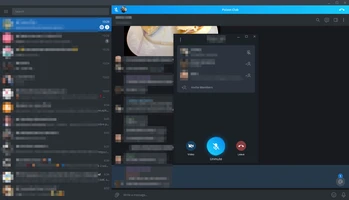
Voice and Video Calls – Make voice and video calls with individual contacts and participate in group voice and video conversations.
Cloud Synchronization – Messages and supported media are synchronized across your Telegram devices.
Large File Sharing – Send large documents and media files directly through Telegram.
Username-Based Communication – Contact other users through usernames without necessarily sharing a phone number.
Stories – Create and view temporary visual updates shared by contacts and channels.
Bots – Use automated bots for games, productivity, customer service, information, and other tasks.
Privacy and Security – Telegram provides encrypted communication, two-step verification, passcode protection, secret chats, and other privacy controls.
Customizable Interface – Customize themes, backgrounds, notifications, chat appearance, and other interface settings.
Multi-Device Support – Use Telegram simultaneously on Windows, macOS, Linux, Android, iOS, and other supported platforms.
User Interface
Telegram Desktop uses a clean and familiar interface centered around the chat list and conversation window.
The left panel provides access to conversations, contacts, groups, channels, and search, while the main area displays the selected conversation. Users can quickly send messages, attach files, make calls, and access additional chat functions.
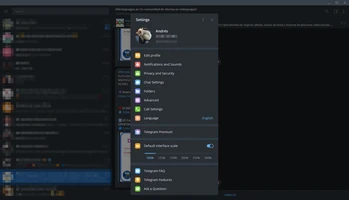
The interface also provides settings for notifications, privacy, appearance, devices, storage, and other account options.
Installation and Setup
-
Download the Telegram Desktop installer for Windows.
-
Run the installation file and follow the setup instructions.
-
Launch Telegram after installation.
-
Sign in using your existing Telegram account.
-
Complete the authentication process using the available login method.
-
Allow the application to synchronize your conversations and account data.
-
Adjust notification, privacy, appearance, and storage settings according to your preferences.
A valid phone number is required to create or authenticate a Telegram account.
How to Use
Start a Conversation: Open Telegram and select a contact or search for a username.
Send Messages: Type your message in the chat box and press Enter to send it.
Share Files: Use the attachment button to send photos, videos, documents, archives, and other supported files.
Make a Call: Open a conversation and select the voice or video call option.
Create a Group: Select the option to create a new group and add the desired contacts.
Join a Channel: Search for a public channel or open an invitation link to join.
Use Telegram on Multiple Devices: Sign in to the same account on your other supported devices. Your cloud-based conversations will synchronize automatically.
Customize Telegram: Open Settings to change notifications, themes, privacy options, chat appearance, storage settings, and other preferences.
FAQ
Is Telegram for Windows free?
Yes. Telegram Desktop is free to download and use. Some optional Telegram services and features may have separate availability or subscription requirements.
Can I use Telegram on multiple devices?
Yes. Telegram supports simultaneous use across multiple devices, with supported cloud chats synchronized between them.
Can I make voice and video calls from my PC?
Yes. Telegram Desktop supports voice and video calling, subject to the features available in your current version.
Can I send large files through Telegram?
Yes. Telegram supports sending relatively large files, although the maximum file size depends on the current Telegram limits and account features.
Does Telegram require a phone number?
A phone number is required for account registration and authentication. After setting up the account, users can communicate through usernames where supported.
Is Telegram end-to-end encrypted?
Telegram uses different encryption models depending on the feature. Regular cloud chats are encrypted between the client and Telegram's servers, while Secret Chats provide end-to-end encryption. Users should not assume that every Telegram conversation is end-to-end encrypted by default.
Can I use Telegram without my phone after logging in?
Yes. Once Telegram Desktop has been authenticated, you can use the desktop application independently for many functions without keeping your phone connected.
Can I create large groups and channels?
Yes. Telegram supports large groups and channels designed for communities, organizations, and broadcasting.
Alternatives
WhatsApp – A widely used messaging platform with desktop applications, voice and video calls, group chats, and file sharing.
Signal – A privacy-focused messaging application with strong end-to-end encryption for supported communications.
Discord – A communication platform particularly popular with gaming communities, online groups, and communities.
Slack – A business-oriented collaboration platform designed around team communication, channels, file sharing, and workplace integrations.
Pricing
Telegram Desktop is free to download and use for its core messaging and communication features.
Telegram also offers Telegram Premium, an optional subscription that provides additional features and limits beyond the standard free account.
System Requirements
-
Operating System: Windows 7, 8, 10, or 11
-
RAM: 1 GB or more recommended
-
Storage: Approximately 100 MB or more for installation
-
Internet Connection: Required
-
Account: Telegram account with a valid phone number
Actual storage requirements may increase depending on the amount of locally cached media and files.
PROS
-
Free desktop messaging application
-
Excellent synchronization across devices
-
Supports large groups and channels
-
Supports voice and video calls
-
Extensive file-sharing capabilities
-
Username-based communication
-
Highly customizable interface
-
Available across multiple platforms
-
Supports bots, stories, and other advanced features
-
Regular feature and security updates
CONS
-
Requires a phone number for account registration
-
Regular cloud chats are not end-to-end encrypted by default
-
Large number of features can be overwhelming for new users
-
Some advanced features are available through Telegram Premium
-
Privacy depends on using the appropriate Telegram security features
Conclusion
Telegram for Windows is a powerful desktop messaging application that combines fast communication, extensive file sharing, large communities, voice and video calls, and multi-device synchronization.
Its desktop client provides nearly all of the core communication tools users expect from Telegram while making it much easier to manage conversations and files from a larger screen.
With its combination of cloud synchronization, groups, channels, bots, customization options, and cross-platform support, Telegram is a strong choice for both personal communication and large online communities.