



Cốc Cốc is a Chromium-based web browser designed primarily for users in Vietnam. It provides standard browsing features along with tools tailored to Vietnamese users, including Vietnamese typing support, built-in translation, media downloading, ad blocking, and an English-Vietnamese dictionary.
The browser has a familiar interface similar to other Chromium-based browsers and supports Chrome extensions. It is available for Windows as well as Android and iOS devices.
What's New
- Improved browser performance and stability.
- Enhanced Vietnamese language and typing tools.
- Improved media downloading capabilities.
- Updated ad-blocking and privacy features.
- Improved compatibility with Chromium-based extensions.
- Bug fixes and general security improvements.
Key Features
- Vietnamese Language Support – Supports Vietnamese typing, automatic diacritic insertion, spell checking, and an English-Vietnamese dictionary.
- Built-in Translation – Provides quick translation tools for supported languages, including Vietnamese and Chinese.
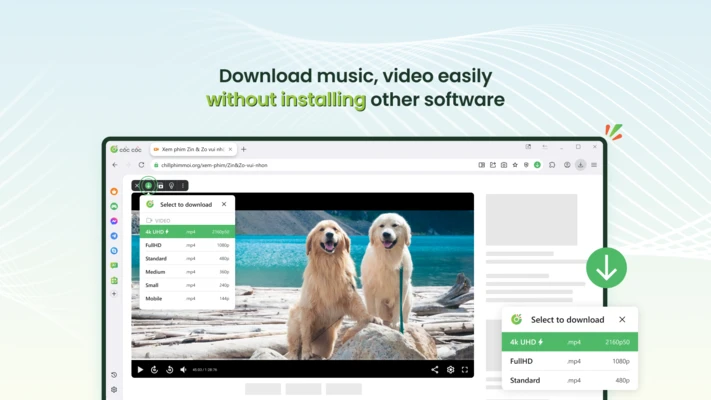
- Media Downloader – Detects supported online audio and video content and provides convenient download options.
- Ad Blocker – Blocks many intrusive advertisements to provide a cleaner browsing experience.
- Fast Downloads – Supports multi-threaded downloading for supported files and media.
- Chrome Extension Support – Compatible with many extensions from the Chrome Web Store.
- Chromium-Based – Provides broad website compatibility and a familiar browsing experience.
- Social Media Shortcuts – Provides quick access to commonly used social media services.
- Cross-Platform Support – Available for Windows, Android, and iOS.
User Interface
Cốc Cốc uses a clean and familiar interface based on Chromium. Users who have experience with Google Chrome or Microsoft Edge should have little difficulty getting started.
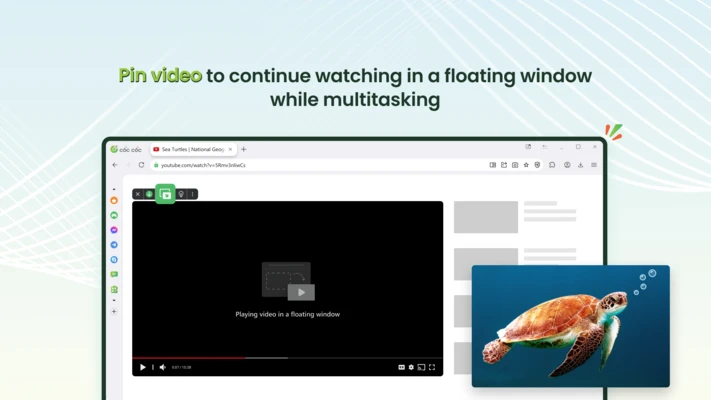
The address bar, tabs, bookmarks, settings, and other navigation controls are arranged in a familiar layout. Additional tools such as translation, media downloading, and ad blocking can be accessed directly from the browser interface.
Installation and Setup
Download – Download the appropriate installer for your operating system.
Install – Run the installer and follow the on-screen instructions.
Set Up – Launch Cốc Cốc and configure your preferred language, search engine, privacy settings, and other options.
Import Data – You can import bookmarks and other browsing information from supported browsers.
How to Use
Browse the Web – Enter a website address or search query into the address bar.
Translate Content – Select text or use the built-in translation tools when browsing supported foreign-language websites.
Download Media – When supported audio or video content is detected, Cốc Cốc may display download options within the browser.
Block Advertisements – Use the built-in ad blocker to reduce unwanted advertisements and improve page readability.
Install Extensions – Open the extension management section to install compatible Chrome Web Store extensions.
Manage Downloads – Use the built-in download manager to view and manage downloaded files.
FAQ
What is Cốc Cốc?
Cốc Cốc is a Chromium-based web browser developed primarily for Vietnamese users. It includes standard browsing features along with Vietnamese-focused tools.
Is Cốc Cốc free?
Yes. Cốc Cốc is available as a free web browser.
Does Cốc Cốc support Chrome extensions?
Yes. Because it is based on Chromium, Cốc Cốc supports many extensions designed for Chromium-based browsers.
Can Cốc Cốc download online videos?
Cốc Cốc includes built-in media detection and downloading features for supported websites and content.
Does Cốc Cốc have an ad blocker?
Yes. The browser includes built-in ad-blocking functionality that can filter many intrusive advertisements.
Does Cốc Cốc support English?
Yes. The browser supports English in addition to Vietnamese and provides language-related tools for users who work with multiple languages.
Is Cốc Cốc available for Android and iOS?
Yes. Cốc Cốc also provides mobile versions for Android and iOS.
Can I import bookmarks from another browser?
Yes. Cốc Cốc provides options for importing bookmarks and other supported browsing data from compatible browsers.
Alternatives
Google Chrome – A popular Chromium-based browser with extensive extension support and integration with Google services.
Microsoft Edge – A Chromium-based browser with strong security, performance, and Microsoft services integration.
Brave – A privacy-focused browser with built-in ad and tracker blocking.
Vivaldi – A highly customizable Chromium-based browser designed for advanced users.
System Requirements
- Operating System: Windows 10 or Windows 11
- Processor: 1 GHz or faster
- RAM: 2 GB or more
- Storage: At least 500 MB of available disk space
- Internet: Required for downloading and online browsing
PROS
- Designed with Vietnamese users in mind
- Built-in Vietnamese language tools
- Integrated media downloading
- Built-in ad blocker
- Supports Chromium extensions
- Available on desktop and mobile platforms
CONS
- Primarily focused on Vietnamese users
- Some features may not be useful for international users
- Can consume more system resources than lightweight browsers
- Media downloading is not supported on every website
Conclusion
Cốc Cốc is a feature-rich Chromium-based browser that is particularly well suited to Vietnamese users. Its built-in Vietnamese language tools, media downloader, ad blocker, translation features, and Chrome extension support make it more than a basic web browser.
For users who frequently browse Vietnamese websites or need Vietnamese-specific tools, Cốc Cốc is a practical alternative to Chrome, Edge, and other mainstream browsers.