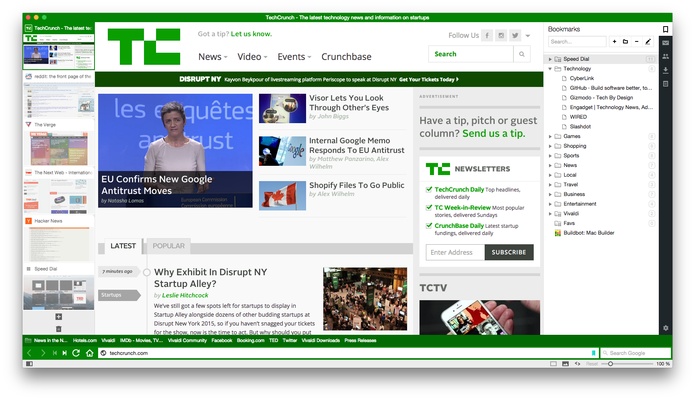
Vivaldi is a free, feature-rich web browser for Windows built for users who want complete control over their browsing experience. Developed by Vivaldi Technologies and co-founded by former Opera CEO Jon Stephenson von Tetzchner, it combines the compatibility of the Chromium engine with extensive customization, powerful productivity tools, and a strong focus on privacy.
Unlike most browsers that follow a one-size-fits-all approach, Vivaldi lets you customize nearly every aspect of its interface and workflow. It also includes built-in tools such as Mail, Calendar, Notes, Translate, and an ad & tracker blocker, reducing the need for third-party extensions.
Key Features
Extensive Customization
- Customize themes, colors, icons, and toolbar layouts.
- Move the address bar, tab bar, and panels to different positions.
- Configure keyboard shortcuts and mouse gestures.
- Create personalized browsing workflows.
Advanced Tab Management
- Tab Stacks for grouping related tabs.
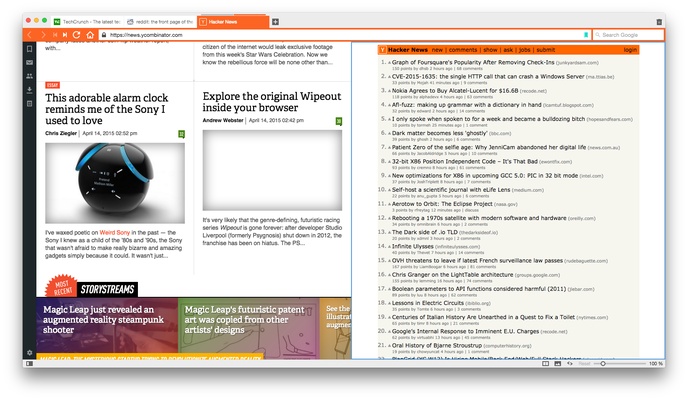
- Split-screen tab tiling for multitasking.
- Workspaces for separating projects or browsing sessions.
- Hibernation for inactive tabs to reduce memory usage.
- Periodic tab reload for automatically refreshing selected pages.
Built-in Productivity Tools
- Vivaldi Mail
- Calendar
- Feed Reader
- Notes with screenshots and tags
- Capture full-page or partial screenshots
- Built-in Translate service
- Pop-out video (Picture-in-Picture)
Privacy & Security
- Built-in tracker blocker.
- Integrated ad blocker.
- Private browsing mode.
- No user profiling or selling of browsing data.
- Frequent Chromium security updates.
Chromium Compatibility
- Supports nearly all Chrome extensions.
- Excellent website compatibility.
- Modern web standards support.
Productivity Features
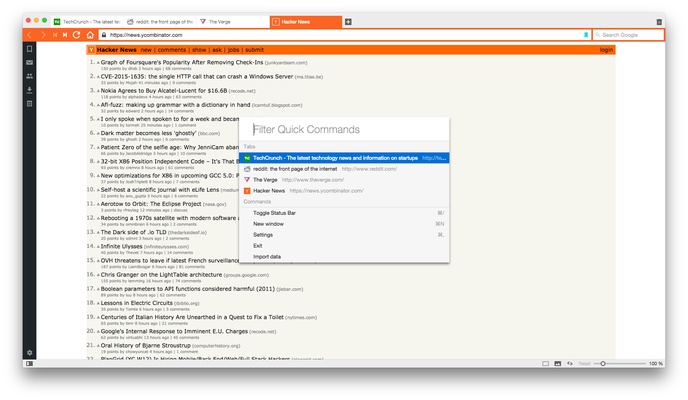
- Quick Commands for searching tabs, settings, bookmarks, and history.
- Command Chains for custom workflows.
- Web Panels for opening websites in the sidebar.
- Reader View for distraction-free reading.
- Speed Dial customizable start page.
- Visual browsing history.
What's New
Recent releases include:
- Improved Workspaces for multitasking.
- Faster Mail, Calendar, and Feed synchronization.
- Enhanced built-in ad and tracker blocker.
- Performance optimizations for quicker startup.
- Improved Tab Stacks with easier grouping and split-screen support.
- Address Bar search improvements.
- Better sync reliability across devices.
- Updated Chromium engine for improved security and compatibility.
- More customization options for themes, icons, and layouts.
User Interface
Vivaldi features one of the most customizable browser interfaces available.
Highlights include:
- Adaptive themes that change based on website colors.
- Configurable Speed Dial homepage.
- Sidebar for bookmarks, downloads, notes, history, and web panels.
- Compact or full-featured layouts.
- Flexible placement of tabs and toolbars.
Despite offering numerous customization options, the interface remains intuitive and can be simplified according to user preference.
How to Use
- Install Vivaldi.
- Import bookmarks and settings from your previous browser.
- Customize the interface using Settings.
- Organize tabs using Stacks or Workspaces.
- Install Chrome extensions if needed.
- Use Notes, Calendar, Mail, and Translate directly from the sidebar.
- Enable the built-in tracker and ad blocker for improved privacy.
- Sync bookmarks, passwords, and settings across devices using a Vivaldi account.
System Requirements
- Operating System: Windows 7, 8, 10, or 11
- Processor: Modern x86 or x64 CPU
- Memory: 2 GB RAM or higher recommended
- Storage: Minimal installation space required
- Internet: Required for synchronization, updates, and online services
Pros
- Extremely customizable interface
- Excellent tab management features
- Built-in Mail, Calendar, Notes, and Feed Reader
- Strong privacy protections with built-in ad and tracker blocking
- Supports Chrome extensions
- Frequent updates and active development
- Free to use
Cons
- Rich feature set may feel overwhelming for new users
- Higher memory usage than minimalist browsers
- Built-in tools may be unnecessary for users who prefer standalone applications
Conclusion
Vivaldi is one of the most capable and customizable web browsers available today. It successfully combines Chromium compatibility with an extensive collection of productivity tools, advanced tab management, and privacy-focused features, making it especially appealing to power users and multitaskers.
While its large feature set may be more than casual users require, those who value flexibility, organization, and control will find Vivaldi to be an excellent alternative to Chrome, Edge, Firefox, and Opera. Its commitment to user choice and continuous innovation makes it one of the strongest browsers for productivity-focused users.
Note: Vivaldi is completely free and is available for Windows, macOS, Linux, Android, and iOS.