Opera Browser is a fast, secure, and highly customizable web browser for Windows 11/10. Developed by Opera Software, it provides a modern browsing experience with built-in privacy tools, productivity features, and performance optimizations.
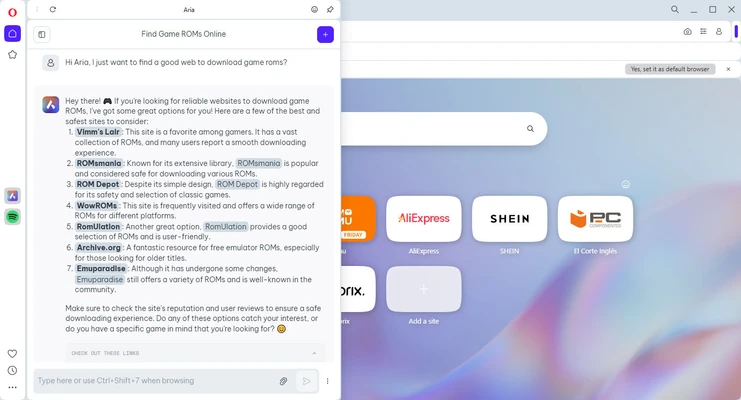
Based on the Chromium engine, Opera supports Chrome extensions while adding unique features such as a free VPN, ad blocker, sidebar tools, Workspaces, Tab Islands, and built-in AI assistant Aria.
It is designed for users who want a feature-rich browser with strong customization options and enhanced privacy protection.
Features and Highlights
Built-in Free VPN
Protect your browsing privacy with Opera’s integrated VPN feature without installing additional software.
Ad Blocker & Tracker Protection
Blocks unwanted ads and online trackers to improve browsing speed and security.
AI Assistant (Aria)
Access built-in AI tools for searching, writing assistance, and content generation directly from the browser sidebar.
Advanced Tab Management
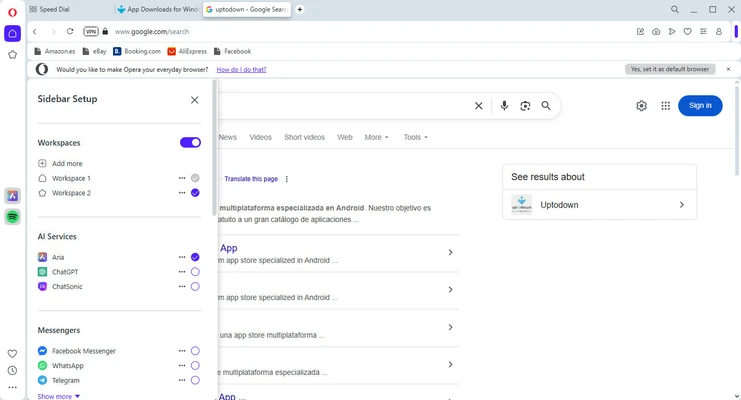
Organize multiple tabs efficiently with Tab Islands, Workspaces, and tab grouping features.
Sidebar Integration
Quickly access messaging apps, music services, bookmarks, and other tools from the built-in sidebar.
Chrome Extension Support
Install extensions from both Opera Add-ons and the Chrome Web Store.
Battery Saver Mode
Optimize power usage on laptops for longer battery life.
Cross-Device Sync
Synchronize bookmarks, passwords, settings, and open tabs across devices.
Built-in Crypto Wallet
Manage supported digital assets and connect with Web3 applications directly from the browser.
What's New
- Integrated Aria AI assistant
- Improved Tab Islands and Workspaces
- Faster built-in VPN performance
- Enhanced ad and tracker blocking
- Better battery optimization
- Updated Chromium engine for improved security
- Interface and performance improvements
How to Use
- Download and install Opera Browser.
- Launch the browser and complete the initial setup.
- Import bookmarks and settings from another browser if needed.
- Customize themes, extensions, and sidebar tools.
- Enable privacy features such as VPN and ad blocker.
- Start browsing with personalized settings.
FAQ
Is Opera Browser free?
Yes. Opera is completely free to download and use.
Does Opera support Chrome extensions?
Yes. Opera supports most Chrome Web Store extensions.
Does Opera include a VPN?
Yes. It includes a built-in free VPN feature.
Is Opera safe to use?
Yes. Opera includes security features such as fraud protection, tracker blocking, and encrypted connections.
Can Opera sync data between devices?
Yes. Users can synchronize bookmarks, passwords, history, and settings.
Alternatives
Google Chrome – Fast and widely supported browser with a huge extension ecosystem.
Mozilla Firefox – Privacy-focused browser with strong customization options.
Microsoft Edge – Chromium-based browser with Microsoft ecosystem integration.
Brave Browser – Privacy-focused browser with built-in ad blocking.
System Requirements
- Operating System: Windows 11 / Windows 10 / Windows 8 / Windows 7 (64-bit)
- Processor: 1 GHz or faster
- RAM: 512 MB minimum
- Graphics: DirectX 9 compatible graphics card
- Storage: 200 MB available space
PROS
- Fast Chromium-based performance
- Built-in free VPN
- Powerful tab management
- Supports Chrome extensions
- Built-in ad blocker
- Highly customizable interface
CONS
- Some websites may have compatibility issues
- Less popular than Chrome and Edge
- Built-in features may feel excessive for simple users
Conclusion
Opera Browser is a powerful and feature-rich browser for Windows users who want more than basic web browsing.
With built-in VPN, ad blocking, AI tools, advanced tab management, and extensive customization options, Opera provides a complete browsing experience for productivity, privacy, and everyday use.