


Wavebox – Productivity Browser for Windows PC
Wavebox is a Chromium-based productivity browser designed to streamline your workflow by consolidating web applications, email accounts, and websites into a single, organized interface. Ideal for professionals and teams, Wavebox helps users stay productive while managing multiple accounts without switching browsers or profiles.
Key Features
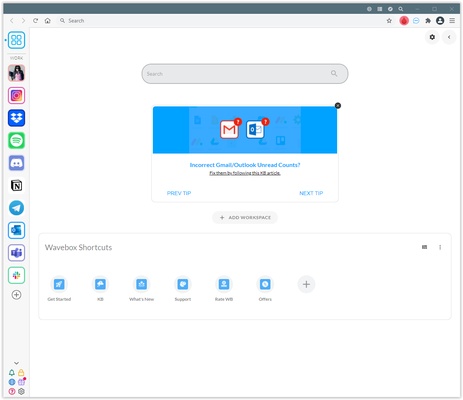
- Unified Workspace: Integrate all your web apps, email accounts, and websites into one platform for efficient multitasking.
- Multi-Account Support: Stay signed in to multiple accounts of the same service, such as Gmail, Slack, or Microsoft Teams, without conflicts.
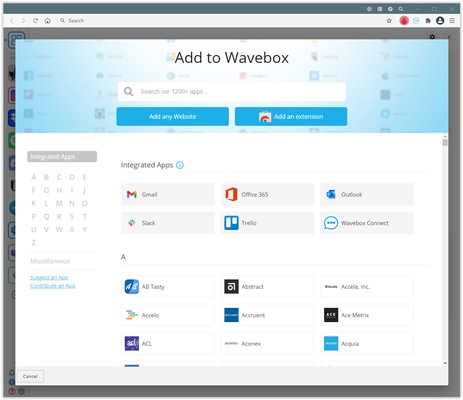
- Custom Integrations: Access over 2,500 app integrations with customizable icons, unread badges, and notification preferences.
- Split-Screen Functionality: Work on multiple apps or tabs side by side within the same window for better productivity.
- Chrome Extension Compatibility: Install and use Chrome Web Store extensions to enhance browser functionality.
- Built-in AI Assistant – Brainbox: Utilize AI-powered tools like ChatGPT for pre-defined prompts, content generation, and workflow automation.
User Interface
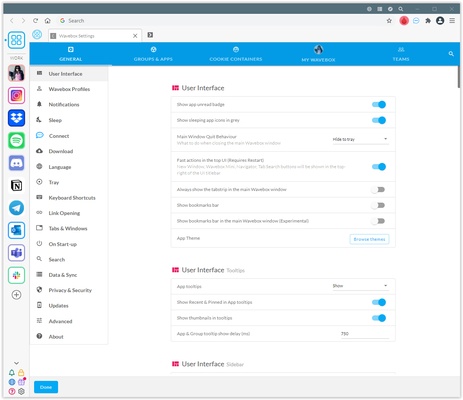
Wavebox features a clean, intuitive interface with a customizable sidebar (webdock) to organize your grouped apps and tabs. Each group has its own tab strip, reducing clutter and helping users focus on tasks efficiently.
Installation and Setup
- Download Wavebox from the official website or FileHorse.
- Run the Windows installer and follow the on-screen instructions.
- Add frequently used web apps and accounts, using templates for popular services.
- Organize apps into groups, customize notifications, and install Chrome extensions as needed.
How to Use Wavebox
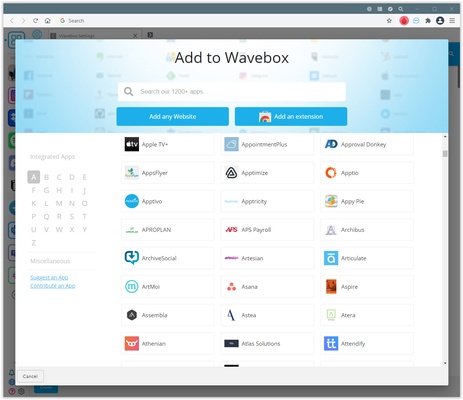
- Adding Apps: Click the "+" icon in the sidebar, select from available integrations, or enter a custom URL.
- Creating Groups: Right-click the sidebar to create a new group and drag related apps into it.
- Split-Screen Mode: Right-click a tab and choose "Split Screen" to view multiple apps side by side.
- Brainbox AI: Highlight text, right-click, and select a Brainbox skill to generate AI-assisted responses or content.
FAQ
- Can I use Chrome extensions? Yes, Wavebox supports all Chrome extensions.
- Is there a free version? A free trial is available. A subscription is required for full access.
- How does Wavebox handle multiple accounts? Cookies are isolated for each app instance, allowing simultaneous logins without conflicts.
- Are keyboard shortcuts supported? Yes, customizable shortcuts improve navigation and efficiency.
- Is my data secure? Wavebox uses encryption and strict privacy policies to protect user data.
Alternatives
- Rambox: Manage multiple web apps with multi-account support.
- Opera GX: Browser built for gamers.
- Shift: Unified workspace for email, calendar, and apps.
- Trillian: Traditional instant messaging client.
Pricing
- Basic (Free): Limited to 2 groups, 2 apps per group, 1 extension, and 1 dashboard.
- Wavebox Pro ($8.33/month, billed annually): Unlimited spaces, groups, apps, extensions, cloud sync, and dashboards.
- Teams ($12.50/month per user): Includes Pro features plus Connect, shared dashboards, Wavebox Live, and consolidated billing.
System Requirements
- OS: Windows 11 or Windows 10
- Processor: Intel Pentium 4 or later (SSE2 capable)
- RAM: Minimum 2 GB
- Storage: 200 MB free disk space
Pros
- Consolidates multiple web apps and accounts into a single interface
- Supports simultaneous login to multiple accounts of the same service
- Compatible with Chrome extensions
- Built-in AI assistant for productivity
- Customizable workspaces and split-screen functionality
Cons
- Subscription required after trial
- High memory usage possible with many active apps
- Some features may have a learning curve for new users
Conclusion
Wavebox is a powerful productivity browser for Windows, designed to simplify workflows and centralize web apps and accounts in one platform. While full access requires a subscription, its AI features, multi-account support, and split-screen functionality make it an excellent choice for professionals and teams looking to improve efficiency.
Note: 7-day trial version available. Limited functionality in the demo version.