Go to Windows platform Display platforms icon
Go to Windows platform Go to Mac platform Go to Android platform
Speedify 16.9.1 icon

Speedify 16.9.1

16.9.1
Nomadio
5.0
11 MB size

Securely browse the Internet at the speed of all your connections combined

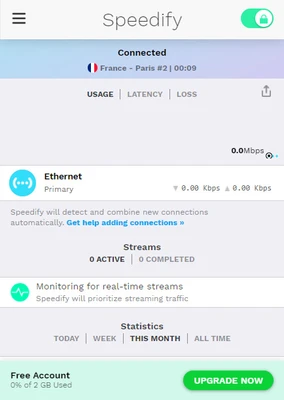
Speedify is a VPN and internet bonding software for Windows designed to improve connection speed, stability, and security by combining multiple internet sources into one faster and more reliable connection.

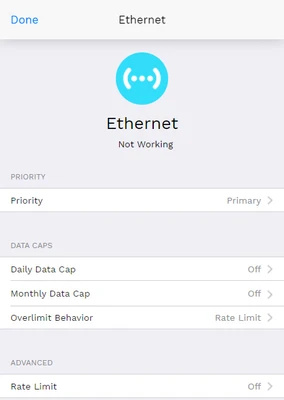
It allows users to connect Wi-Fi, Ethernet, mobile hotspots, and cellular data at the same time, intelligently distributing traffic to reduce lag, buffering, and disconnects. If one connection drops, traffic is automatically switched to another without interruption.

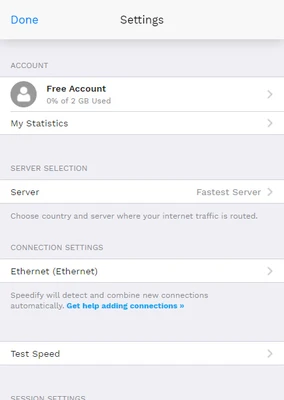
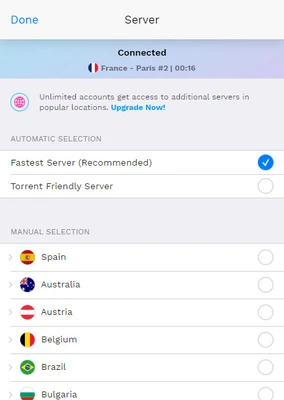
Speedify also provides encrypted VPN protection, helping secure browsing activity and protecting data from hackers, ISPs, and public network risks. Users can choose a server location manually or let the software automatically connect to the best available server based on latency and performance.

A key technology is channel bonding, which splits data packets across multiple connections to improve speed and stability, even for large transfers such as video streaming, file uploads, and video calls.


Key Features

  • Internet bonding (combine multiple connections)
  • Built-in VPN encryption
  • Automatic failover protection
  • Packet-level traffic distribution (channel bonding)
  • Streaming and video call optimization
  • Global server network
  • Secure browsing protection
  • Cross-platform support (Windows, macOS, Linux, iOS, Android)

Performance Benefits

  • Faster file uploads and downloads
  • Stable video conferencing (Zoom, Google Meet, Skype, etc.)
  • Reduced buffering during streaming
  • Improved connection reliability in weak network areas
  • Seamless switching between networks

Pricing

  • Individual Plan: $7.49/month (up to 5 devices)
  • Family Plan: $11.25/month (multi-user support, admin dashboard)
  • Free plan available with limited monthly data

System Requirements

  • Windows 7 / 8 / 10 / 11 (64-bit)
  • 1 GHz processor or higher
  • 2 GB RAM minimum
  • 100 MB storage space
  • Active internet connection

Pros

  • Strong connection stability and speed boost
  • Easy automatic setup
  • Effective for streaming and video calls
  • Works across multiple devices

Cons

  • Free plan has limited data
  • Fewer advanced VPN controls
  • Can consume system resources
  • Server coverage not as extensive as top-tier VPNs

Best for

Users who need a more stable internet connection, improved streaming performance, and basic VPN protection with the ability to combine multiple networks.

Information about Speedify 16.9.1

License Trial / Demo
Op. System Windows
Category Internet
Language English
Author Nomadio
permission icon Permissions Not applicable
Date 2026-06-20
Size 11 MB
File type Official Website

Apps recommended for you

Xshell Free 8.0 Build 0107 icon
Amazing SSH, SFTP, TELNET, RLOGIN and SERIAL terminal emulator for PC
Douyin Live Companion icon
Upgrade your Douyin live streams
HideMy.name VPN icon
Protect your online privacy and access the internet securely with HideMy.name VPN for Windows, the fast VPN software with encrypted connections and anonymous browsing.
Waterfox icon
Waterfox is a privacy-focused web browser based on Firefox, offering enhanced security and support for older extensions.
Brave Browser 1.94.117 icon
Load web pages 3x to 6x faster, better privacy and protection!
Octo Browser 3.1.3 icon
Antidetect browser for multi-accounting - One antidetect to rule them all!
TikTok icon
Disfruta de TikTok en tu computadora con Windows
Remote Desktop Manager Enterprise 2026.3.5.0 icon
An application used to manage all your remote connections!
VidMasta 31.0 icon
Watch and download any movie or TV titles that are being shared online
Mozilla Firefox 160.0.1 icon
The best alternative for Internet browsing
Speedify 17.3.0.13917 icon
Browse without barriers
SSuite NetSurfer Prometheus 2.12.14.10.7 icon
Surf smarter, faster, and safer with our original NetSurfer browser.
WhatsApp Desktop 2.2642.101.0 icon
The official WhatsApp app for Windows
GS-Calc 24.3.2 icon
Easily create and edit spreadsheets
Google Chrome 156.0.8078.80 icon
Fast, clean and easy web browsing courtesy of Google
MicroSIP 3.22.23 icon
Make free voice calls over SIP
DataVare TGZ to MBOX Converter icon
The expert solution for converting TGZ to MBOX format.
Midori Browser icon
Midori Browser is a lightweight, fast, and secure web browser
Chromium icon
Chromium for Windows is an open-source web browser that serves as the foundation for Google Chrome, offering fast browsing and robust security features.
The Dude 7.24.2 icon
Scan your home network, make a layout map and start monitoring!
Bitvise SSH Client icon
Bitvise SSH Client for Windows is a secure tool that allows users to connect to remote servers via SSH for file transfer and terminal access.
Firefox Developer Edition 153.0b8 (64-bit) icon
Get the latest features, fast performance, and the development tools!
Telegram for Desktop 7.0.7 icon
Speedy alternative to WhatsApp. Send Telegrams from any device!
FileZilla icon
The most used client for uploading files via FTP