Brave Browser is a free, open-source web browser developed by Brave Software. Built on Chromium, it provides a familiar browsing experience while placing a strong emphasis on privacy, security, and performance.
Brave blocks many ads and trackers by default through its built-in Shields system, which can reduce unwanted tracking and improve page loading on some websites. It is available for Windows, macOS, Linux, Android, and iOS.
In addition to standard web browsing, Brave includes features such as private browsing with Tor, Brave Rewards, an integrated cryptocurrency wallet, optional VPN services, and the Brave Leo AI assistant.
What's New
Recent versions of Brave continue to improve Chromium compatibility, browser performance, privacy protection, security, and cross-platform synchronization.
Updates may include improvements to the Shields engine, fingerprinting protection, tab management, Brave Leo, Brave Wallet, Brave Rewards, customization options, and Chromium security fixes.
Because Brave is updated frequently, specific features and changes can vary between releases.
Key Features
Built-in Ad and Tracker Blocking: Brave Shields blocks many advertisements, trackers, and other unwanted web elements by default.
Privacy Protection: Provides features designed to reduce tracking, fingerprinting, cookie-based tracking, and other common web privacy risks.
Brave Firewall + VPN: Provides an optional VPN service designed to protect network traffic across the device, rather than only traffic generated by the browser.
Private Browsing with Tor: Includes a private window option that routes browsing traffic through the Tor network for additional privacy.
Brave Rewards: Allows users to optionally participate in a privacy-focused advertising system and receive rewards in supported regions and configurations.
Brave Wallet: Provides a built-in cryptocurrency wallet for managing supported digital assets without requiring a separate browser extension.
Brave Leo: An integrated AI assistant that can answer questions, summarize webpages and documents, assist with writing, translate content, and provide other AI-powered features.
Chromium Compatibility: Uses the Chromium browser engine, providing broad compatibility with modern websites and Chromium-based browser technologies.
Extensions: Supports a wide range of browser extensions, including extensions designed for Chromium-based browsers.
Synchronization: Allows users to synchronize supported browser data between compatible Brave installations and devices.
Customization: Provides options for customizing the appearance, toolbar, sidebar, tabs, themes, and other parts of the browser.
User Interface
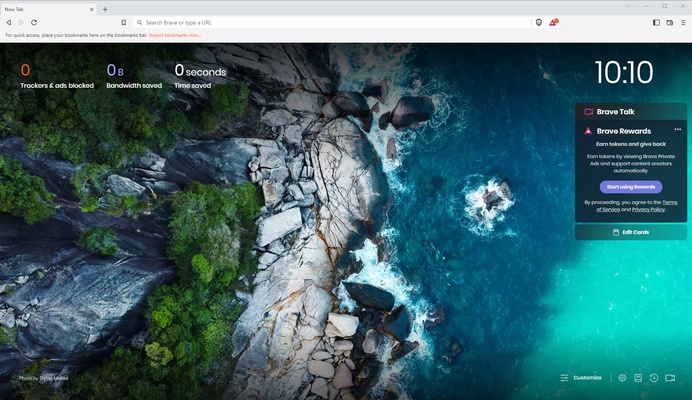
Brave uses a familiar Chromium-based interface, making it relatively easy for users switching from other popular browsers.
The main window includes the address bar, tabs, navigation controls, bookmarks, extensions, and standard browser menus. Privacy-related controls are prominently integrated into the browsing experience.
Shields is one of Brave's most distinctive interface elements. It can be accessed from the address bar and provides controls for blocking advertisements, trackers, scripts, cookies, and other website-related content.
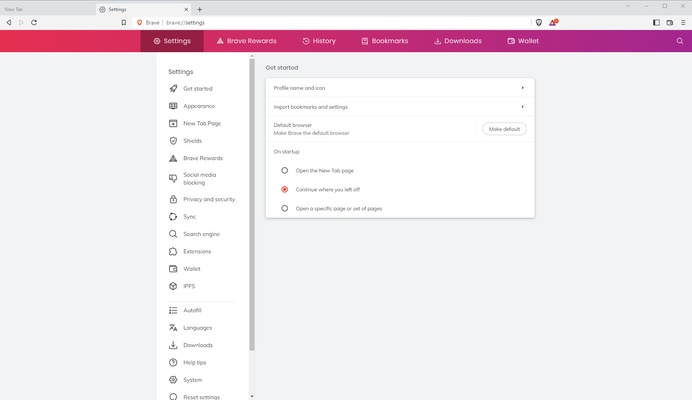
The settings area provides additional controls for privacy, security, appearance, search engines, extensions, synchronization, rewards, wallet features, and other browser functions.
Installation and Setup
Download the appropriate Brave installer for your operating system and run the setup program.
Follow the on-screen instructions to complete the installation. After launching Brave, you can choose a default search engine, import bookmarks and settings from another browser, configure privacy preferences, and customize the appearance.
Brave Shields is enabled by default, but its settings can be adjusted for individual websites or globally according to your preferences.
Optional features such as Brave Rewards, Brave Wallet, VPN services, and Brave Leo can be configured separately.
How to Use
-
Launch Brave and enter a website address or search query in the address bar.
-
Open additional webpages using tabs.
-
Click the Shields icon to review or change privacy protections for the current website.
-
Import bookmarks, passwords, and other supported data from another browser if needed.
-
Install compatible extensions through the browser's extension management tools.
-
Use Private Windows when you want a separate browsing session.
-
Enable a private window with Tor when additional network privacy is required.
-
Configure Brave Sync to keep supported browsing data available across devices.
-
Open Brave Leo to use the integrated AI assistant.
-
Configure Brave Rewards or Brave Wallet only if you want to use these optional features.
FAQ
Is Brave Browser free?
Yes. Brave Browser is free to download and use. Some optional services and features, such as certain VPN offerings, may require a subscription.
Is Brave Browser based on Chromium?
Yes. Brave uses the Chromium browser engine, which provides compatibility with many modern websites and Chromium-based extensions.
Does Brave block ads by default?
Yes. Brave Shields is designed to block many advertisements and trackers by default. Individual websites can be configured differently when necessary.
Can I install Chrome extensions in Brave?
Yes. Brave supports many extensions designed for Chromium-based browsers, including extensions available through the Chrome Web Store.
Does Brave Browser support mobile devices?
Yes. Brave is available for Android and iOS in addition to desktop platforms.
Does Brave have a built-in VPN?
Brave offers a VPN service that can protect network traffic across supported devices. The VPN is an optional service and may require a paid subscription.
What is Brave Rewards?
Brave Rewards is an optional system that allows eligible users to participate in Brave's privacy-focused advertising program and receive rewards in supported regions.
What is Brave Leo?
Brave Leo is an AI assistant integrated into the browser. It can perform tasks such as answering questions, summarizing webpages and documents, helping with writing, and translating content.
Can I import bookmarks from another browser?
Yes. Brave includes tools for importing supported browsing data, including bookmarks, from other browsers.
Is Brave Browser safe to use?
Brave includes numerous security and privacy features, including automatic HTTPS upgrades where supported, tracker blocking, fingerprinting protections, private browsing, and Chromium security updates. As with any browser, users should keep it updated and exercise normal caution when visiting websites or downloading files.
Alternatives
Google Chrome: A widely used Chromium-based browser with extensive extension support, Google service integration, and cross-device synchronization.
Mozilla Firefox: An independent browser with a strong focus on customization, privacy, and open web standards.
Opera: A Chromium-based browser that includes built-in tools and customization options for everyday browsing.
Microsoft Edge: A Chromium-based browser with strong Windows integration, Microsoft services, and a broad selection of built-in features.
Pricing
Brave Browser
Brave Browser is free to download and use.
Optional Services
Some additional Brave services, such as Brave Firewall + VPN, may require a paid subscription. Optional features such as Brave Rewards do not require payment to use, although availability and functionality depend on the user's region and account configuration.
System Requirements
Brave is available on:
-
Windows
-
macOS
-
Linux
-
Android
-
iOS
The exact hardware and operating system requirements vary by platform and Brave version. In general, Brave is designed to run on modern desktop computers and mobile devices that meet the requirements of its supported operating systems.
Pros
-
Free and open-source browser
-
Built-in ad and tracker blocking
-
Strong privacy-focused features
-
Chromium-based compatibility
-
Supports a wide range of extensions
-
Built-in private browsing with Tor
-
Optional Brave Rewards and Brave Wallet
-
Integrated Brave Leo AI assistant
-
Available across desktop and mobile platforms
-
Extensive customization options
Cons
-
Some websites may not work correctly with aggressive blocking enabled
-
Some advanced features require separate configuration or paid services
-
Brave Rewards and cryptocurrency features may not appeal to all users
-
Privacy settings and additional features can make the browser more complex for beginners
-
Higher resource usage can occur when many tabs and extensions are open
Conclusion
Brave Browser is a capable Chromium-based web browser that combines broad website compatibility with a strong set of built-in privacy and security features. Its default ad and tracker blocking, private browsing options, extension support, and customizable Shields system make it a practical choice for users who want more control over their browsing experience.
Additional features such as Brave Leo, Brave Wallet, Brave Rewards, and optional VPN services extend its functionality beyond traditional web browsing. While some users may not need these extras, Brave remains a solid free browser for anyone looking for a modern alternative to mainstream browsers with a greater emphasis on privacy.