Opera for Windows is a Chromium-based web browser that combines everyday browsing with built-in tools for privacy, tab management, customization, and productivity. It includes an integrated ad blocker, tracker blocking, browser VPN, Workspaces, Tab Islands, a customizable sidebar, and support for Chrome extensions.
Opera also features Aria, its built-in AI assistant, along with cross-device synchronization and Flow for sharing links and files between compatible devices.
What's New
Recent Opera updates focus on AI, tab organization, privacy, performance, and browser customization.
-
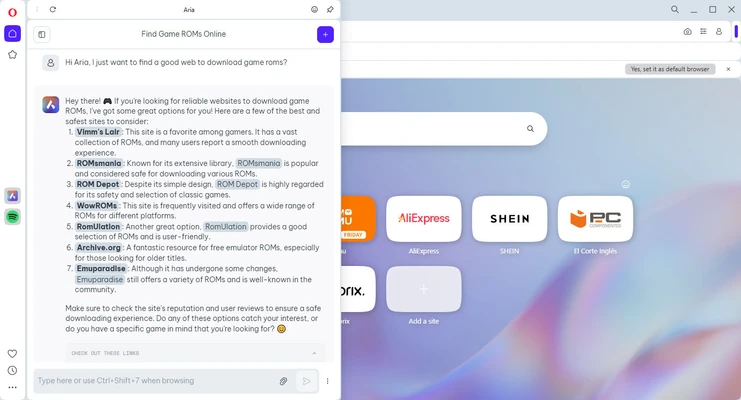
Integrated Aria AI assistant for AI-powered browsing and content tasks.
-
Improved Tab Islands for organizing related tabs.
-
Enhanced Workspaces for separating different browsing sessions.
-
Improvements to the built-in ad and tracker blocker.
-
Performance and startup optimizations.
-
Improved Flow for sharing content between devices.
-
Additional interface and customization improvements.
-
Battery-saving improvements for compatible laptops.
Features may vary depending on the current Opera version.
Key Features
Tab Islands
Group related tabs together to keep large browsing sessions organized and reduce tab clutter.
Workspaces
Create separate tab environments for different projects, tasks, or activities.
Aria AI
Access Opera's built-in AI assistant from the sidebar for tasks such as answering questions, generating content, and summarizing information.
Built-in Ad Blocker
Block many advertisements directly in the browser without requiring a separate extension.
Tracker Blocking
Reduce tracking by websites and improve browsing privacy with Opera's built-in tracker protection.
Free Browser VPN
Opera includes a browser-level VPN that can help protect browsing traffic within Opera. It is not a replacement for a system-wide VPN.
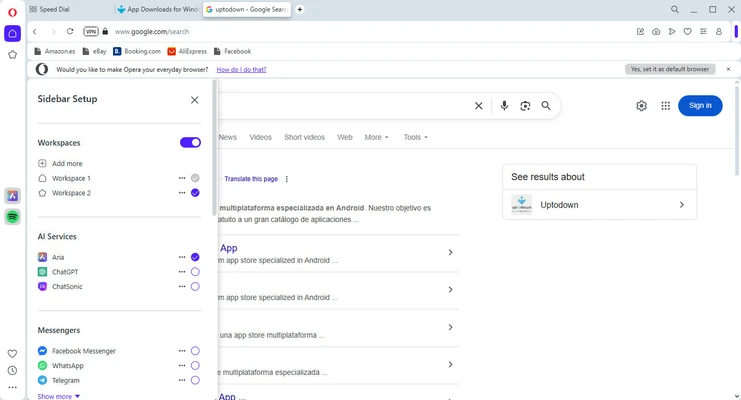
Sidebar
Access supported messaging, media, and productivity services directly from the browser sidebar.
Flow
Send links, notes, files, and other content between compatible Opera installations.
Chrome Extension Support
Install many extensions designed for Chromium-based browsers, including extensions from the Chrome Web Store.
Synchronization
Sign in to Opera to synchronize supported browser data, such as bookmarks and open tabs, across compatible devices.
How to Use
-
Download and install Opera for Windows.
-
Launch the browser and enter a website address or search term in the address bar.
-
Open multiple websites using tabs.
-
Use bookmarks or Speed Dial to save frequently visited websites.
-
Organize tabs with Tab Islands and Workspaces.
-
Open Settings to configure privacy, notifications, appearance, and other preferences.
-
Sign in to Opera if you want to synchronize supported data between devices.
-
Use the sidebar to access Aria and other supported services.
FAQ
Is Opera free?
Yes. Opera is free to download and use. Some optional services or features may have separate requirements.
Is Opera a Chromium browser?
Yes. Opera is based on the Chromium browser engine and supports many Chromium-compatible extensions.
Does Opera support Chrome extensions?
Yes. Opera supports many Chrome extensions, although compatibility can vary between individual extensions.
Does Opera have a built-in VPN?
Yes. Opera provides a browser-level VPN feature. It protects supported traffic within the Opera browser rather than providing VPN protection for the entire computer.
Does Opera block ads?
Yes. Opera includes a built-in ad blocker and tracker-blocking features that can be configured through its settings.
What is Aria in Opera?
Aria is Opera's integrated AI assistant. It can help with tasks such as answering questions, generating text, and summarizing information.
Can Opera synchronize my bookmarks and tabs?
Yes. After signing in, supported browser data such as bookmarks and open tabs can be synchronized across compatible devices.
Is Opera available for Windows 64-bit?
Yes. Current desktop versions of Opera support 64-bit Windows systems. Check the current system requirements for the version you are downloading.
Alternatives
Opera GX – A gaming-focused version of Opera with additional features for gamers and resource management.
Google Chrome – A widely used Chromium-based browser with extensive extension support and Google service integration.
Mozilla Firefox – A customizable browser with a strong focus on privacy and open web standards.
Microsoft Edge – A Chromium-based browser with strong Windows and Microsoft service integration.
Brave – A privacy-focused browser with built-in ad and tracker blocking.
System Requirements
-
Operating System: Windows 10 or later, 64-bit
-
Processor: 1 GHz or faster
-
RAM: 512 MB or higher
-
Storage: Sufficient free disk space for installation
-
Internet Connection: Required for web browsing, updates, and online services
Actual requirements may vary by version.
PROS
-
Feature-rich Chromium-based browser.
-
Built-in ad and tracker blocking.
-
Integrated browser VPN.
-
Useful Tab Islands and Workspaces.
-
Built-in Aria AI assistant.
-
Supports many Chrome extensions.
-
Cross-device synchronization and Flow.
-
Extensive customization options.
CONS
-
May feel feature-heavy compared with simpler browsers.
-
Some integrated services may not be useful to every user.
-
The built-in VPN only covers browser traffic.
-
Can use significant system resources with many tabs and extensions open.
Conclusion
Opera for Windows is a feature-rich web browser that combines Chromium compatibility with built-in privacy, productivity, and tab-management tools. Features such as Tab Islands, Workspaces, Aria AI, ad blocking, browser VPN, and Flow make it particularly useful for users who frequently work with multiple tabs and online services.
If you prefer a browser with more built-in features and customization options rather than a minimal browsing experience, Opera is a solid choice for Windows users.