


Speedify is a powerful VPN and internet bonding application designed to improve connection speed, stability, and security by combining multiple internet connections into a single optimized connection.
Unlike traditional VPN services that only encrypt traffic, Speedify for Windows uses advanced channel bonding technology to combine Wi-Fi, Ethernet, mobile hotspots, 3G/4G/5G connections, and other available networks at the same time.
By intelligently distributing network traffic across multiple connections, Speedify can provide faster downloads, smoother streaming, more reliable video calls, and automatic protection against connection failures.
The software is suitable for users who need stable internet performance for streaming, gaming, remote work, video conferencing, and large file transfers.
Key Features
Internet Connection Bonding
Speedify combines multiple internet sources into one faster and more reliable connection.
Supported connections include:
- Wi-Fi networks
- Ethernet
- Cable and DSL
- Mobile networks
- Smartphone tethering
Automatic Failover Protection
If one network connection fails, Speedify automatically switches traffic to another available connection without interrupting your online activities.
Faster File Transfers
The application improves upload and download performance by distributing data across multiple connections.
Secure VPN Encryption
Speedify encrypts your internet traffic to help protect personal information from hackers, network monitoring, and unsafe public Wi-Fi environments.
Streaming Optimization
Speedify automatically prioritizes streaming traffic to reduce buffering and improve video quality.
Video Conference Support
The software helps maintain stable connections for platforms such as Zoom, Skype, Microsoft Teams, and other communication services.
Global VPN Servers
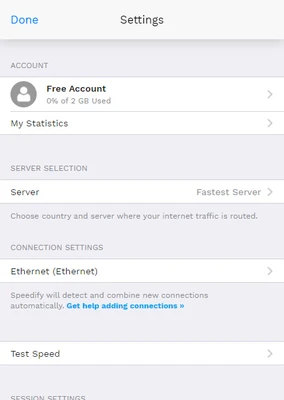
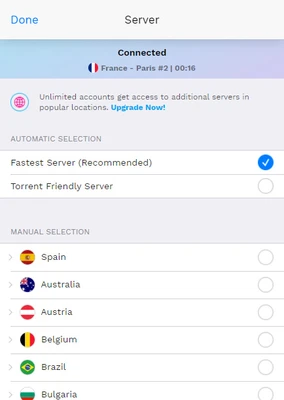
Users can select VPN server locations around the world or allow Speedify to automatically choose the fastest available server.
How Speedify Works
Speedify uses a technology called channel bonding to split internet traffic at the packet level.
Instead of sending all data through a single connection, Speedify intelligently distributes packets across multiple networks and combines them again through its cloud servers.
This allows users to achieve:
- Higher connection speeds
- Reduced latency
- Better reliability
- Protection against temporary network failures
User Interface
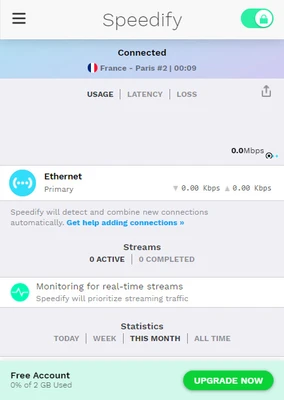
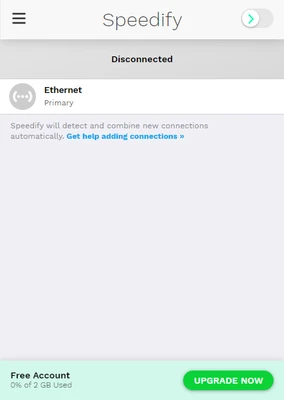
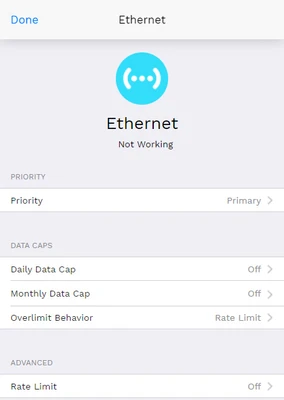
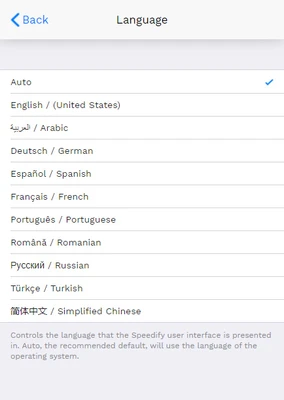
Speedify features a simple and modern interface designed for both beginners and advanced users.
The main dashboard displays:
- Current connection status
- Available internet connections
- Connection speeds
- Data usage
- VPN server location
Users can enable automatic mode or manually configure connection priority settings.
Installation and Setup
- Download the Speedify installer for Windows.
- Run the setup file and complete installation.
- Launch Speedify.
- Sign in or create a Speedify account.
- Select a VPN server location.
- Enable available internet connections.
- Start browsing with an optimized connection.
The software automatically manages traffic distribution after activation.
How to Use
- Open Speedify on your computer.
- Connect multiple available networks.
- Select your preferred server location.
- Choose connection priority settings.
- Click the Connect button.
- Continue using the internet normally.
Speedify works in the background and automatically optimizes network performance.
Full Features
- Internet connection bonding
- VPN encryption
- Automatic connection switching
- Packet-level traffic distribution
- Failover protection
- Redundant connection mode
- Streaming optimization
- Video conferencing improvement
- Worldwide VPN servers
- Connection priority controls
- Error correction technology
- Low-latency optimization
- Cross-platform support
FAQ
What is Speedify?
Speedify is a VPN application that combines multiple internet connections to improve speed, reliability, and security.
Does Speedify make internet faster?
Speedify can improve performance by combining multiple connections. The actual speed improvement depends on available networks and server conditions.
Can Speedify combine Wi-Fi and mobile data?
Yes. Speedify can combine Wi-Fi, Ethernet, and mobile data connections simultaneously.
Is Speedify safe?
Yes. Speedify uses encryption technology to protect internet traffic and improve privacy.
Can Speedify be used for gaming?
Yes. Its connection optimization and failover features can help reduce interruptions during online gaming.
Does Speedify work on Windows 11?
Yes. Speedify supports modern Windows versions, including Windows 10 and Windows 11.
Alternatives
NordVPN
A popular VPN service focused on privacy, security, and worldwide server coverage.
ExpressVPN
A premium VPN solution known for fast speeds and simple operation.
Proton VPN
A privacy-focused VPN offering secure browsing and a free plan.
Surfshark VPN
An affordable VPN service with unlimited device connections.
Pricing
Individual Plan - $7.49/month
Includes:
- Unlimited data usage
- Up to 5 devices
- Internet bonding technology
- Optimized streaming
- Video conferencing support
- Worldwide premium servers
- Secure encryption
Families Plan - $11.25/month
Includes:
- Unlimited data usage
- Up to 5 users
- Up to 5 devices per user
- Administration dashboard
- Internet bonding technology
- Premium server access
- Secure encryption
A free version is also available with limited bandwidth.
System Requirements
Minimum Requirements
- Operating System: Windows 7, 8, 10, 11 (64-bit)
- Processor: Intel or AMD 1 GHz or faster
- RAM: 2 GB
- Storage: 100 MB free space
- Internet Connection: Required
Recommended Requirements
- Operating System: Windows 10 or Windows 11
- Processor: Intel Core i3 or better
- RAM: 4 GB or more
- Storage: 200 MB free space
- High-speed internet connection
PROS
- Combines multiple internet connections
- Improves connection stability
- Secure VPN encryption
- Excellent for streaming and video calls
- Automatic failover protection
- Easy-to-use interface
CONS
- Free plan has limited bandwidth
- Fewer advanced VPN features than some competitors
- Requires multiple connections for maximum benefit
- Premium plans can be expensive
- May increase battery usage on laptops
Conclusion
Speedify is an innovative VPN solution that focuses on improving internet performance through connection bonding technology.
By combining multiple networks into one optimized connection, it provides better speed, reliability, and protection compared with traditional VPN services.
For users who frequently stream videos, join online meetings, upload large files, or rely on unstable networks, Speedify offers a unique and practical way to maintain a faster and more reliable internet connection.
Note: Free version includes 1GB bandwidth per month.