

Universal Media Server (UMS) is a free and open-source media server software that allows users to stream videos, music, and images from a Windows PC to various devices, including smart TVs, smartphones, gaming consoles, and other network-connected devices.
Based on UPnP and DLNA technology, Universal Media Server for Windows provides an easy way to create a personal media library and access content throughout your home network. It supports real-time transcoding, allowing devices with different format requirements to play multimedia files smoothly.
UMS is available for Windows, Linux, and macOS, making it a flexible solution for users who want a private alternative to commercial media server platforms.
Key Features
Wide Device Compatibility
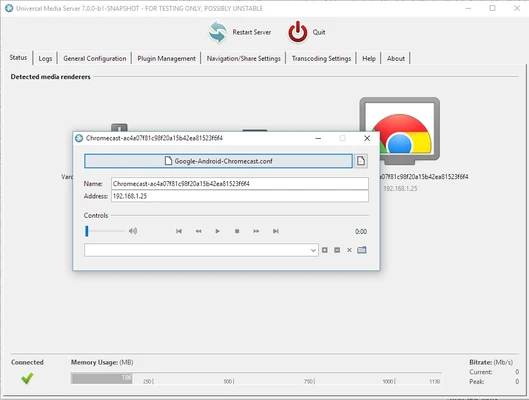
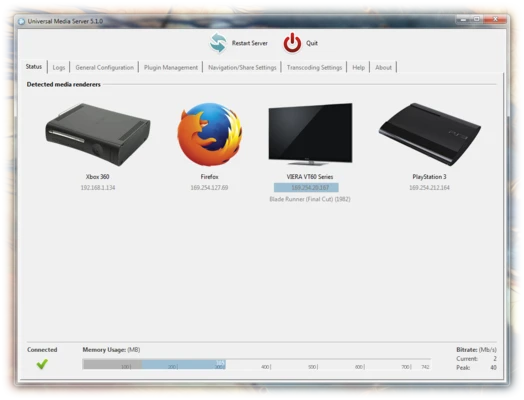
Universal Media Server works with a large range of UPnP and DLNA-compatible devices, including televisions, consoles, mobile devices, and media players.
Real-Time Transcoding
The software can automatically convert unsupported video and audio formats during playback, improving compatibility across different devices.
Metadata Management
UMS retrieves detailed media information from online databases such as IMDb and MusicBrainz, helping organize movies, TV shows, and music collections.
Subtitle Support
The server can automatically download subtitles during playback, making international movies and shows easier to enjoy.
Online Media Support
Users can add online content sources such as internet radio stations, podcasts, and RSS feeds.
Privacy Protection
Universal Media Server does not collect personal viewing data or track user activity, keeping your media library private.
User Interface
Universal Media Server provides a simple web-based interface that can be accessed from any modern browser.
The interface automatically organizes available media files into categories such as videos, music, and pictures. Users can browse content directly through the browser or send files to compatible playback devices.
While the interface is not as visually advanced as some commercial media servers, it focuses on simplicity, performance, and reliability.
Installation and Setup
- Download the Universal Media Server installer for Windows.
- Run the installation package and follow the setup instructions.
- Launch Universal Media Server.
- Add folders containing your media files.
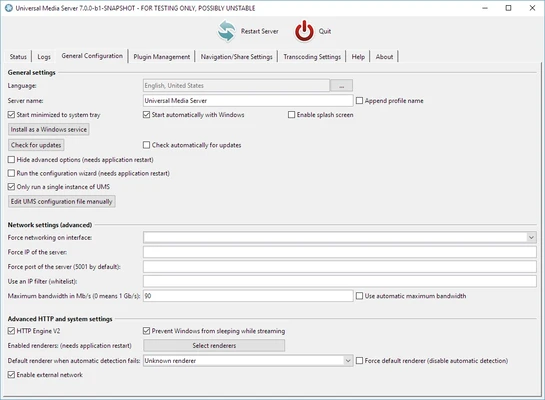
- Configure network and transcoding options if required.
- Open the web interface or connect a DLNA-compatible device.
After setup, your media library will become available across supported devices on the same network.
How to Use
- Open Universal Media Server on your computer.
- Add video, music, or image folders in the shared folders settings.
- Wait for the server to scan and index your files.
- Open a compatible device or web browser.
- Select your media library and start playback.
The server automatically handles format conversion when necessary.
Supported Features
- UPnP and DLNA media streaming
- Video, audio, and image sharing
- Real-time transcoding
- Automatic subtitle downloading
- Metadata retrieval
- Web-based media browsing
- Multiple device support
- Local network streaming
- Privacy-focused operation
- Cross-platform support
Supported Formats
Universal Media Server supports many popular multimedia formats, including:
- MP4
- MKV
- AVI
- MPEG
- MP3
- FLAC
- WAV
- OGG
- JPEG
- PNG
Additional formats may be supported through transcoding engines installed on the system.
FAQ
Is Universal Media Server free?
Yes. Universal Media Server is completely free and open-source software.
Can UMS stream to a smart TV?
Yes. It supports most DLNA-compatible smart TVs and media devices.
Does Universal Media Server work over the internet?
UMS is mainly designed for local network streaming. Remote access requires additional network configuration and security considerations.
Does UMS support 4K video?
Yes. However, smooth 4K playback depends on your computer hardware, network speed, and whether transcoding is required.
Does Universal Media Server have a mobile app?
No official mobile app is available, but users can access the web interface or use third-party DLNA applications.
Alternatives
Plex Media Server
A popular media server platform with advanced organization tools, remote streaming, and premium features.
Emby Server
A flexible media server solution with strong customization options and live TV support.
Jellyfin
A free and open-source media server focused on privacy and user control.
System Requirements
- Operating System: Windows 7, Windows 8, Windows 10, Windows 11
- Processor: Dual-core CPU or better
- RAM: 1 GB minimum
- Storage: Additional space required for media libraries
- Network: Local network connection required for streaming
PROS
- Free and open-source
- Supports many devices and formats
- Real-time transcoding support
- No user tracking
- Easy local network streaming
- Cross-platform availability
CONS
- Interface is less polished than commercial alternatives
- Advanced features are limited
- Initial transcoding configuration may require technical knowledge
Conclusion
Universal Media Server is an excellent choice for users who want a free, private, and reliable way to stream media across their home network.
With broad device compatibility, powerful transcoding capabilities, and support for many multimedia formats, UMS provides a practical alternative to paid media server solutions. Although it lacks some advanced features found in platforms like Plex and Emby, its open-source nature and privacy-focused design make it a strong option for personal media streaming.