


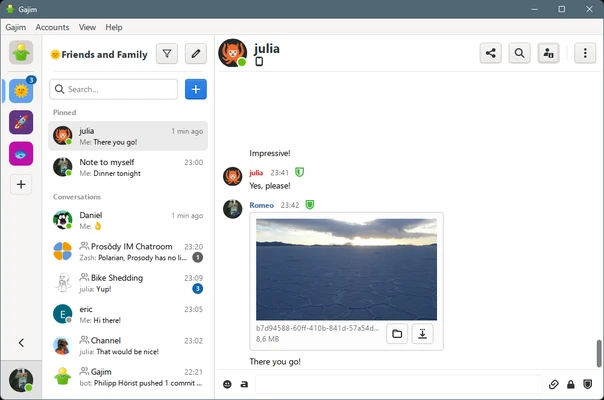
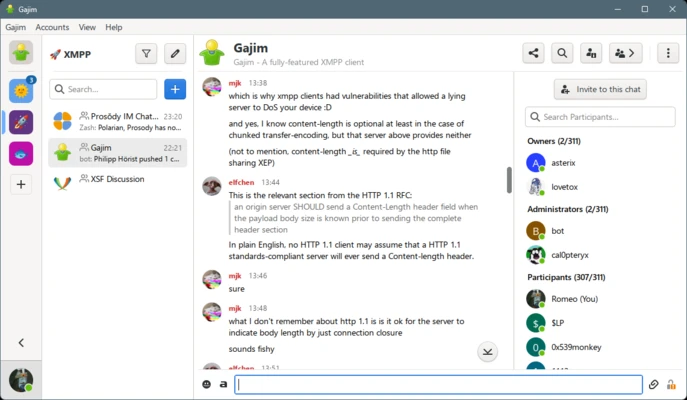
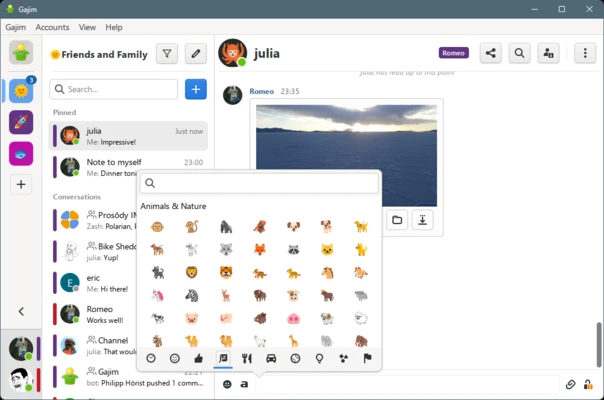
Gajim is an open-source XMPP client built with Python and GTK. It allows users to connect to XMPP servers for instant messaging, file transfers, group chats, contact management, and encrypted communication. Gajim supports features such as OMEMO and OpenPGP encryption, message synchronization, chat history, and a plugin system.
Despite its name, which originally stood for "GNOME Advanced Jabber Instant Messenger," Gajim can be used on Windows and does not require the GNOME desktop environment.
What's New
Recent versions of Gajim focus on improving XMPP compatibility, encryption, file transfers, group chats, plugin support, and overall stability. Updates also include interface improvements, bug fixes, and compatibility enhancements for modern XMPP servers and extensions.
Key Features
Multiple Account Support: Manage multiple XMPP accounts from a single application.
End-to-End Encryption: Supports OMEMO and OpenPGP for encrypted conversations.
File Transfers: Send and receive files through XMPP with support for file previews where available.
Chat History: Store and access previous conversations for easier reference.
Group Chats: Supports XMPP Multi-User Chat (MUC) rooms for group communication.
Plugin System: Extend the application with additional plugins and functionality.
Message Synchronization: Supports message carbons and related XMPP features to keep conversations synchronized across devices.
Contact Management: Organize contacts, monitor presence information, and manage your XMPP roster.
Voice and Video Calls: Provides experimental support for audio and video communication through WebRTC-based functionality.
User Interface
Gajim uses a GTK-based interface with a practical and relatively lightweight design. The main window provides access to accounts, contacts, conversations, and connection status.
Chats can be managed through the main interface, while preferences and plugins are available through the application settings. The interface is designed primarily for functionality and efficient XMPP communication rather than visual effects.
Installation and Setup
Download and install the appropriate Gajim package for Windows and follow the installation wizard.
After installation, launch Gajim and add an existing XMPP account or register a new account with a supported XMPP server. You can configure encryption, notifications, plugins, and other preferences through the settings.
How to Use
-
Launch Gajim and add an existing XMPP account or create a new account.
-
Connect to the XMPP server and wait for your contacts to appear.
-
Add contacts using their XMPP addresses.
-
Double-click a contact to start a conversation.
-
Use the available encryption options to enable OMEMO or OpenPGP when supported.
-
Join or create XMPP group chat rooms through the group chat features.
-
Open the plugin manager to install and configure additional extensions.
FAQ
Does Gajim support Google Chat or Facebook Messenger?
No. Gajim is designed for the XMPP protocol and does not natively support proprietary messaging platforms such as Facebook Messenger or Google Chat.
Does Gajim support encrypted messaging?
Yes. Gajim supports encryption technologies including OMEMO and OpenPGP, depending on the configuration and capabilities of the XMPP server and other participants.
Can I use multiple XMPP accounts with Gajim?
Yes. Multiple XMPP accounts can be added and managed within the same Gajim installation.
Can Gajim synchronize messages between devices?
Yes. Gajim supports XMPP features such as Message Carbons that can synchronize messages between compatible clients and connected devices.
Does Gajim have a mobile version?
Gajim is primarily a desktop XMPP client. Android and iOS users can use other XMPP-compatible applications to access the same accounts.
Does Gajim support plugins?
Yes. Gajim includes a plugin system that allows users to add optional features and customize the application's functionality.
Alternatives
Pidgin: A lightweight multi-protocol instant messaging client that includes support for XMPP and other messaging protocols.
Pricing
Gajim is free and open-source software. There is no subscription or paid license required to use the desktop application.
System Requirements
-
OS: Windows 10 or Windows 11
-
Processor: 1 GHz or faster
-
RAM: 512 MB minimum
-
Disk Space: Approximately 200 MB
-
Internet Connection: Required for connecting to XMPP servers
Pros
-
Free and open-source
-
Strong XMPP protocol support
-
Supports OMEMO and OpenPGP encryption
-
Multiple account management
-
Built-in plugin system
-
Supports group chats and file transfers
-
Lightweight and functional interface
Cons
-
Primarily focused on XMPP
-
Voice and video calling support is limited
-
Interface may feel dated compared with modern messaging applications
-
No official native mobile client
Conclusion
Gajim is a capable XMPP client for Windows users who need a flexible desktop application for decentralized messaging. It combines multiple account support, encrypted communication, group chats, file transfers, synchronization, and plugins in a single application. For users who already rely on XMPP or prefer open communication protocols, Gajim provides a practical alternative to proprietary messaging clients.