
Go to Windows platform Display platforms icon
Go to Windows platform Go to Mac platform Go to Android platform
TightVNC 2.8.88 (64-bit) icon

TightVNC 2.8.88 (64-bit)

2.8.88
TightVNC Team
5.0
2.43 MB size

Lightweight, Fast and Reliable Remote Control Software

TightVNC is a free and open-source remote desktop software that allows users to control another computer over a network.

It is commonly used for remote administration, technical support, and screen sharing, making it a lightweight solution for managing systems from a distance.

TightVNC works by installing a server on the remote machine and a viewer on the local device. Once connected, users can fully control the remote desktop as if they were sitting in front of it.

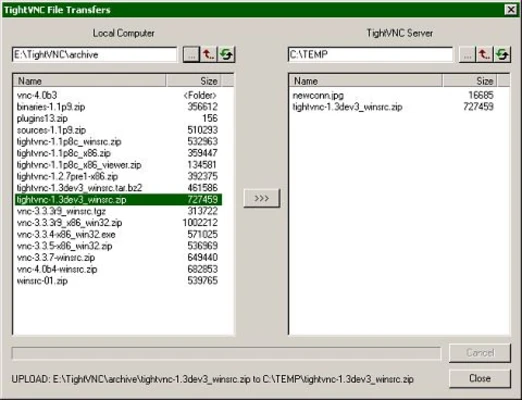
The software is optimized for low-bandwidth connections, making it suitable for slower or unstable networks. It also supports file transfer between local and remote machines for basic data exchange.


Key Features

  • Cross-platform support (Windows, Linux, Java viewer)
  • Low-bandwidth optimized remote control
  • Built-in file transfer
  • Password-based authentication
  • Multiple simultaneous connections
  • Lightweight and minimal resource usage

How It Works

  • Install TightVNC Server on the remote PC
  • Install TightVNC Viewer on the local PC
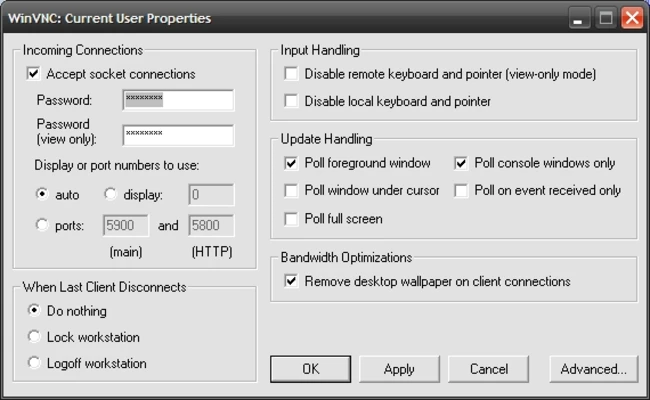
  • Set a password for access
  • Connect using the remote machine’s IP address
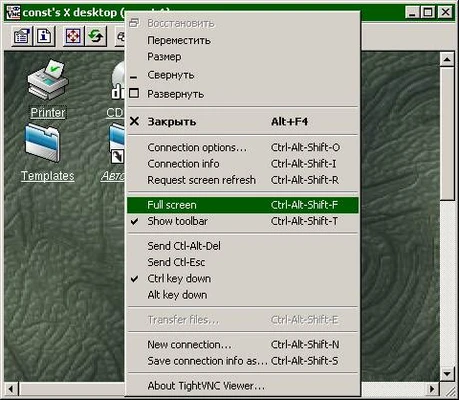
  • Control the desktop remotely

Security

TightVNC uses basic password authentication by default. For sensitive environments, additional encryption or secure tunneling (such as VPN) is often recommended.


System Requirements

  • Windows 7 / 8 / 10 / 11 (32-bit and 64-bit)
  • Minimal CPU and memory usage
  • Network connection required for remote access

Pros

  • Free and open-source
  • Very lightweight and fast
  • Works well on low-speed networks
  • Supports file transfer

Cons

  • Limited built-in security features
  • No native macOS server version
  • Requires manual network configuration for internet access

Best for

Users who need a simple, lightweight remote desktop tool for local network administration, basic remote support, and system access.

Information about TightVNC 2.8.88 (64-bit)

License Open Source
Op. System Windows
Category Development
Language English
Author TightVNC Team
permission icon Permissions Not applicable
Date 2026-06-20
Size 2.43 MB
File type Official Website

Apps recommended for you

RunJS icon
RunJS for Windows is a JavaScript playground that allows users to quickly run and test JavaScript code in a fast, interactive environment.
VSCodium icon
Powerful IDE that protects your privacy
Flutter icon
Google Flutter – UI toolkit for building beautiful, natively compiled, cross-platform applications.
InnoExtractor icon
Complete GUI for Inno Setup.
RenPy icon
An engine to create interactive visual novels
dotConnect for MySQL Professional 10.1.123 icon
Development framework with a number of innovative technologies
Code::Blocks icon
An open-source IDE for C, C++ and Fortran
SciTE (SCIntilla) icon
SciTE is a lightweight and fast text editor based on the Scintilla engine, designed for programmers with syntax highlighting and scripting support.
EMCO MSI Package Builder 12.2.0 icon
Create MSI Packages and Convert EXE to MSI With No Hassle!
pgAdmin 4 9.16 icon
A web based administration tool for the PostgreSQL database!
Gradle 9.6.0 icon
It helps teams build, automate and deliver better software!
Secure Eraser 7.103 icon
Secure data deletion, shredders your files & folders
JProfiler 16.1.1 icon
The award-winning all-in-one Java profiler for Windows PC
Node.js 26.3.1 icon
Is a JavaScript runtime built on Chrome`s V8 JavaScript engine
Godot Engine 4.7 (64-bit) icon
Free and open source 2D and 3D game engine for Windows PC
dotConnect for MySQL Professional 10.1.123 icon
Development framework with a number of innovative technologies
Gradle icon
Gradle for Windows is a powerful build automation tool that helps developers compile, test, and deploy projects efficiently.
Hex Editor icon
Hex Editor is a specialized tool that allows users to view, edit, and analyze binary files in hexadecimal format for low-level data inspection and modification.
Inno Setup icon
Inno Setup for Windows is a free installer creation tool that helps developers package and deploy Windows applications easily.
Windsurf icon
Powerful AI-driven IDE
Typora icon
Write and edit Markdown documents seamlessly with Typora for Windows, the minimalistic and user-friendly Markdown editor for focused writing.
EMCO MSI Package Builder 12.2.0 icon
Create MSI Packages and Convert EXE to MSI With No Hassle!
SoftEther VPN Gate Client Plugin icon
SoftEther VPN Gate Client Plugin for Windows is a VPN client that allows users to connect to VPN Gate servers for secure and anonymous internet browsing.
Electron icon
Electron is an open-source framework for building cross-platform desktop applications using web technologies like HTML, CSS, and JavaScript.