


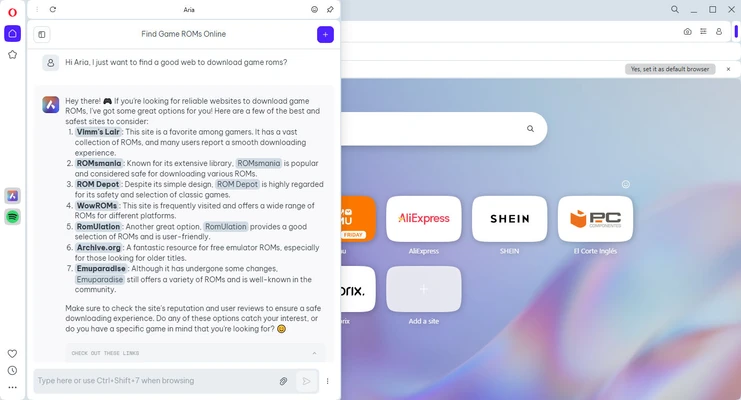
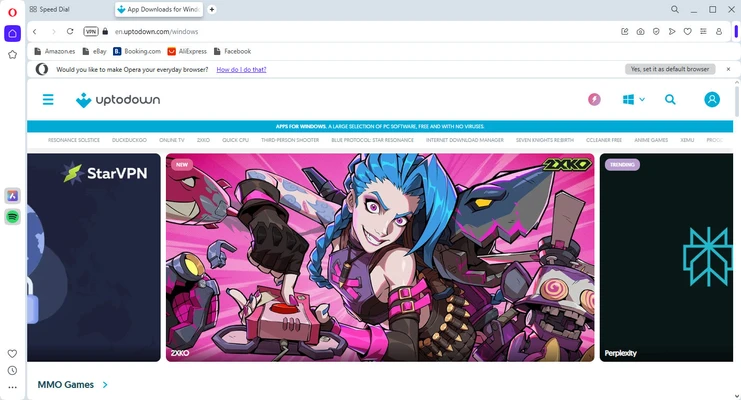
Opera is a fast, feature-rich web browser for Windows that combines performance, privacy, and productivity in a modern interface. Built on the Chromium engine, it offers excellent website compatibility while adding exclusive features such as a built-in VPN, ad blocker, Workspaces, AI assistant, sidebar integrations, and battery-saving tools.
The latest Opera One redesign introduces a refreshed interface, smarter tab management, and Aria, Opera's built-in AI assistant, making it one of the most innovative Chromium-based browsers available.
What's New (2026)
- Built-in Aria AI Assistant for chatting, writing, summarizing, and web assistance.
- Faster and more reliable free VPN.
- Smarter Tab Islands for automatic tab grouping.
- Improved Workspaces for project organization.
- Enhanced Battery Saver mode.
- More powerful built-in ad blocker and tracker blocker.
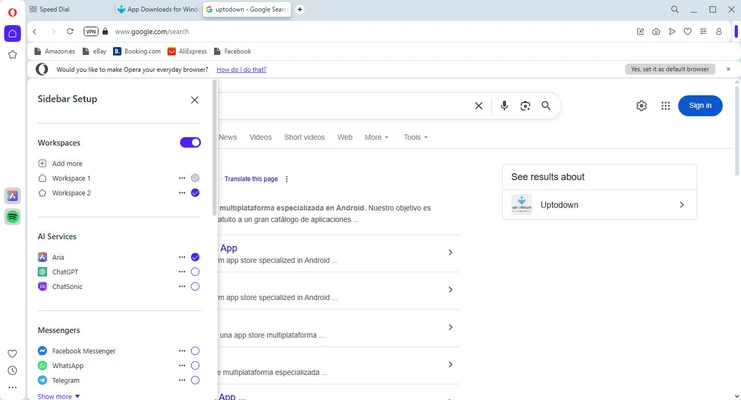
- Updated sidebar with messaging and social media integrations.
- Faster Flow file sharing between desktop and mobile.
- Performance optimizations for quicker startup and smoother browsing.
- Refined user interface with improved customization options.
Key Features
Fast Chromium-Based Browser
- Fast page loading and excellent website compatibility.
- Optimized performance with low resource usage.
- Smooth browsing even with dozens of open tabs.
Built-in Privacy Protection
- Free integrated VPN.
- Native ad blocker.
- Tracker blocker.
- Protection against phishing, malicious websites, and online fraud.
Aria AI Assistant
- AI-powered chat directly inside the browser.
- Generate content, summarize webpages, answer questions, and assist with daily browsing tasks.
Smart Tab Management
- Automatic Tab Islands organize related tabs.
- Workspaces separate browsing sessions for work, school, or personal projects.
- Recently closed tabs and tab cycling improve multitasking.
Sidebar Integrations
Quick access to:
- Telegram
- Facebook Messenger
- Discord
- X (Twitter)
- Spotify
- Apple Music
- Aria AI
without leaving your current webpage.
Built-in Productivity Tools
- Flow for syncing files, notes, and links between devices.
- Pinboards for collecting web content.
- Screenshot capture.
- Video Pop-out mode.
- Battery Saver.
Opera Crypto Wallet
- Built-in cryptocurrency wallet.
- Supports Bitcoin, Ethereum, Solana, and multiple other blockchains.
- Store NFTs.
- Connect directly to Web3 applications without extensions.
Extensive Customization
- More than 1,000 extensions.
- Support for many Chrome extensions.
- Themes and wallpapers.
- Custom keyboard shortcuts and mouse gestures.
How to Use
- Install Opera and launch the browser.
- Import bookmarks and settings from your previous browser.
- Sign in with your Opera account to sync data across devices.
- Enable the built-in VPN or ad blocker from Settings.
- Organize projects using Workspaces and Tab Islands.
- Use the sidebar to access messaging apps, music services, and Aria AI.
- Install extensions to customize your browsing experience.
FAQ
Is Opera based on Chromium?
Yes. Opera uses the Chromium engine, providing excellent compatibility with modern websites.
Does Opera include a free VPN?
Yes. Opera includes a built-in VPN that can be enabled from the Privacy settings. While useful for privacy, it is not intended to replace a full-featured commercial VPN.
Can Opera install Chrome extensions?
Yes. Opera supports its own extensions and also allows installation of many Chrome extensions.
What is Opera One?
Opera One is the newest generation of Opera featuring a redesigned interface, Tab Islands, improved Workspaces, and the integrated Aria AI assistant.
Does Opera sync across devices?
Yes. Signing into an Opera account syncs bookmarks, passwords, history, tabs, and settings across desktop and mobile devices.
Alternatives
- Opera GX — Gaming-focused version with CPU, RAM, and network limiters.
- Google Chrome — Excellent compatibility and extension ecosystem.
- Mozilla Firefox — Strong privacy and open-source browser.
- Microsoft Edge — Fast Chromium browser with Microsoft integration.
- Brave — Privacy-focused browser with aggressive ad and tracker blocking.
- Vivaldi — Highly customizable browser for advanced users.
System Requirements
- Operating System: Windows 11, 10, 8, or 7 (64-bit)
- Processor: 1 GHz or faster
- Memory: 512 MB RAM minimum
- Graphics: DirectX 9.0c compatible
- Storage: Approximately 400 MB available disk space
- Internet: Required for synchronization, updates, VPN, and AI features
Pros
- Fast Chromium-based performance
- Built-in VPN, ad blocker, and tracker blocker
- Integrated Aria AI assistant
- Smart tab organization with Tab Islands
- Excellent Workspaces for multitasking
- Sidebar with messaging and music apps
- Supports Chrome extensions
- Battery Saver for laptops
- Modern, attractive interface
Cons
- Built-in VPN has fewer features than dedicated VPN services
- Some sidebar features may be unnecessary for minimalists
- Slightly smaller extension ecosystem than Google Chrome
- Crypto Wallet features may not be useful for all users
Conclusion
Opera is one of the most feature-complete web browsers available for Windows. It combines Chromium's speed and compatibility with exclusive tools like the built-in VPN, ad blocker, Workspaces, Tab Islands, Flow, and the integrated Aria AI assistant, delivering a browsing experience focused on productivity, privacy, and convenience.
While users seeking a minimal browser may prefer Chrome or Edge, Opera offers far more built-in functionality without relying heavily on extensions. For users who want an all-in-one browser with modern AI features, privacy protection, and advanced tab management, Opera is an outstanding choice.