SoftEther VPN Gate Client Plugin is a free and open-source plugin for the SoftEther VPN Client that allows users to connect to public VPN relay servers provided through the VPN Gate project.
Developed as part of a research project at the University of Tsukuba, VPN Gate provides access to volunteer-operated VPN servers in different countries and regions. The plugin integrates the VPN Gate server list directly into SoftEther VPN Client, allowing users to browse available servers and establish VPN connections without creating a VPN Gate account.
VPN Gate can be useful for improving privacy on public networks, changing the apparent IP address, and accessing websites or online services that may be unavailable from a particular location. However, because the public relay servers are operated by volunteers, connection speed, availability, and trustworthiness can vary considerably.
What's New
Recent development of SoftEther VPN and VPN Gate focuses on compatibility, connection stability, security improvements, protocol support, and performance.
The VPN Gate server list is continuously changing because public relay servers can be added, removed, or become temporarily unavailable. Available servers, connection speeds, latency, and uptime therefore vary over time.
Key Features
Free Public VPN Servers: Connect to volunteer-operated VPN Gate relay servers without paying for a VPN subscription.
No Registration Required: VPN Gate can be used without creating a dedicated VPN Gate account.
Global Server List: Browse available public relay servers in different countries and regions.
Server Information: The client displays information such as server location, connection speed, ping, and uptime to help users select a suitable relay.
SoftEther VPN Support: Uses SoftEther's SSL-VPN protocol to establish VPN connections over HTTPS-compatible traffic.
Multiple VPN Protocols: The SoftEther VPN platform supports several protocols and technologies, including SoftEther VPN, OpenVPN, L2TP/IPsec, SSTP, L2TPv3, and EtherIP.
Encryption: VPN connections can use strong cryptographic algorithms supported by SoftEther VPN to protect data transmitted through the tunnel.
Firewall and NAT Traversal: SoftEther VPN includes technologies designed to establish connections through many NAT devices and restrictive network environments.
IPv4 and IPv6: Supports dual-stack network environments.
Cross-Platform SoftEther Support: SoftEther VPN software is available for Windows, Linux, macOS, FreeBSD, and Solaris, although the VPN Gate Client Plugin itself is primarily associated with the Windows SoftEther VPN Client.
Open Source: SoftEther VPN is released as open-source software, allowing its source code to be inspected and modified.
User Interface
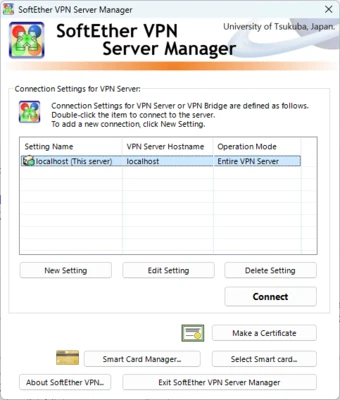
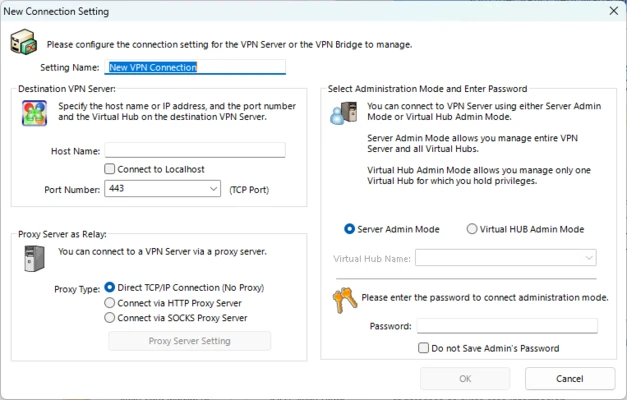
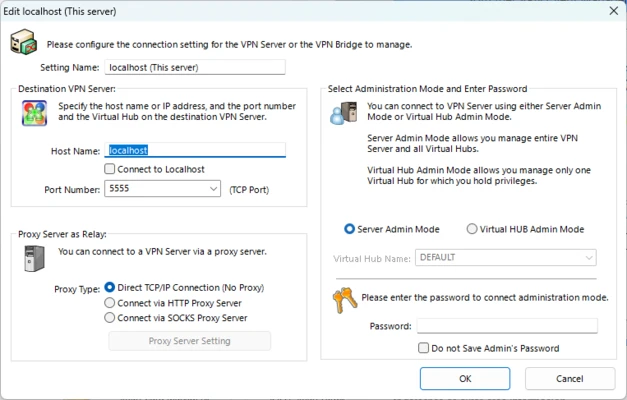
The VPN Gate Client Plugin integrates with the SoftEther VPN Client Manager rather than operating as a completely independent VPN application.
After opening the client manager, users can access the VPN Gate Public VPN Relay Servers section to view currently available servers.
The server list provides useful information such as country, region, latency, number of connected users, uptime, and connection speed. Users can select a server from the list and initiate a connection directly from the client.
Installation and Setup
SoftEther VPN Gate Client Plugin is designed to work with the SoftEther VPN Client.
-
Download and install the SoftEther VPN Client.
-
Install the VPN Gate Client Plugin.
-
Launch SoftEther VPN Client Manager.
-
Open VPN Gate Public VPN Relay Servers.
-
Wait for the current public server list to load.
-
Select a VPN server based on location, latency, and available bandwidth.
-
Double-click the selected server to establish a connection.
-
Accept the connection prompts and wait for the VPN tunnel to become active.
The available servers can change frequently, so a server that works today may become unavailable later.
How to Use
-
Launch SoftEther VPN Client Manager.
-
Double-click VPN Gate Public VPN Relay Servers.
-
Wait for the public relay server list to appear.
-
Sort or review servers by country, speed, ping, or uptime.
-
Select a suitable server.
-
Double-click the server or choose the connection option.
-
Confirm the connection when prompted.
-
Wait until the VPN connection is established.
-
Check your network connection before accessing websites or other online services.
-
Disconnect from the VPN server when you no longer need the connection.
Because VPN Gate servers are operated by independent volunteers, avoid sending highly sensitive information through an unfamiliar public relay server.
FAQ
Is SoftEther VPN Gate Client Plugin free?
Yes. VPN Gate is provided as a free service and the client software is open source. There is no subscription fee for connecting to public VPN Gate relay servers.
Does VPN Gate require registration?
No. Users can connect to available public relay servers without registering a VPN Gate account.
Is VPN Gate the same as SoftEther VPN?
No. SoftEther VPN is the underlying multi-protocol VPN software, while VPN Gate is a public VPN relay service. The VPN Gate Client Plugin adds access to VPN Gate's public relay server network through SoftEther VPN Client.
Can I use VPN Gate on Windows 11?
Yes. SoftEther VPN Client and the VPN Gate Client Plugin can be used on supported modern Windows systems, including Windows 11.
Can I choose a specific country?
Yes. The public relay server list provides location information, allowing users to select an available server in a particular country or region.
Are VPN Gate servers always available?
No. VPN Gate servers are operated by volunteers and can appear or disappear at any time. Server speed and availability can also change.
Is VPN Gate secure?
VPN Gate encrypts traffic between the VPN client and the VPN server using supported VPN protocols. However, public relay servers are operated by independent volunteers, so users should not automatically assume that every server is trustworthy. Avoid transmitting highly sensitive information through an unfamiliar public relay.
Does VPN Gate hide my IP address?
When the VPN connection is active, internet services generally see the public IP address of the VPN server instead of the original public IP address.
Can VPN Gate bypass internet censorship?
It can sometimes provide access to websites or services that are restricted by local networks or geographic filtering. However, results depend on the network, VPN server, destination service, and local regulations.
Does VPN Gate work on mobile devices?
The VPN Gate Client Plugin is primarily designed for use with SoftEther VPN Client on Windows. Other platforms may be able to connect to compatible VPN Gate servers using supported VPN protocols, but they require separate configuration.
Alternatives
NordVPN: A commercial VPN service with a large network of dedicated servers, additional security features, and subscription-based plans.
ExpressVPN: A paid VPN service focused on privacy, security, and access to servers in multiple locations.
Proton VPN: A privacy-focused VPN service that provides both free and paid plans.
Windscribe: A VPN service offering free and paid options with support for multiple platforms.
Pricing
VPN Gate: FREE
VPN Gate public relay servers are available without a subscription or registration fee.
The service is supported by volunteer-operated relay servers, so there is no guarantee of a particular server's bandwidth, uptime, or availability.
System Requirements
-
OS: Windows 7, Windows 8, Windows 10, and Windows 11
-
Processor: 1 GHz or faster
-
RAM: 512 MB or more
-
Disk Space: Approximately 100 MB
-
Internet Connection: Required
Actual requirements may vary depending on the SoftEther VPN Client version and the number of network connections being handled.
Pros
-
Free to use
-
Open-source SoftEther VPN technology
-
No VPN Gate account required
-
Large selection of volunteer-operated servers
-
Servers available in many countries and regions
-
Multiple VPN protocols supported by SoftEther
-
Server information helps users compare available connections
-
Supports VPN connections through many NAT and firewall environments
Cons
-
Public servers can be unstable or slow
-
Server availability changes frequently
-
No guaranteed bandwidth or uptime
-
Public relay operators are not controlled by a commercial VPN provider
-
Not recommended for highly sensitive traffic on untrusted servers
-
Setup is less straightforward than commercial VPN applications
-
VPN Gate Client Plugin is primarily intended for Windows and SoftEther VPN Client
Conclusion
SoftEther VPN Gate Client Plugin provides a simple way to access the public VPN Gate relay network through SoftEther VPN Client. It gives users access to volunteer-operated servers around the world without requiring a subscription or registration.
Its biggest advantage is accessibility: users can select from available servers in different countries and establish VPN connections using SoftEther's flexible VPN technology. However, the volunteer-based nature of VPN Gate also means that server performance, reliability, and trustworthiness can vary.
For casual browsing, testing VPN connections, or accessing networks from different locations, VPN Gate is a useful free option. Users who require predictable performance, dedicated servers, or stronger control over the VPN infrastructure may prefer a reputable commercial VPN service.