Opera for Windows is a feature-rich web browser designed for fast, convenient, and personalized web browsing.
It combines a modern interface with built-in tools such as an ad blocker, tracker blocker, free VPN, tab management, workspaces, and browser synchronization. Opera also supports Chrome extensions, allowing users to customize the browser with additional features.
Key Features
Built-in Ad Blocker: Blocks unwanted advertisements to improve page loading speed and browsing comfort.
Free VPN: Provides a built-in VPN feature for additional privacy when browsing the web.
Tracker Blocker: Helps prevent websites from tracking browsing activity.
Tab Islands: Automatically groups related tabs to keep large browsing sessions organized.
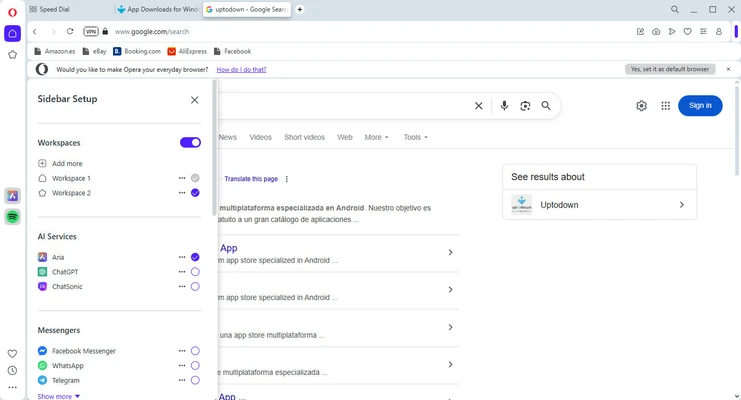
Workspaces: Create separate browsing spaces for different projects, tasks, or activities.
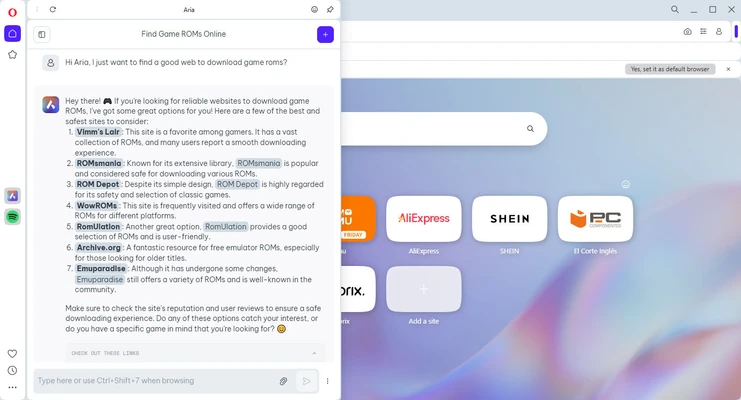
Built-in AI: Opera includes Aria, an integrated AI assistant for tasks such as answering questions, generating content, and summarizing information.
Sidebar: Provides quick access to selected messaging, media, and browser tools without opening additional windows.
Sync: Synchronize bookmarks, tabs, passwords, and other browser data across supported devices.
Chrome Extensions: Supports extensions from the Chrome Web Store in addition to Opera add-ons.
Battery Saver: Helps reduce power consumption when browsing on laptops.
Crypto Wallet: Includes a built-in wallet for supported digital assets and decentralized applications.
Installation and Setup
-
Download the Opera installer for Windows.
-
Run the installer and follow the on-screen instructions.
-
Launch Opera after installation.
-
Choose your preferred browser settings and search engine.
-
Sign in to an Opera account if you want to synchronize browser data.
-
Import bookmarks and other data from another browser if needed.
How to Use
Browse the Web: Enter a website address or search term in the address bar.
Manage Tabs: Open, close, move, and group tabs from the tab bar.
Create Workspaces: Use Workspaces to separate tabs for different activities.
Enable Ad Blocking: Open Settings and enable the built-in ad blocker.
Enable VPN: Open Settings and turn on the VPN feature when available.
Install Extensions: Add Opera add-ons or compatible Chrome extensions to expand browser functionality.
Sync Data: Sign in to your Opera account to access supported browsing data across devices.
FAQ
Is Opera free?
Yes. Opera is available as a free web browser.
Does Opera have a built-in VPN?
Yes. Opera includes a built-in VPN feature. It is intended for browser traffic and is not equivalent to a full-device VPN service.
Can Opera install Chrome extensions?
Yes. Opera supports compatible extensions from the Chrome Web Store as well as its own add-on catalog.
Is Opera available for Windows 11?
Yes. Opera supports modern Windows versions, including Windows 11 and Windows 10.
Does Opera block advertisements?
Yes. Opera includes a built-in ad blocker that can be enabled or disabled through the browser settings.
Can Opera synchronize bookmarks and tabs?
Yes. Signing in with an Opera account allows supported browsing data to be synchronized across compatible devices.
What is Opera One?
Opera One is a redesigned version of the Opera browser that introduced features such as Tab Islands, a modular interface, and deeper integration with Opera's AI assistant.
Alternatives
Opera GX: A gaming-oriented browser with resource controls and gaming-related features.
Google Chrome: A widely used browser with strong website compatibility and a large extension ecosystem.
Mozilla Firefox: An open-source browser with extensive customization and privacy features.
Microsoft Edge: A Chromium-based browser with strong Windows and Microsoft 365 integration.
Brave: A privacy-focused browser with built-in ad and tracker blocking.
System Requirements
-
Operating System: Windows 10 or Windows 11
-
Architecture: 64-bit
-
Processor: 1 GHz or faster
-
RAM: 512 MB or more
-
Graphics: DirectX 9.0c compatible graphics hardware or later
-
Internet Connection: Required for downloading, updates, and online services
PROS
-
Built-in ad and tracker blocking
-
Free VPN feature
-
Supports Chrome extensions
-
Advanced tab and workspace management
-
Built-in AI assistant
-
Cross-device synchronization
-
Customizable interface
CONS
-
Some built-in features may use additional system resources
-
VPN performance can vary depending on network conditions
-
Some advanced features require an Opera account
-
Interface may feel busy for users who prefer a minimal browser
Conclusion
Opera for Windows is a versatile browser that combines standard web browsing with a wide range of built-in productivity, privacy, and customization features.
Its ad blocker, VPN, Tab Islands, Workspaces, AI assistant, synchronization, and extension support make it a practical choice for users who want more functionality without installing numerous separate browser extensions. Users who prefer a simpler browser may find Opera's large feature set less appealing.