Firefox Developer Edition is a specialized version of Mozilla Firefox designed for web developers, designers, and developers who build and test websites and web applications.
It includes the full Firefox browser along with advanced developer tools for inspecting web pages, debugging JavaScript and CSS, monitoring network activity, analyzing performance, and testing responsive layouts.
Firefox Developer Edition also provides access to some experimental and upcoming web platform features, allowing developers to test new technologies before they become widely available in the standard Firefox release.
What’s New
Recent versions of Firefox Developer Edition include updates to Firefox DevTools, CSS inspection, JavaScript debugging, network monitoring, performance analysis, and Responsive Design Mode. Updates also improve compatibility with modern web standards, browser security, and overall stability.
Key Features
-
Firefox DevTools – Built-in tools for inspecting, debugging, and analyzing web pages.
-
Page Inspector – Examine and modify HTML and CSS directly in the browser.
-
JavaScript Debugger – Set breakpoints, inspect variables, and troubleshoot JavaScript code.
-
Web Console – View errors, warnings, logs, and run JavaScript commands.
-
Network Monitor – Analyze network requests, responses, headers, and loading performance.
-
Performance Tools – Identify performance bottlenecks and analyze browser activity.
-
Responsive Design Mode – Test websites at different screen sizes and device resolutions.
-
CSS Grid and Flexbox Tools – Inspect and debug modern CSS layouts.
-
Accessibility Inspector – Examine accessibility-related properties and page structure.
-
WebSocket Debugging – Inspect WebSocket connections and related network activity.
-
Service Worker Tools – Inspect and debug service workers and related web application features.
-
Multi-Account Containers – Maintain separate browsing sessions for testing different accounts.
-
Experimental Web Technologies – Test selected upcoming web platform features.
-
Firefox Extensions – Install compatible Firefox add-ons to extend the browser.
-
Developer Profile – Keep developer-specific settings and extensions separate from a regular Firefox installation.
User Interface
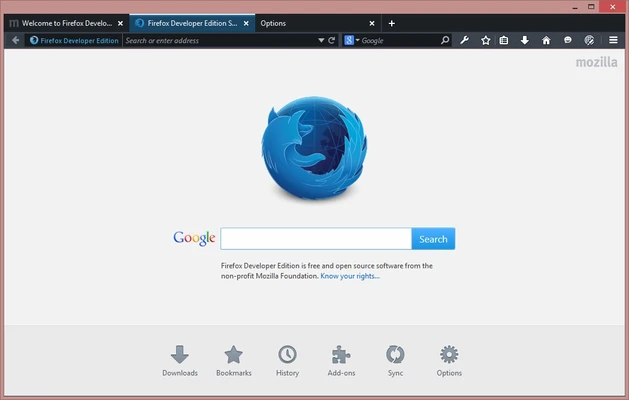
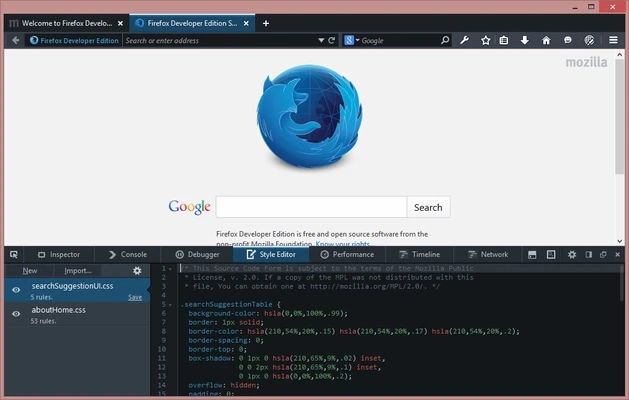
Firefox Developer Edition uses a familiar Firefox interface with developer tools integrated directly into the browser.
Developer Tools can be opened from the browser menu or keyboard shortcuts and provide access to the Inspector, Console, Debugger, Network Monitor, Performance tools, and other utilities.
The interface can be customized to suit different development workflows. Developers can dock DevTools to different sides of the browser window or open them in a separate window.
Installation and Setup
-
Download the latest Firefox Developer Edition installer for Windows.
-
Run the installation file and follow the on-screen instructions.
-
Launch Firefox Developer Edition after installation.
-
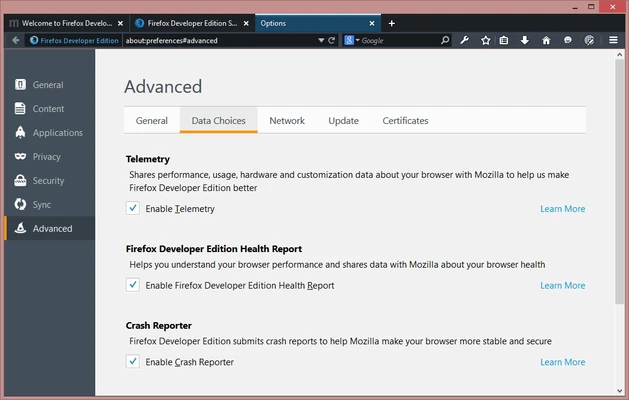
Configure privacy, browser, and developer preferences.
-
Install required extensions and developer tools.
-
Optionally sign in to Firefox Sync to synchronize supported browser data.
Firefox Developer Edition can be installed alongside the standard Firefox browser, allowing developers to use both versions independently.
How to Use
Inspect a Web Page
Open a website and press F12 or Ctrl + Shift + I to open Developer Tools. Use the Inspector to examine HTML elements and CSS styles.
Debug JavaScript
Open the Debugger or Console to identify JavaScript errors, set breakpoints, inspect variables, and execute JavaScript commands.
Analyze Network Activity
Use the Network Monitor to inspect requests, response headers, transferred files, loading times, and other network information.
Test Responsive Layouts
Press Ctrl + Shift + M to open Responsive Design Mode. Select different viewport sizes or enter custom dimensions to test how a website behaves on different devices.
Analyze Performance
Use the Performance tools to record browser activity and identify areas that may affect page responsiveness and loading speed.
Inspect CSS
Use the Inspector and CSS layout tools to examine Grid, Flexbox, and other modern CSS features.
Test Web Applications
Use the available service worker, storage, network, and debugging tools to test modern web applications directly in the browser.
FAQ
What is Firefox Developer Edition?
Firefox Developer Edition is a version of Firefox specifically designed for web development. It includes advanced DevTools and selected features intended for developers.
Is Firefox Developer Edition free?
Yes. Firefox Developer Edition is free to download and use.
Can I install it alongside regular Firefox?
Yes. Firefox Developer Edition is designed to use a separate browser profile, allowing it to coexist with the standard Firefox installation.
Does Firefox Developer Edition support extensions?
Yes. It supports compatible Firefox extensions and add-ons.
Is Firefox Developer Edition suitable for everyday browsing?
Yes. It is a full-featured Firefox browser and can be used for everyday browsing, although its developer-focused features make it particularly useful for development and testing.
Is Firefox Developer Edition a beta version?
No. It is a separate Firefox channel intended for developers. It receives newer features and developer-focused changes before they reach the standard Firefox release.
Can I test responsive websites with Firefox Developer Edition?
Yes. Responsive Design Mode allows developers to test websites at different viewport sizes and simulate various device configurations.
Does it support JavaScript debugging?
Yes. The built-in Debugger provides breakpoints, variable inspection, call stack analysis, and other JavaScript debugging features.
Alternatives
Google Chrome: Includes Chrome DevTools with extensive debugging, performance, and web development tools.
Microsoft Edge: Provides Chromium-based DevTools with strong compatibility with modern web standards.
Opera Developer: A developer-focused version of Opera with browser development and testing tools.
Safari Technology Preview: Designed for developers who need to test upcoming Safari and WebKit technologies on macOS.
Pricing
Firefox Developer Edition is completely free to download and use.
It is developed and distributed by Mozilla as part of the Firefox browser project and does not require a paid subscription or license.
System Requirements
-
Operating System: Windows 10 or Windows 11 (64-bit)
-
Processor: 64-bit Intel or AMD processor
-
Memory: 2 GB RAM minimum; 4 GB or more recommended
-
Storage: At least 500 MB of available disk space
-
Internet Connection: Required for downloading updates and accessing online content
Pros
-
Free to use.
-
Powerful built-in developer tools.
-
Advanced CSS and JavaScript debugging.
-
Responsive Design Mode.
-
Network and performance analysis tools.
-
Supports modern web standards.
-
Can run alongside standard Firefox.
-
Strong privacy and open-source foundation.
Cons
-
Some newer features may change or behave differently from the standard Firefox release.
-
Can consume significant memory when multiple development tools are active.
-
Some websites and development workflows may be more extensively tested against Chromium-based browsers.
-
The large number of developer tools can be overwhelming for beginners.
Conclusion
Firefox Developer Edition is a capable browser for web developers who need advanced tools for building, debugging, and testing websites and web applications.
Its integrated DevTools provide everything from HTML and CSS inspection to JavaScript debugging, network analysis, performance profiling, and responsive design testing. The separate developer-focused environment also makes it convenient to keep development tools and settings independent from a regular Firefox installation.
For developers who value open-source software, privacy, and strong web standards support, Firefox Developer Edition is a solid alternative to Chromium-based development browsers.