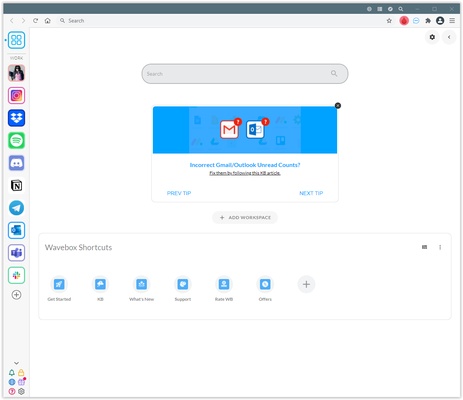
Wavebox is a Chromium-based productivity browser that lets users manage multiple web applications, websites, and accounts from a single interface. It is designed for users who regularly work with services such as email, messaging, project management, and other web-based tools.
The browser supports multiple accounts, customizable workspaces, split-screen layouts, Chrome extensions, and integrated AI tools.
What's New
Recent versions of Wavebox have focused on improvements to workspace management, app integrations, browser performance, notifications, and AI-assisted features.
Key Features
Unified Workspace: Manage web apps, websites, and accounts from one interface.
Multiple Accounts: Stay signed in to multiple accounts of the same service without repeatedly switching browser profiles.
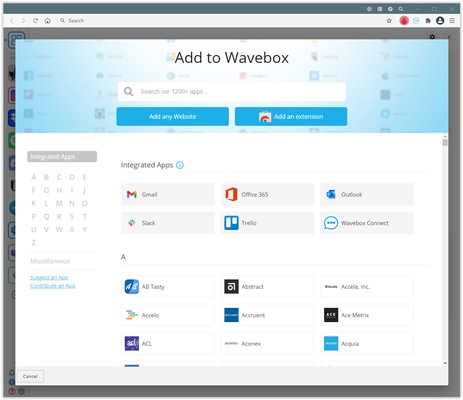
App Integrations: Add popular web applications or custom URLs and organize them into groups.
Split Screen: Display multiple apps or webpages side by side for easier multitasking.
Chrome Extensions: Install compatible extensions from the Chrome Web Store.
AI Assistant: Use Brainbox for AI-assisted tasks and content generation.
Custom Workspaces: Organize applications into groups and customize notifications and shortcuts.
User Interface
Wavebox uses a browser-style interface with a customizable sidebar for organizing apps, groups, and workspaces. Each group can contain its own collection of web applications and tabs, helping reduce clutter when working with multiple services.
The interface is flexible but may take some time for new users to learn because of its large number of workspace and customization options.
Installation and Setup
-
Download and install Wavebox for Windows.
-
Launch the application and sign in if required.
-
Add the web apps and services you use regularly.
-
Organize apps into groups or workspaces.
-
Configure notifications, shortcuts, and extensions as needed.
How to Use
Add Apps: Use the add-app option to select a supported service or enter a custom website address.
Create Groups: Organize related applications into separate groups or workspaces.
Use Split Screen: Open multiple webpages or applications side by side when working on related tasks.
Install Extensions: Add compatible Chrome extensions to extend browser functionality.
Use Brainbox: Access the built-in AI tools when you need assistance with webpage content or other supported tasks.
FAQ
Can Wavebox use Chrome extensions?
Yes. Wavebox supports compatible Chrome extensions that can be installed from the Chrome Web Store.
Can I use multiple accounts of the same service?
Yes. Wavebox isolates account sessions so multiple accounts can remain signed in simultaneously.
Is Wavebox free?
Wavebox offers a free plan with limitations, as well as paid plans with additional features.
Does Wavebox support keyboard shortcuts?
Yes. It provides keyboard shortcuts for common navigation and productivity functions.
Is Wavebox available for Windows?
Yes. Wavebox supports Windows 10 and Windows 11.
Alternatives
Rambox – A desktop application for managing multiple web services and accounts in one interface.
Shift – A productivity workspace focused on email, calendars, and web applications.
Opera – A Chromium-based browser with built-in productivity and customization features.
Pricing
Free: Provides basic workspace functionality with limitations.
Pro: Adds expanded workspaces, apps, extensions, synchronization, and other advanced features.
Teams: Includes additional collaboration and team management features.
Pricing and plan limits may change over time.
System Requirements
-
Operating System: Windows 10 or Windows 11
-
Processor: Intel or AMD processor with SSE2 support
-
Memory: 2 GB RAM minimum
-
Storage: Approximately 200 MB of available disk space
Actual resource usage can increase significantly when many web apps and tabs are active simultaneously.
Pros
-
Combines multiple web apps in one interface
-
Supports multiple accounts
-
Compatible with Chrome extensions
-
Customizable workspaces and groups
-
Split-screen multitasking
-
Built-in AI features
Cons
-
Full functionality requires a paid plan
-
Can use significant memory with many active apps
-
The large number of customization options may take time to learn
Conclusion
Wavebox is a practical productivity browser for users who regularly work with multiple web applications and accounts. Its workspace organization, multi-account support, split-screen tools, and Chrome extension compatibility make it useful for managing a large number of web-based services from one application.
The free plan is suitable for basic use, while the paid versions provide additional workspace and productivity features for heavier users and teams.