KakaoTalk is a free messaging and communication application for Windows developed by Kakao. Originally popular in South Korea, it provides a desktop experience that connects with the KakaoTalk mobile app, allowing users to continue conversations and manage chats from a PC.
The Windows version supports text messaging, group chats, file sharing, multimedia content, and other communication features. Messages and conversations can be synchronized between supported devices, making it convenient for users who regularly switch between mobile and desktop.
What's New
- Improved desktop messaging and synchronization.
- Enhanced group chat and notification features.
- Improved file and multimedia sharing.
- Updated chat interface and usability.
- Better compatibility with recent Windows versions.
- Improved account security and login verification.
- Various performance and stability improvements.
Key Features
Free Messaging: Send text messages and other content to individual contacts and groups over an Internet connection.
Voice Calls: Make Internet-based voice calls with supported KakaoTalk contacts.
Device Synchronization: Connect the Windows application with the mobile version to access supported conversations and account features across devices.
Group Chats: Create and participate in group conversations with friends, family, coworkers, or other contacts.
File Sharing: Send images, videos, documents, and other supported files directly through chat.
Multimedia Support: Share photos, videos, links, and other media within conversations.
KakaoTalk Calendar: Organize schedules and reminders through supported chat and calendar features.
Contact Management: Search and organize contacts and conversations from the desktop application.
Themes and Customization: Customize supported chat appearance and other interface options.
User Interface
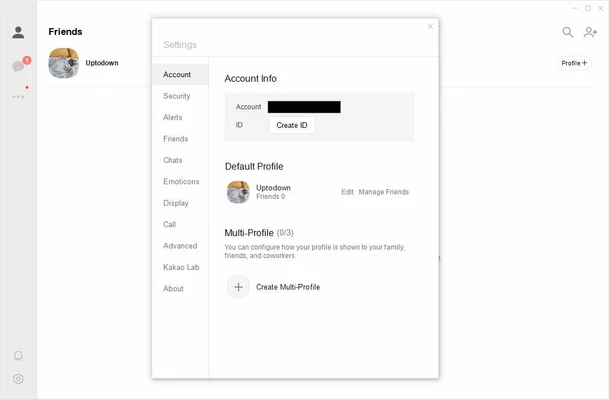
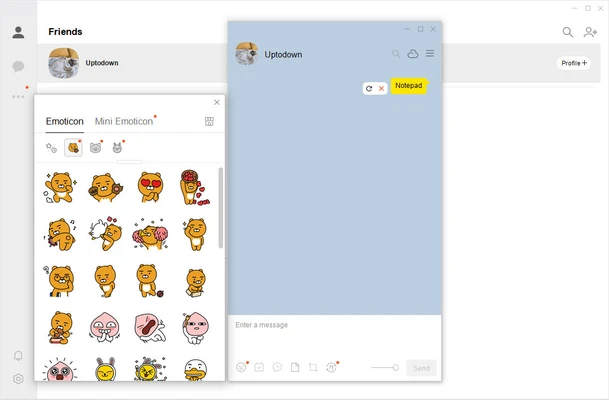
KakaoTalk for Windows uses a clean interface that resembles the mobile version of the application. A sidebar provides access to contacts and conversations, while the main panel displays the selected chat.
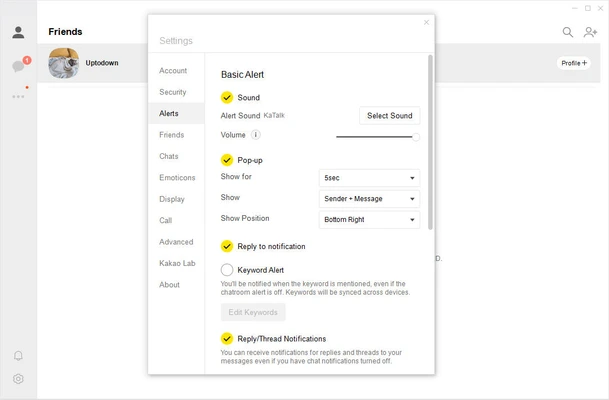
The layout is simple and familiar, with chat bubbles, notifications, file-sharing controls, and other functions positioned for easy access. Keyboard input and desktop notifications also make it convenient for users who spend significant time working on a PC.
Installation and Setup
Download the KakaoTalk installer for Windows and run the setup file. Follow the on-screen instructions to complete the installation.
After installation, launch KakaoTalk and sign in with your Kakao account. Depending on the account and security settings, the desktop login may require verification through the mobile KakaoTalk application.
Once authentication is completed, the desktop application can be used for messaging and other supported communication features.
How to Use
- Download and install KakaoTalk for Windows.
- Launch the application.
- Sign in with your Kakao account.
- Verify the desktop login through the mobile application if required.
- Select a contact or existing conversation.
- Send messages, images, files, or other supported content.
- Create or join group chats when needed.
- Use supported voice calling features directly from the desktop.
- Adjust notifications and other settings according to your preferences.
FAQ
Is KakaoTalk for Windows free?
Yes. KakaoTalk is free to download and use for its core messaging and communication features. Internet or mobile data charges may apply depending on your network provider.
Can I use KakaoTalk on Windows without a phone?
A KakaoTalk account and mobile setup are generally required for initial desktop authentication. The Windows application is designed to work as a companion to the mobile service.
Does KakaoTalk for Windows support voice calls?
Yes. KakaoTalk provides voice calling features between supported users, although available functions can vary depending on the platform and current version.
Are KakaoTalk messages synchronized between mobile and PC?
Yes. The desktop application is designed to synchronize supported conversations and account information with the mobile service.
Can I use KakaoTalk on multiple computers?
Desktop logins can be performed on supported computers, but additional security verification may be required when signing in on a new device.
Can I send files through KakaoTalk?
Yes. KakaoTalk supports sharing various types of files and multimedia content through chats, subject to file size and service limitations.
Is KakaoTalk secure?
KakaoTalk provides account security and encrypted communication features. Users should also enable available security options and keep both the desktop and mobile applications updated.
Alternatives
WhatsApp Desktop – A popular desktop messaging application with support for text messaging, voice and video calls, group chats, and file sharing.
Telegram Desktop – A cross-platform messaging application known for large group support, cloud synchronization, and extensive file-sharing capabilities.
LINE for PC – A desktop companion to LINE with messaging, voice calls, stickers, and other communication features.
Discord – A communication platform focused on communities, group chats, voice communication, and gaming.
Microsoft Teams – A collaboration and communication platform designed for messaging, meetings, file sharing, and workplace communication.
Pricing
KakaoTalk is free to download and use for its core messaging and communication features. Optional content and services may be available separately depending on the platform and region.
System Requirements
- Operating System: Windows 10 and Windows 11
- Processor: Compatible dual-core processor
- Memory: 2 GB RAM or more
- Storage: Approximately 200 MB of available space, with additional space required for cached media
- Internet: Required for messaging, calls, synchronization, and online features
Pros
- Free messaging and communication
- Desktop and mobile synchronization
- Supports group chats
- File and multimedia sharing
- Voice calling support
- Clean and familiar interface
- Useful desktop notifications
- Strong presence in the Korean messaging market
Cons
- Initial desktop setup generally requires a mobile account
- Some features may vary between desktop and mobile versions
- Certain features are more region-specific
- Internet connection required for online communication
- Less widely used than some global messaging platforms outside Asia
Conclusion
KakaoTalk is a convenient desktop messaging solution for users who already use the KakaoTalk mobile service. Its Windows application brings messaging, group conversations, file sharing, voice calls, and other communication features to the desktop while maintaining synchronization with the mobile ecosystem.
Although the platform is particularly popular in South Korea and some features may vary by region, its straightforward interface and broad communication features make KakaoTalk a practical choice for users who want to stay connected across mobile and Windows devices.