


Surfshark VPN is a reliable VPN and online security application that helps users protect their internet connection, hide their IP address, and access online content securely.
With a simple interface and strong privacy features, Surfshark for Windows allows users to encrypt internet traffic, connect to servers worldwide, and browse the web with enhanced security.
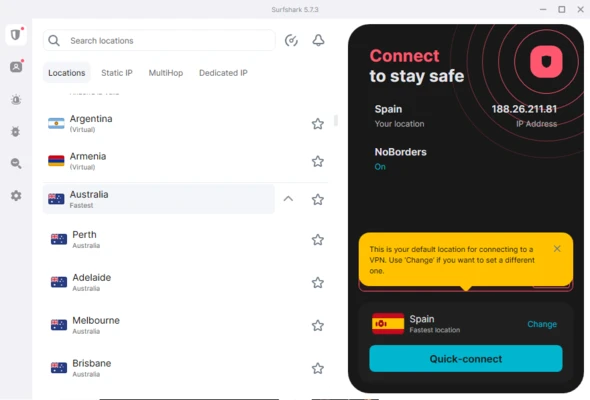
Surfshark operates a global network of 3200+ servers in 100 countries, providing fast and stable connections for browsing, streaming, gaming, and remote work.
Features
Secure VPN Connection
Encrypts your internet traffic and protects your online activity from unwanted monitoring.
Global Server Network
Connect to thousands of VPN servers across 100 countries for better speed and accessibility.
Unlimited Device Connections
Use a single account to connect unlimited devices, including Windows PCs, smartphones, tablets, and browsers.
No-Logs Policy
Surfshark follows a strict no-logs policy to protect user privacy.
Kill Switch
Automatically disconnects your internet connection if the VPN connection drops.
CleanWeb
Blocks ads, trackers, and malicious websites for a safer browsing experience.
Split Tunneling (Whitelister)
Allows selected apps or websites to bypass the VPN connection.
MultiHop VPN
Routes your connection through multiple VPN servers for additional privacy.
Browser Extensions
Available for Chrome, Firefox, and Edge browsers.
Cross-Platform Support
Supports Windows, macOS, Linux, Android, iOS, and browser platforms.
User Interface
Surfshark features a clean and beginner-friendly interface.
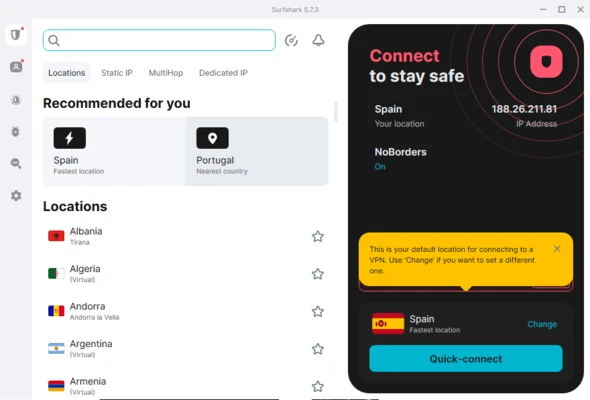
The main dashboard displays connection status, available servers, and quick access to security features such as CleanWeb, Kill Switch, and MultiHop.
Users can connect to a VPN server with a single click or allow Surfshark to automatically select the fastest available server.
Installation and Setup
- Download Surfshark VPN for Windows.
- Run the installer and complete the setup process.
- Sign in with your Surfshark account.
- Select a VPN server location.
- Click Connect to secure your internet connection.
How to Use
- Launch Surfshark VPN.
- Choose a server location or use the automatic connection option.
- Enable additional features such as CleanWeb or Kill Switch if needed.
- Browse the internet securely with encrypted traffic.
FAQ
Is Surfshark VPN free?
No. Surfshark is a premium VPN service, but it offers a 30-day money-back guarantee.
How many devices can I connect?
Surfshark supports unlimited simultaneous device connections.
Does Surfshark keep logs?
No. Surfshark follows a strict no-logs policy.
Can Surfshark unblock streaming services?
Yes. It can help access geo-restricted streaming content.
Does Surfshark work on Windows 11?
Yes. It supports Windows 11, Windows 10, and older Windows versions.
Alternatives
NordVPN – A popular VPN service with strong security features and a large server network.
ExpressVPN – Known for fast connections and privacy protection.
CyberGhost VPN – Offers an easy-to-use interface with dedicated streaming servers.
Private Internet Access (PIA) – Provides advanced VPN customization options.
Pricing
Surfshark Starter
$2.39/month
Includes:
- Secure VPN
- Ad blocker
- Cookie pop-up blocker
Surfshark One
$3.06/month
Includes:
- Secure VPN
- Ad blocker
- Cookie pop-up blocker
- Antivirus protection
- Webcam protection
- Malware protection
- Email breach alerts
- Personal data security tools
A 30-day money-back guarantee is available.
System Requirements
- Operating System: Windows 11, Windows 10, Windows 8.1, Windows 7
- Processor: Intel or AMD processor
- RAM: 2 GB or more
- Storage: 200 MB free space
- Internet: Required
PROS
- Strong privacy and security features
- Unlimited device connections
- Large global server network
- Easy-to-use interface
- Supports multiple platforms
- Includes ad and tracker blocking
CONS
- Requires a paid subscription
- Server performance may vary depending on location
Conclusion
Surfshark VPN is a powerful and easy-to-use VPN solution for Windows users who want better online privacy, security, and access to global content.
With unlimited device connections, strong encryption, and useful security tools, Surfshark is suitable for everyday browsing, streaming, remote work, and protecting personal data online.