



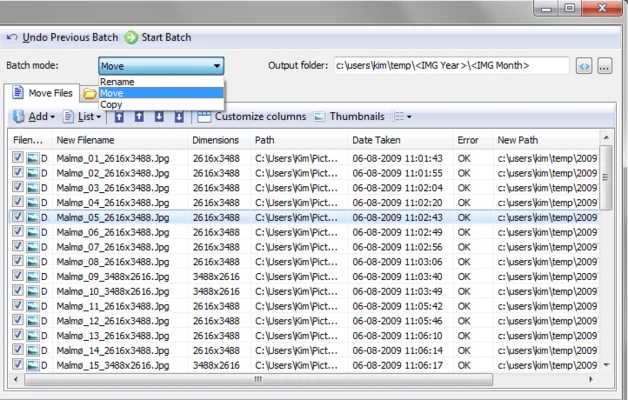
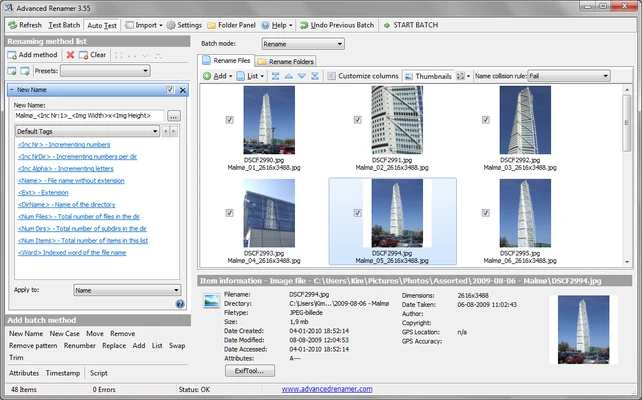
Advanced Renamer is a free batch file renaming tool for Windows that allows users to rename multiple files and folders quickly and efficiently.
With support for customizable renaming methods, metadata tags, and preview functions, Advanced Renamer helps users organize large collections of photos, music, videos, and documents with just a few clicks.
It is suitable for photographers, media collectors, developers, and anyone who needs to manage large numbers of files.
Key Features
- Batch rename thousands of files and folders
- Multiple renaming methods
- Preview changes before applying
- Undo completed rename operations
- Replace, remove, add, and modify file names
- Change file attributes and timestamps
- Rename files using metadata information
- Support for images, music, and video files
- Import information from online databases
- Move or copy files during renaming
Main Features Explained
Batch File Renaming
Advanced Renamer allows users to process large numbers of files at once. Multiple renaming rules can be combined to create customized file naming systems.
Image File Management
For photographers and image collectors, the thumbnail mode provides a visual way to review pictures while renaming them.
The software can also use image metadata, including GPS information, to add location details such as city and country names.
Music File Renaming
Built-in ID3 tag support allows users to rename MP3 and other audio files based on artist names, album information, track numbers, and other metadata.
Video File Organization
Users can automatically add video information such as resolution, codec, and other media details into file names.
TV Show Organization
Advanced Renamer can retrieve episode information and automatically rename TV show files using online database information.
How to Use Advanced Renamer
- Download and install Advanced Renamer.
- Add files or folders to the program.
- Select a renaming method.
- Configure naming rules and metadata options.
- Preview the new file names.
- Click the batch start button to rename files.
- Undo changes if necessary.
System Requirements
- Operating System: Windows 7, Windows 8, Windows 10, Windows 11
- Processor: 1 GHz or faster
- Memory: 512MB RAM minimum
- Storage: Around 20MB free disk space
- Display: 1024×768 resolution or higher
Pros
- Completely free for personal use
- Supports large batch renaming tasks
- Powerful customization options
- Metadata-based file naming
- Preview before applying changes
- Lightweight and fast
Cons
- Interface may be confusing for beginners
- Advanced rules require some learning
- Mainly focused on Windows users
- Lacks built-in cloud storage integration
Alternatives
- Bulk Rename Utility – Powerful batch renaming tool with many customization options.
- Rename Master – Lightweight Windows file renaming application.
- Ant Renamer – Simple open-source batch file renamer.
Conclusion
Advanced Renamer is a powerful and flexible batch file renaming tool for Windows users who need better control over file organization.
With support for metadata-based naming, image management, music tags, and video information, it provides an efficient way to organize large collections of files.
For users managing thousands of photos, videos, or documents, Advanced Renamer is a lightweight and practical solution.