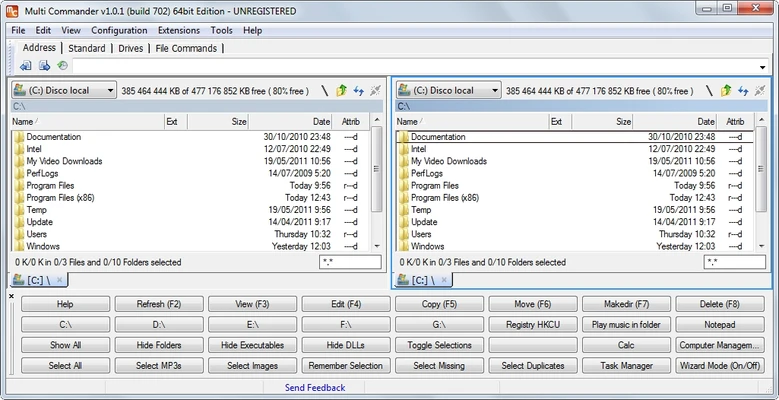
Multi Commander is a powerful file manager for Windows that provides an alternative to the standard File Explorer. It uses a dual-panel interface and offers advanced tools for copying, moving, renaming, comparing, and organizing files.
Designed primarily for power users, Multi Commander supports tabs, customizable keyboard shortcuts, batch operations, scripting, FTP access, archive management, and a wide range of other file management functions. It is available as both an installable and portable application.
What's New
Recent versions focus on improved stability, compatibility, performance, and refinements to existing file management tools.
Key Features
-
Dual-panel interface for managing two locations at the same time.
-
Tabbed browsing for working with multiple folders.
-
Advanced copy, move, rename, and delete operations.
-
Batch file renaming and file comparison tools.
-
Copy and move queues for managing multiple operations.
-
Built-in archive management.
-
FTP support for accessing remote files.
-
File preview and metadata viewing.
-
Customizable toolbars, menus, colors, and keyboard shortcuts.
-
Scripting and automation through MultiScript.
-
Support for external scripts and commands.
-
Portable version available.
-
Extensive customization for advanced workflows.
User Interface
Multi Commander uses a dual-panel layout that makes it easy to work with files between two folders or drives. Tabs allow users to keep multiple locations open within the same window.
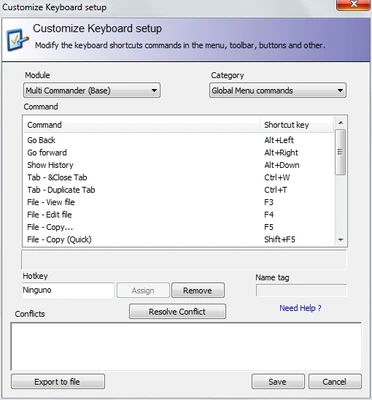
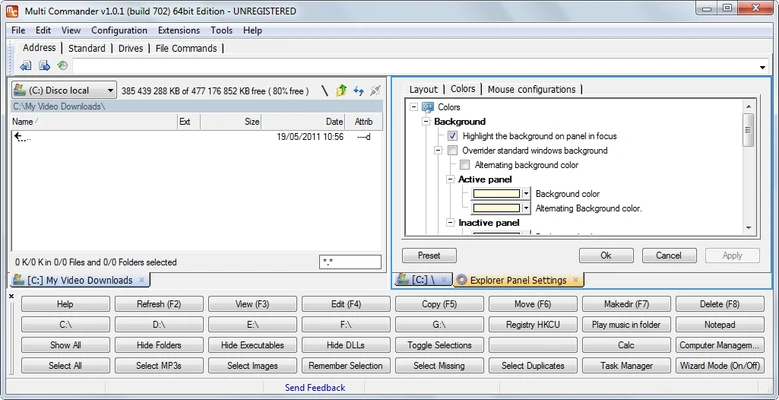
The interface is highly customizable, with options for modifying toolbars, menus, keyboard shortcuts, colors, and other visual elements. While the large number of options may take some time to learn, experienced users can configure the interface to match their workflow.
Installation and Setup
Download the installer and follow the on-screen instructions to install Multi Commander on Windows.
The software also provides a portable version that can be run without a traditional installation. After launching the program, users can customize the interface, keyboard shortcuts, and other settings according to their preferences.
How to Use
-
Launch Multi Commander and select a preferred interface layout.
-
Use the two panels to navigate between folders and drives.
-
Open multiple locations using tabs.
-
Copy or move files between panels.
-
Use batch renaming to rename multiple files at once.
-
Compare files and folders when needed.
-
Manage archives using the built-in archive tools.
-
Connect to remote locations through FTP.
-
Customize shortcuts and interface elements.
-
Use scripting features to automate repetitive tasks.
FAQ
Is Multi Commander free?
Yes. Multi Commander is free to use and does not require a paid license for its core features.
Does Multi Commander have a portable version?
Yes. A portable edition is available and can be run without installation.
Does Multi Commander support FTP?
Yes. It includes built-in FTP functionality for accessing and managing files on remote servers.
Can I customize keyboard shortcuts?
Yes. Keyboard shortcuts can be customized to suit different workflows.
Does Multi Commander support scripting?
Yes. Multi Commander includes scripting and automation features that can be used to automate repetitive file management tasks.
Alternatives
Total Commander: A popular dual-panel file manager with extensive plugins and customization options.
FreeCommander: A free Windows file manager with a dual-panel interface and a range of advanced file management tools.
Directory Opus: A highly customizable file manager designed for users who need extensive control over file operations.
XYplorer: A portable file manager with tabbed browsing, advanced search, and powerful file management features.
Far Manager: A console-based file manager aimed primarily at advanced users and administrators.
Pricing
Multi Commander is FREE to use.
System Requirements
-
OS: Windows 7, Windows 8, Windows 10, and Windows 11
-
Architecture: 32-bit and 64-bit
-
RAM: 1 GB or more
-
Storage: Approximately 50 MB
-
Processor: Modern x86-compatible processor
Pros
-
Free to use
-
Dual-panel and tabbed interface
-
Extensive file management tools
-
Highly customizable
-
Supports scripting and automation
-
Built-in FTP and archive tools
-
Portable version available
-
Lightweight compared with many feature-rich file managers
Cons
-
Can be overwhelming for beginners
-
Large number of settings requires some learning
-
Interface looks dated compared with some modern file managers
-
No native integration with major cloud storage services
Conclusion
Multi Commander is a capable Windows file manager for users who need more functionality than Windows File Explorer provides. Its dual-panel interface, tabs, batch operations, scripting support, FTP tools, and extensive customization make it particularly useful for advanced users and anyone who regularly performs complex file management tasks.