Multi Commander is a powerful and feature-rich file manager for Windows that provides an advanced alternative to the default Windows File Explorer.
Designed for experienced users and professionals, it features a dual-panel interface, extensive customization options, powerful file operation tools, and automation capabilities to improve file management efficiency.
With support for tabs, scripting, batch operations, and built-in utilities, Multi Commander gives users greater control over managing files and folders.
Overview
Multi Commander is designed for users who need more advanced file management features than the standard Windows Explorer.
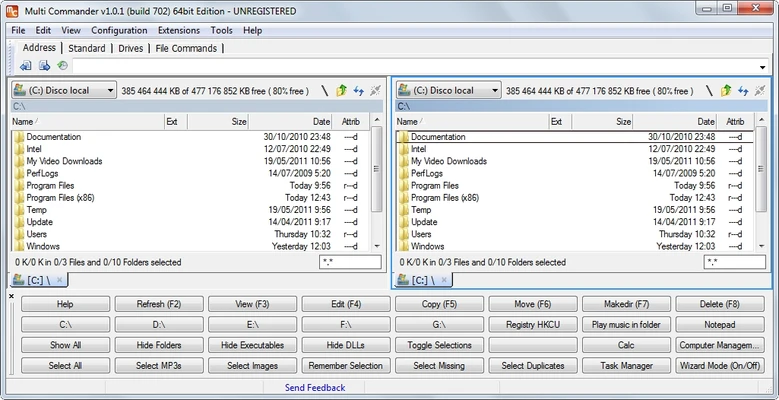
The dual-panel layout allows users to view and manage two folders at the same time, making file copying, moving, comparing, and organizing much faster.
The software includes many built-in tools such as FTP support, archive management, file preview, registry access, and automation scripts, making it suitable for power users, administrators, and developers.
Multi Commander is available as both an installed application and a portable version, allowing users to run it from external storage without installation.
Features
Dual-Panel File Management
Manage two locations simultaneously with a classic dual-pane interface for faster file operations.
Tabbed Folder Browsing
Open multiple folders in separate tabs and switch between locations quickly.
Advanced File Operations
Includes powerful tools such as:
- Batch file renaming
- File comparison
- Copy and move queues
- Advanced search
- Folder synchronization
Built-in Utilities
Provides additional tools including:
- FTP client
- Archive manager
- Registry editor
- File preview system
- Metadata viewer
Customizable Interface
Users can customize:
- Toolbars
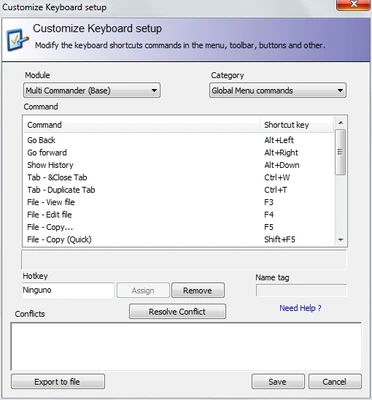
- Keyboard shortcuts
- Themes
- Layout settings
- Panel configurations
Scripting and Automation
Supports MultiScript and external scripting solutions to automate repetitive file management tasks.
Portable Version
The portable edition allows users to run Multi Commander without installation, making it convenient for technicians and advanced users.
User Interface
Multi Commander uses a traditional dual-panel file manager design focused on productivity.
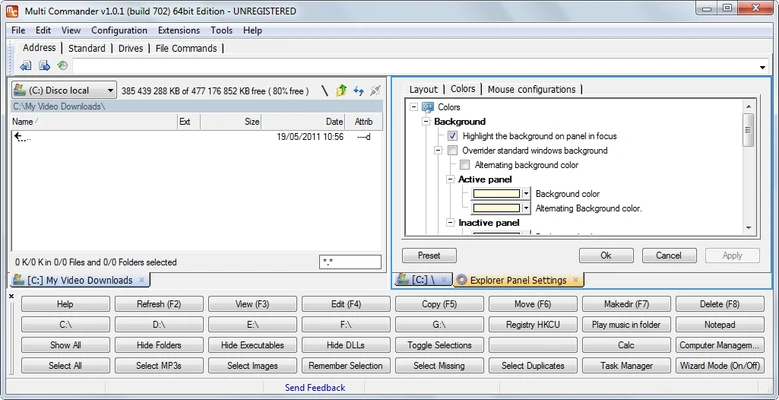
The interface can be customized extensively, allowing users to adjust panels, menus, shortcuts, and visual styles according to their workflow.
While experienced users will appreciate the powerful layout, beginners familiar only with Windows Explorer may need some time to learn the available features.
Installation and Setup
- Download the installer or portable version.
- Run the setup program.
- Select preferred interface options.
- Configure shortcuts and toolbar settings.
- Launch Multi Commander and start managing files.
The installation process is lightweight and requires minimal system resources.
How to Use
- Launch Multi Commander.
- Use the two panels to browse different folders.
- Copy, move, rename, or compare files between panels.
- Create tabs for frequently used locations.
- Use built-in tools for FTP, archives, and file management.
- Customize shortcuts and scripts for automated tasks.
FAQ
Is Multi Commander free?
Yes. Multi Commander is completely free to use.
Does Multi Commander have a portable version?
Yes. A portable version is available and can run without installation.
Can Multi Commander replace Windows Explorer?
Yes. It can be used as a more advanced replacement for Windows Explorer, especially for users who need additional file management features.
Does Multi Commander support FTP?
Yes. It includes built-in FTP functionality for accessing remote files.
Does Multi Commander support scripting?
Yes. Users can automate tasks through MultiScript and external scripting tools.
Alternatives
Total Commander – A popular professional dual-pane file manager with extensive plugin support.
Directory Opus – A premium file manager with a highly polished interface and advanced features.
FreeCommander – A free and lightweight file management alternative.
XYplorer – A tab-based file manager with powerful search and organization tools.
Far Manager – A keyboard-focused file manager popular among advanced users.
System Requirements
- Operating System: Windows 7, 8, 10, 11
- Architecture: 32-bit and 64-bit
- Processor: Any modern CPU
- RAM: 1GB or more
- Storage: About 50MB free disk space
PROS
- Free and lightweight
- Powerful dual-panel file management
- Extensive customization options
- Supports automation and scripting
- Portable version available
- Includes many built-in tools
CONS
- May be difficult for beginners
- Interface design feels outdated
- No native cloud storage integration
- Advanced features require learning time
Conclusion
Multi Commander is an excellent file manager for users who need more control and flexibility than Windows Explorer provides.
Its dual-panel interface, automation features, portable support, and extensive customization options make it a powerful tool for advanced users, system administrators, and anyone who frequently manages large numbers of files.
For users looking for a free alternative to traditional file managers, Multi Commander is a reliable and feature-rich choice.