All My Books is a Windows library management tool for organizing physical books, ebooks, and audiobooks. It lets users catalog collections, automatically retrieve book information and cover art, track loans, search and filter entries, and export library data in several formats.
Key Features
-
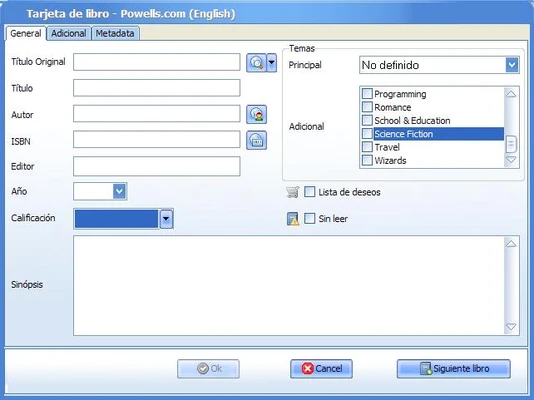
Automatic Book Information – Retrieve metadata such as title, author, publisher, publication date, synopsis, and cover art using an ISBN, title, or author.
-
Physical and Digital Books – Manage physical books, ebooks, and audiobooks in the same library.
-
Custom Fields – Add personal notes, reading status, condition, location, and other custom information.
-
Book Lending – Track books that have been loaned and record borrowing information.
-
Search and Organization – Sort, filter, group, and search books using different criteria.
-
Multiple Databases – Maintain separate databases for different collections.
-
Barcode Support – Add books quickly by scanning ISBN barcodes with a compatible scanner.
-
Import and Export – Import existing book lists and export collections to formats such as HTML, PDF, Excel, and text.
-
Visual Catalog – View books in list or shelf-style layouts with cover images.
-
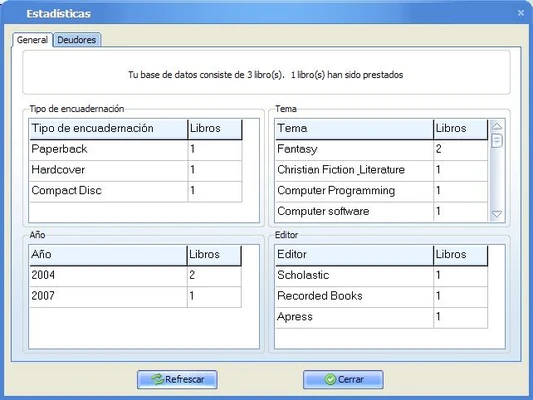
Statistics – Generate basic statistics and reports about your collection.
-
File Support – Store information about ebooks and play supported audiobook files from book records.
User Interface
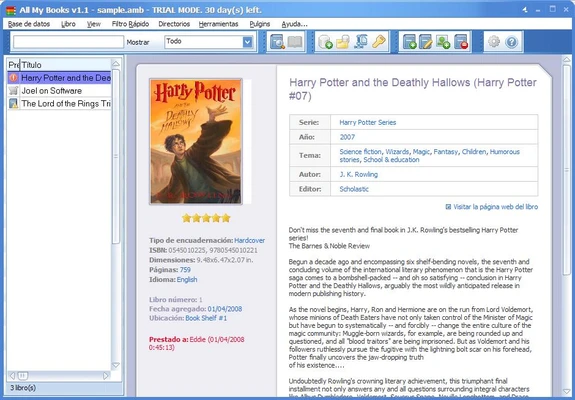
All My Books provides a traditional Windows interface with list and visual catalog views. Books can be sorted, filtered, and searched from the main library window, while the shelf-style view displays collections using book covers.
Installation and Setup
Install All My Books on your Windows PC and create a new library database. Books can then be added manually, searched by ISBN, imported from existing lists, or added using compatible barcode scanners. Online database access can automatically fill in missing book information.
How to Use
-
Create a library database.
-
Add books manually or search by ISBN, title, or author.
-
Review and edit the automatically retrieved information.
-
Organize books using categories, filters, and custom fields.
-
Record reading status and loan information when needed.
-
Search the collection to quickly find individual books.
-
Export the library for backup, reporting, or sharing.
System Requirements
-
Operating System: Windows 7, 8, 10, or 11
-
Processor: 1 GHz or faster
-
RAM: 512 MB or more
-
Storage: About 20 MB of free space
-
Internet: Required for online book database features
Pros
-
Easy-to-use library management interface
-
Supports physical books, ebooks, and audiobooks
-
Automatic metadata and cover retrieval
-
ISBN and barcode support
-
Custom fields and lending management
-
Multiple export formats
-
Visual shelf-style catalog
Cons
-
Windows-only
-
No native mobile or cloud synchronization
-
Some advanced features are limited in the trial version
-
Online metadata features require an Internet connection
Conclusion
All My Books is a practical choice for readers and collectors who want to maintain a detailed digital catalog of their physical and digital libraries. Automatic metadata retrieval, ISBN support, custom fields, lending management, and flexible export options make it suitable for both small personal collections and larger libraries.