Go to Windows platform Display platforms icon
Go to Windows platform Go to Mac platform Go to Android platform
Anki 26.09.2 icon

Anki 26.09.2

26.09.2
Damien Elmes
5.0
192 MB size

The best flashcard app to learn languages and more!

Anki is a free flashcard application that uses spaced repetition to help users memorize information and improve long-term retention. It is commonly used for language learning, exam preparation, and studying large amounts of factual information.

Users can create custom flashcards and decks or download shared decks. During study sessions, Anki uses your responses to determine when cards should be reviewed again.


Key Features

  • Spaced Repetition – Schedules flashcards based on your review performance.

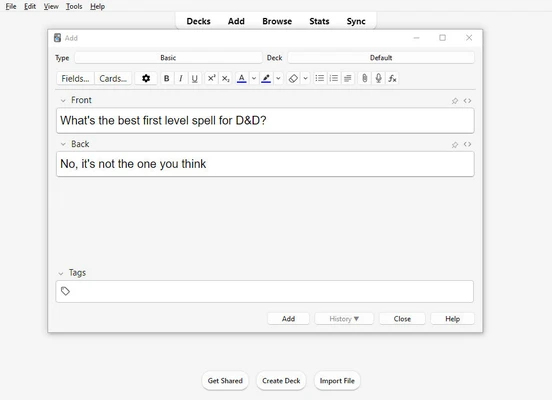
  • Custom Flashcards – Create cards with text, images, and audio.

  • Decks – Organize flashcards into separate study collections.

  • Shared Decks – Import pre-made decks for different subjects.

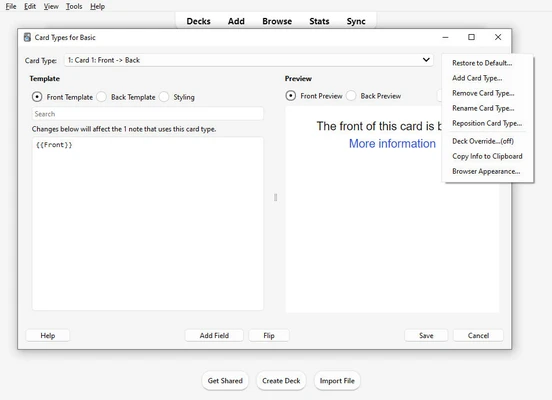
  • Custom Templates – Adjust card layouts and formatting.

  • Statistics – Track study progress and review activity.

  • Sync – Synchronize your collection across supported devices.

  • Add-ons – Extend the application's functionality with additional tools.


User Interface

Anki uses a simple interface centered around decks and flashcards. The main screen provides access to study decks, while the card editor and browser allow users to create and manage their cards.


Installation and Setup

  1. Install Anki on your Windows PC.

  2. Launch the application and create a profile.

  3. Create a new deck or import an existing one.

  4. Add your flashcards.

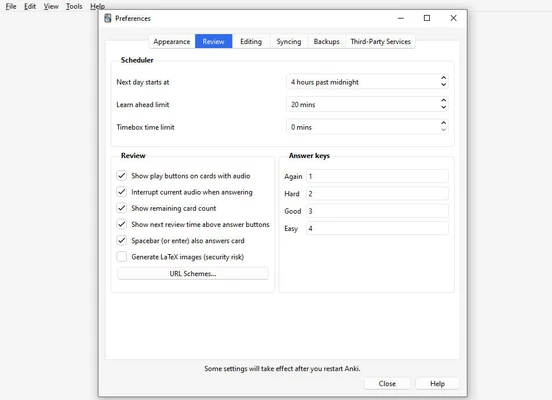
  5. Adjust study settings if needed.

  6. Start reviewing your cards.


How to Use

Select a deck and start a study session. Review each card, reveal the answer, and rate how well you remembered it. Anki uses these responses to schedule future reviews.

You can use the Browse feature to edit and organize cards, while shared decks and add-ons can be imported when additional study material or functionality is required.


Pros

  • Effective spaced repetition

  • Highly customizable

  • Supports multimedia cards

  • Shared deck library

  • Cross-device synchronization

  • Free to use


Cons

  • Interface is somewhat dated

  • Advanced customization requires some learning

  • Creating large custom decks can take time


Conclusion

Anki is a practical flashcard program for memorizing information through spaced repetition. Its simple core workflow, customizable cards, shared decks, and synchronization make it suitable for students, language learners, and anyone who needs to retain information over time.

Information about Anki 26.09.2

License Freeware
Op. System Windows
Category Business
Language English + more
Author Damien Elmes
permission icon Permissions Not applicable
Date 2026-09-16
Size 192 MB
File type Official Website

Apps recommended for you

Pagico icon
Plan and manage all of your tasks and projects
WebSite Auditor 4.62.6 icon
On-page analysis & optimization. All in one app for Windows PC!
Plexos Project; Lean Project Management icon
Create a complete production plan for your project
GesTaller icon
Manage your repair shop in the most comprehensive way
Manager icon
Manager
IBM SPSS Statistics icon
Statistics software for all your business needs
ChatWork icon
ChatWork for Windows is a team communication and collaboration app that enables messaging, file sharing, and task management.
Multi Monitor Show icon
Multi Monitor Show - show info/image/video/ads on additional displays
OpenWork 0.18.49 icon
AI productivity and automation assistant
EdrawMind 14.0.1 icon
A Full-Featured Cross-Platform Mind Mapping Software for PC!
Calibre 9.15.0 icon
The one stop solution for all your e-book needs. Comprehensive e-book software
Epubor Ultimate eBook Converter 3.0.16.741 icon
Amazing eBook Converter + eBook DRM Removal for Windows
Okular 26.08.1 icon
Allows you to read PDF documents, comics, EPub books and more!
WordPress 7.1.1 icon
Free software you can use to create a beautiful website, blog or app!
Notion 7.34.0 icon
Work offline, collaborate in real-time, write without distractions!
FocusMe 8.0.4.7 icon
Break free from distractions, unleash your productivity!
Grammarly 1.2.295.1954 icon
All-in-one writing assistant that works on your desktop or browser!
FocusMe 7.7.7.3 icon
Break free from distractions, unleash your productivity!
JobCard 2 icon
Free Workshop Management Software
AFFiNE icon
A convenient way to create your own knowledge base
Zotero 10.0.1 icon
Free and open-source reference management software for PC
Calibre 9.15.0 icon
The one stop solution for all your e-book needs. Comprehensive e-book software
Chanty icon
Connect with your colleagues with this collaboration tool