


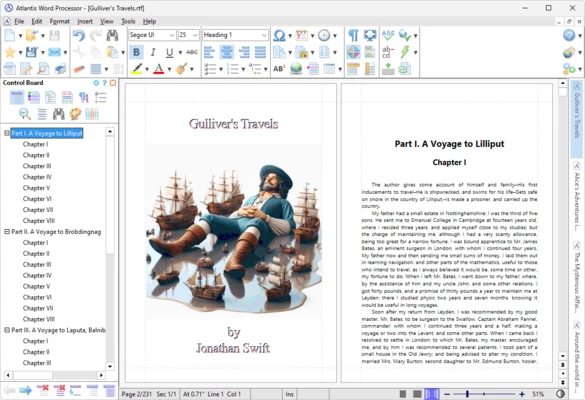

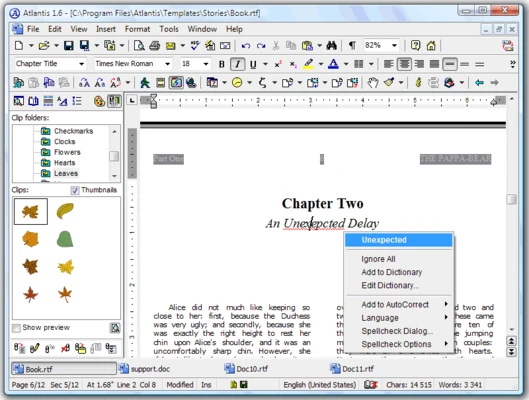
Atlantis Word Processor is a lightweight, fast, and highly customizable text editing application designed for both casual writers and professionals. Renowned for its compact installation size and swift performance, it serves as an efficient, resource-friendly alternative to bulky office suites like Microsoft Word.
The application focuses heavily on ease of use, running smoothly even on older hardware systems while offering a rich set of specialized text customization and file protection tools.
Overview and Key Features
-
Highly Customizable Interface: Allows users to fully tailor toolbars, rearrange operational buttons, adjust workspace layouts, and modify color schemes to build a personalized writing environment.
-
Broad Format Compatibility: Fully supports opening, editing, and saving industry-standard document formats including DOC, DOCX, RTF, and TXT.
-
Advanced Text Formatting: Provides comprehensive text tools for font styles, complex paragraph alignment, floating pictures with wrapping, and custom list structures.
-
Built-In Encryption & Backup: Safeguards your high-value creative property with built-in document encryption security alongside an automated background file backup module.
-
Specialized Creative Writing Tools: Features an Overused Words Analyzer, a Word Frequency Counter, and active Writing Target metrics to assist authors in improving prose quality and clarity.
-
Seamless Portable Deployment: Can be installed directly onto a USB flash drive to run locally on any host Windows machine without leaving footprint configurations.
-
Distraction-Free Environment: Includes a dedicated Full Screen mode and specialized Spotlight options to isolate active text lines and eliminate external visual disruptions.
How to Use
-
Run the downloaded installer package and complete the setup configurations.
-
Open the application interface to access the main workspace layout, featuring a familiar traditional menu architecture and ribbon-style toolbars.
-
Click the "New Document" shortcut to open a clean blank sheet or import existing DOCX/DOC files from your storage drives.
-
Utilize the primary formatting toolbar to modify font weights, size variables, bullet points, or document margins dynamically.
-
Navigate to the "Tools" directory menu to deploy advanced analytical tools like the Overused Words feature.
-
Choose the "Save As" command to export your writing to standard formats or compile text into digital eBooks.
Pros and Cons
Pros
-
Extremely small storage requirement and low RAM footprint ensure fast loading times.
-
Advanced customization allows deep interface restructuring to match specific workflows.
-
Powerful writing analytics give creative authors distinct text-refinement advantages.
-
Flexible lifetime license option eliminates recurring monthly or yearly subscription fees.
Cons
-
Exclusively engineered for Windows platforms, lacking native macOS or Linux application packages.
-
Devoid of built-in real-time online collaboration tools for multi-user editing.
-
Not optimized for handling highly complex scientific data requiring heavy mathematical formulas.
System Requirements
-
Operating System: Microsoft Windows 11, 10, 8, 7, Vista, or XP (Both 32-bit and 64-bit architectures).
-
Processing Unit: 1 GHz or faster central processor.
-
System Memory: 512 MB of RAM minimum.
-
Storage Requirement: Less than 10 MB of available hard drive space for installation files.