

RotorCrypt X-Files is a file encryption tool that protects files and folders entirely offline. It does not require cloud storage, external servers, or an account. All encryption and file management take place on your computer, keeping your data under your control.
The Vault – Your Digital Safe
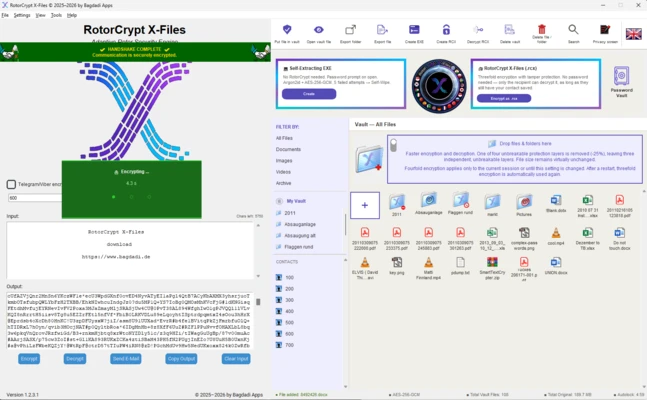
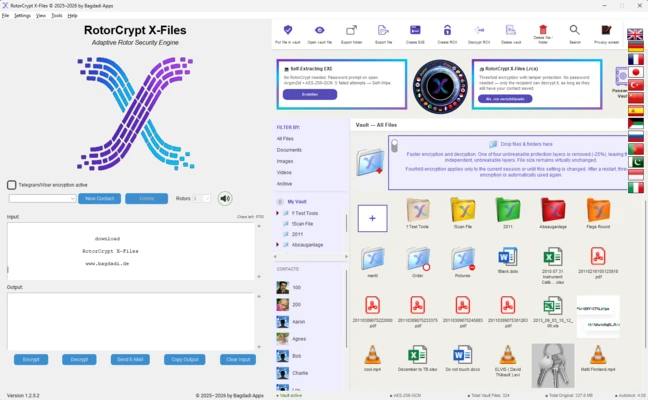
The program's central feature is the Vault, a secure space for storing files. Simply drag and drop individual files or entire folders into it, and they are automatically encrypted using three security layers by default. You don't need to enter a separate password for every file. An additional fourth layer of protection can be enabled with a single click.
File Management Inside the Vault
The Vault provides a familiar file management interface similar to Windows Explorer. You can move files using drag and drop or create new folders to organize your data. Files can also be opened and edited normally: double-click a file to use it, and it is automatically locked again when you close it.
Sharing Files Securely
After confirming a contact through a secure handshake, you can exchange encrypted files without entering additional passwords for each transfer. The connection handles the security of the exchange.
Sending to Recipients Without RotorCrypt X-Files
You can also send self-extracting encrypted files to recipients who don't have RotorCrypt X-Files installed. They simply double-click the file and enter a password to access its contents, without installing additional software. You can configure an expiration date for automatic deletion or set the file to delete itself after too many incorrect password attempts.
Password Protection & Secure Deletion
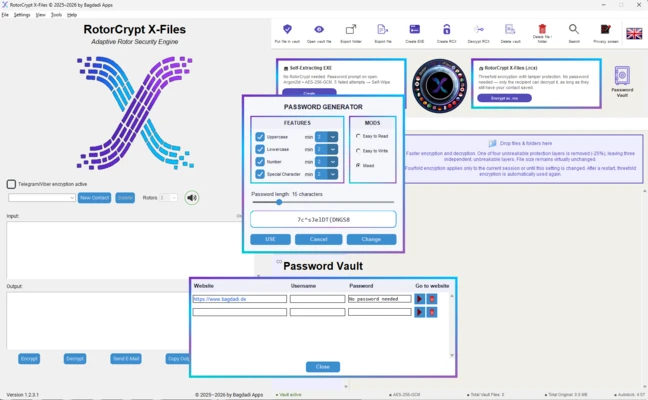
RotorCrypt X-Files uses password protection designed to make unauthorized access and password cracking difficult. It also offers secure deletion by overwriting deleted data multiple times to make recovery more difficult.
Key Features
-
Works fully offline, with no cloud storage, external server, or account required
-
Encrypts individual files and entire folders through drag and drop
-
Uses three security layers by default, with an optional fourth layer
-
Provides Windows-like file management inside the Vault
-
Exchanges encrypted files with confirmed contacts without additional passwords
-
Creates self-extracting files for recipients who don't have the program installed
-
Supports configurable expiration dates and automatic deletion
-
Detects file tampering
-
Includes a quick privacy screen and automatic locking after inactivity
-
Permanently deletes data through multiple overwriting operations
-
Offers a free version