

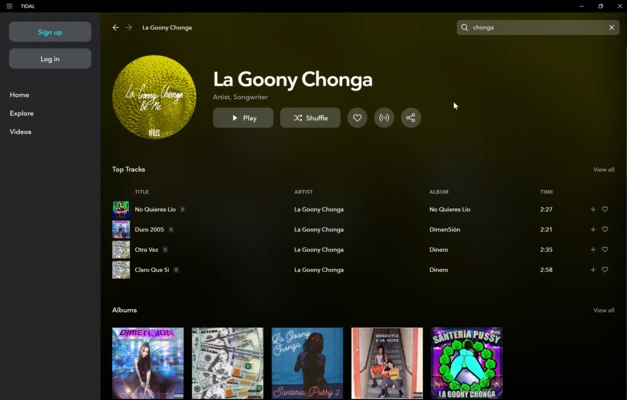
TIDAL Desktop is the official Windows application for TIDAL, a music streaming service focused on high-quality audio, lossless music, personalized playlists, and exclusive content.
The desktop app provides a convenient way to listen to music without using a web browser. It supports high-quality FLAC playback, offline listening for eligible subscribers, music videos, playlists, and TIDAL Connect for compatible devices.
TIDAL Desktop is particularly well suited to audiophiles and users with high-quality headphones, speakers, or external DACs.
Key Features
High-Quality Audio
Supports lossless FLAC playback and high-resolution audio on compatible tracks and subscription plans.
Offline Listening
Subscribers can download supported music for offline playback.
TIDAL Connect
Stream music directly to compatible speakers, receivers, and other supported devices.
Personalized Recommendations
Discover music through personalized mixes, playlists, recommendations, and curated content.
Music Videos
Access music videos, live performances, interviews, and other video content.
Custom Playlists
Create and manage personal playlists and organize favorite albums, artists, and tracks.
Gapless Playback
Provides smooth transitions between tracks where supported, which is useful for live albums and continuous recordings.
External DAC Support
Works with compatible external DACs and high-end audio equipment for improved listening quality.
Multi-Device Support
Use the same TIDAL account across supported devices and control playback from compatible platforms.
User Interface
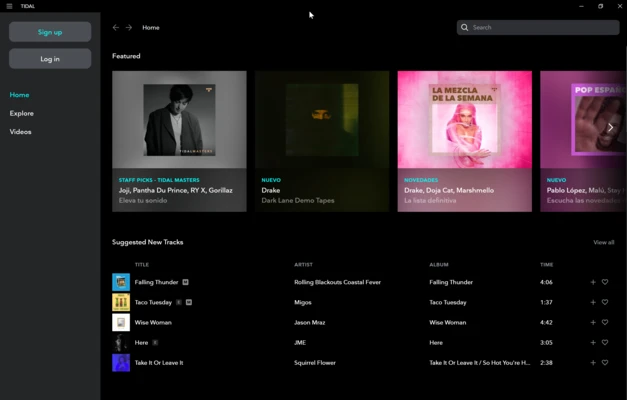
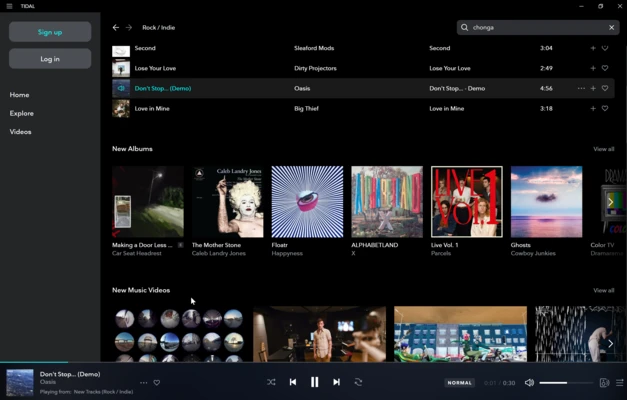
TIDAL Desktop uses a clean, dark-themed interface with straightforward navigation.
The main sections provide access to music recommendations, albums, artists, playlists, videos, and the user's collection. The playback controls remain accessible at the bottom of the window, while audio quality and playback settings can be configured through the application settings.
Installation and Setup
- Download and install TIDAL Desktop for Windows.
- Launch the application.
- Sign in with an existing TIDAL account or create a new account.
- Choose an available subscription plan if required.
- Open Settings and configure streaming and audio quality.
- Start searching for music and building your collection.
How to Use
Search for Music
Use the search function to find artists, albums, songs, playlists, and other content.
Create a Playlist
Add songs or albums to a new or existing playlist to organize your music.
Adjust Audio Quality
Open the settings and select the available streaming quality based on your subscription, hardware, and network connection.
Download Music
Download supported tracks, albums, or playlists for offline listening when the feature is available with your subscription.
Use TIDAL Connect
Select a compatible device from the playback screen to stream music directly to supported hardware.
FAQ
Is TIDAL Desktop free?
The Windows application can be downloaded and installed for free, but most music streaming features require an active TIDAL subscription.
Does TIDAL support lossless audio?
Yes. TIDAL offers lossless FLAC audio, with the available quality depending on the track and current subscription plan.
Can I listen to TIDAL offline?
Yes. Supported subscribers can download music for offline playback.
Does TIDAL Desktop work with an external DAC?
Yes. TIDAL can be used with compatible external DACs and other high-quality audio equipment.
Can I use TIDAL on multiple devices?
Yes. A TIDAL account can be used across supported devices, although simultaneous playback and other limitations depend on the current subscription.
Does TIDAL have music videos?
Yes. TIDAL includes music videos, live performances, interviews, and other video content.
Pricing
TIDAL is a subscription-based music streaming service. Available plans, prices, features, and trial offers may vary by country and can change over time.
Depending on the current plans available in your region, subscriptions may include individual, family, and student options.
System Requirements
- Operating System: Windows 10 or Windows 11
- Processor: Intel Core i3 or equivalent
- RAM: 4 GB minimum
- Storage: At least 200 MB of free space
- Internet: Broadband connection recommended for high-quality streaming
Higher-quality audio and other advanced features may require a faster and more stable internet connection.
PROS
- High-quality lossless audio
- Supports FLAC playback
- Offline listening for eligible subscribers
- TIDAL Connect support
- Music videos and exclusive content
- Works with external DACs and audio equipment
- Clean and easy-to-use interface
CONS
- Requires a paid subscription for most features
- Available audio quality varies by track and plan
- High-quality streaming uses more bandwidth
- Some features may vary by region
- Not ideal for users looking for a completely free music service
Alternatives
Spotify – A popular music streaming service with extensive playlists, recommendations, and broad platform support.
Apple Music – Offers lossless audio, Dolby Atmos, a large music library, and strong integration with Apple devices.
Amazon Music – Provides lossless and high-resolution music with a large catalog.
Deezer – A music streaming service that also offers lossless audio and personalized recommendations.
Conclusion
TIDAL Desktop is a solid choice for Windows users who prioritize audio quality and want a dedicated desktop music streaming application. Its lossless FLAC support, offline listening, TIDAL Connect, and compatibility with external audio equipment make it particularly appealing to audiophiles.
Casual listeners may find other streaming services more suitable, especially if price, free access, or broader platform integration is more important than high-quality audio.
Note: Subscription requirements, audio formats, pricing, and available features may vary by region and can change with future updates.