Vim for Windows is a powerful, lightweight, keyboard-driven text editor designed for programmers, system administrators, and advanced users.
Based on the classic Unix Vi editor, Vim uses a modal editing system that allows users to navigate, edit, search, and manipulate text efficiently without relying heavily on a mouse.
It supports programming, scripting, configuration files, plain text, and many other types of documents. Vim is free, open-source, highly customizable, and available with both command-line and graphical interfaces.
Key Features
Modal Editing: Use Normal, Insert, Visual, and Command-line modes for efficient text editing.
Keyboard Navigation: Navigate and edit files using keyboard commands instead of relying on a mouse.
Syntax Highlighting: Supports syntax highlighting for a wide range of programming languages and file types.
Advanced Search and Replace: Use powerful search and regular expression features to find and modify text.
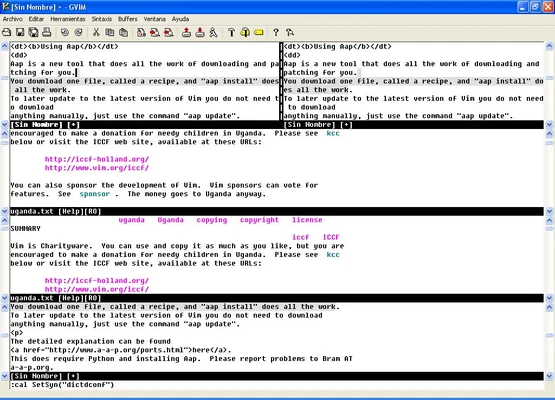
Split Windows and Tabs: Edit multiple files simultaneously using split windows and tab pages.
Extensive Customization: Configure Vim through the vimrc file and customize its behavior with scripts and plugins.
Plugin Support: Extend the editor with a large ecosystem of plugins and third-party tools.
Undo and Redo: Provides an advanced undo system for managing changes efficiently.
Lightweight Performance: Uses relatively few system resources and starts quickly, even on older hardware.
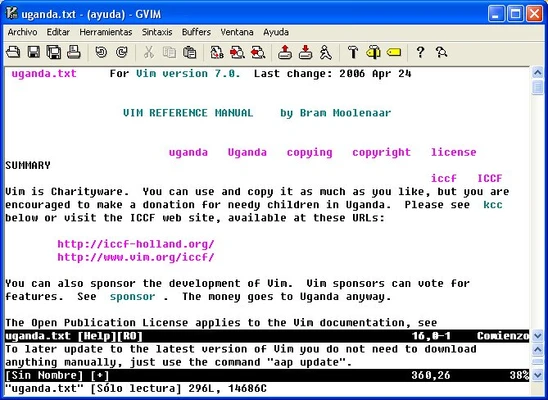
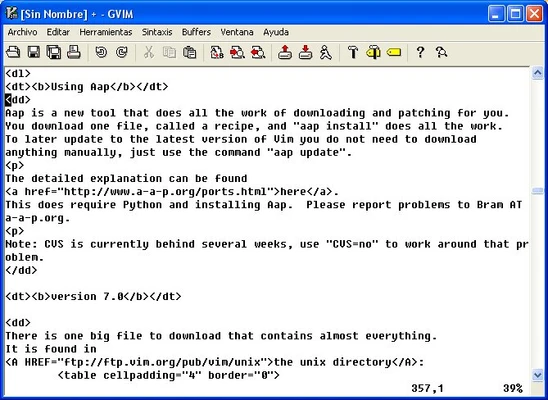
GVim: Includes a graphical version with menus, toolbars, and other GUI features.
User Interface
Vim primarily uses a terminal-based interface and relies heavily on keyboard commands.
The graphical GVim version provides a more traditional interface with menus and toolbar controls. While the command-based interface can be unfamiliar to beginners, experienced users can perform many editing operations quickly without leaving the keyboard.
Installation and Setup
-
Download the Windows installer.
-
Run the installer and follow the setup wizard.
-
Choose the components and installation options you need.
-
Optionally enable command-line integration and GVim.
-
Launch Vim or GVim after installation.
-
Customize settings through the vimrc configuration file if required.
How to Use
Open a File: Launch Vim from the Start menu or open a file from Command Prompt.
Insert Text: Press i to enter Insert mode and start typing.
Return to Normal Mode: Press Esc.
Save a File: Press Esc, type :w, and press Enter.
Exit Vim: Type :q to exit or :wq to save and exit.
Quit Without Saving: Type :q!.
Delete a Line: In Normal mode, press dd.
Copy a Line: Press yy.
Paste Text: Press p.
Search: Type / followed by the search term and press Enter.
FAQ
Is Vim free?
Yes. Vim is free and open-source software.
Is Vim available for Windows?
Yes. Vim provides Windows versions that can be installed on modern Windows systems.
Is Vim difficult to learn?
Vim has a steeper learning curve than most traditional text editors because of its modal editing system. However, basic commands can be learned relatively quickly.
Can Vim be used for programming?
Yes. Vim supports syntax highlighting, search and replace, scripting, plugins, split windows, and many other features useful for software development.
What is GVim?
GVim is the graphical version of Vim. It provides menus, toolbars, and other graphical controls while retaining Vim's editing features.
Can Vim be customized?
Yes. Users can modify configuration files and install plugins to change the editor's appearance and functionality.
Alternatives
Emacs: A highly customizable text editor with extensive programming and scripting capabilities.
Sublime Text: A fast graphical text editor with a more traditional interface.
Visual Studio Code: A feature-rich code editor with extensive extensions and Vim emulation support.
System Requirements
-
Operating System: Windows 7, 8, 10, or 11
-
Processor: 1 GHz or faster
-
RAM: 512 MB or more
-
Storage: Less than 100 MB of free disk space
PROS
-
Free and open-source
-
Extremely lightweight and fast
-
Powerful keyboard-driven editing
-
Highly customizable
-
Extensive plugin ecosystem
-
Supports many programming languages
CONS
-
Steep learning curve for beginners
-
Modal editing can be confusing at first
-
Advanced customization requires configuration knowledge
-
Interface is less intuitive than modern GUI editors
Conclusion
Vim for Windows is an efficient and highly customizable text editor for users who prefer keyboard-driven workflows. Its powerful editing commands, plugin support, and low resource usage make it particularly suitable for programmers and experienced users.
Although Vim takes time to learn, its efficiency and flexibility make it a valuable alternative to traditional graphical text editors.