

Godot Engine is a free and open-source game engine for creating 2D and 3D games and interactive applications on Mac. It provides a complete development environment with scene editing, animation, physics, scripting, rendering, debugging, and cross-platform export tools.
Godot is released under the MIT license and can be used to create both personal and commercial projects without engine royalties. Its flexible scene system and integrated tools make it suitable for indie developers, hobbyists, educators, and professional game development teams.
What's New
Recent Godot updates include improvements to 2D and 3D rendering, animation, physics, scripting, editor performance, platform support, and development workflows. Newer versions also provide improved support for modern graphics APIs and Apple Silicon Macs.
Key Features
-
Dedicated 2D and 3D game development tools
-
Scene and node-based development system
-
GDScript scripting language
-
C# support in supported Godot editions
-
Visual scene and level editor
-
2D and 3D physics
-
Animation editor and animation systems
-
Visual shader tools
-
Integrated debugger and profiler
-
Asset and resource management
-
TileMap and 2D game development tools
-
3D model and animation import
-
Cross-platform game export
-
Open-source MIT license
-
Support for desktop, mobile, and web development
User Interface
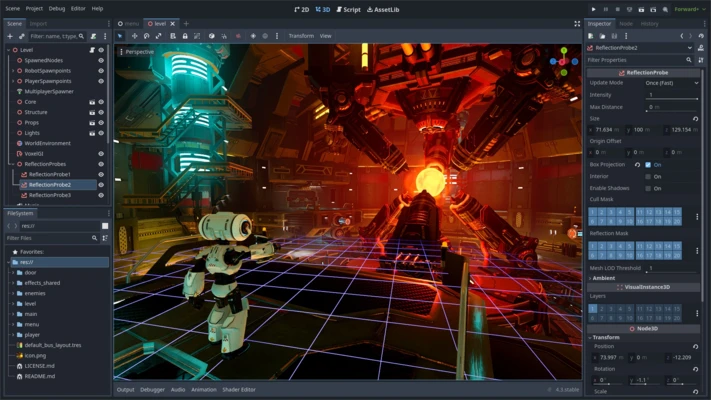
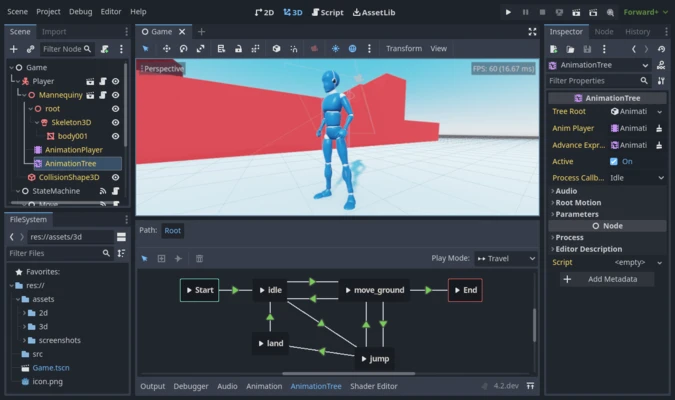
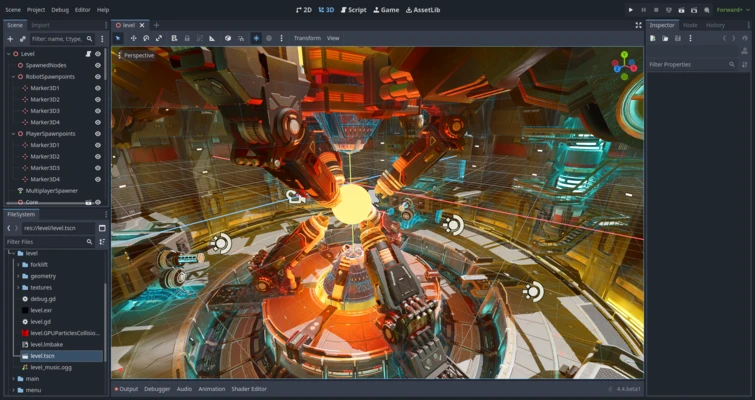
Godot uses a scene-based editor with dedicated panels for the Scene tree, Inspector, FileSystem, viewport, scripts, animation, and debugging tools.
The interface is designed around nodes and scenes, allowing developers to build game objects and levels from reusable components. The workspace can be customized depending on whether you are working on 2D scenes, 3D environments, scripts, or animations.
Installation and Setup
-
Download Godot Engine for Mac.
-
Open the downloaded application or archive.
-
Move Godot to the Applications folder if required.
-
Launch Godot from Applications.
-
Create a new project or import an existing project.
-
Choose the appropriate renderer for your project.
-
Select a project folder and create the project.
-
Start building scenes, adding assets, and writing scripts.
How to Use
-
Create a new project from the Godot Project Manager.
-
Build game scenes using nodes.
-
Add sprites, models, cameras, lights, and other components.
-
Write gameplay logic using GDScript or supported C# workflows.
-
Create animations using the Animation editor.
-
Configure physics and collision objects.
-
Test the game directly from the Editor.
-
Use the debugger and profiler to identify problems and performance issues.
-
Configure export settings for the target platform.
-
Export the finished project using the Export dialog.
FAQ
Is Godot Engine free?
Yes. Godot is free and open-source software released under the MIT license. Developers can use it for both personal and commercial projects.
What programming language does Godot use?
Godot primarily uses GDScript, a scripting language designed specifically for game development. C# is also supported in applicable Godot versions and builds.
Can Godot create 2D games?
Yes. Godot includes a dedicated 2D engine with tools for sprites, animation, physics, tile-based games, particles, and other 2D development tasks.
Can Godot create 3D games?
Yes. Godot provides tools for 3D scenes, models, animation, lighting, physics, materials, shaders, and rendering.
Does Godot support Apple Silicon Macs?
Yes. Modern Godot versions support Apple Silicon Macs, although specific third-party plugins and project dependencies may have their own compatibility requirements.
Can Godot export games to other platforms?
Yes. Godot supports exporting projects to multiple platforms, including Windows, macOS, Linux, Android, iOS, and the web, depending on the project and installed export templates.
Alternatives
Popular alternatives to Godot include Unity, Unreal Engine, and GameMaker. Godot is particularly attractive to developers who want a lightweight, open-source engine without royalties or proprietary licensing restrictions.
Pricing
Godot Engine is completely free and open source. There are no engine subscription fees or royalties for games created with Godot.
System Requirements
-
macOS on a compatible Intel or Apple Silicon Mac
-
64-bit processor
-
Metal-compatible graphics hardware recommended
-
At least 4 GB RAM
-
8 GB RAM or more recommended for larger projects
-
Sufficient free storage for the Editor, projects, assets, and export templates
Pros
-
Free and open source
-
No engine royalties
-
Lightweight compared with many large game engines
-
Excellent 2D development tools
-
Flexible scene and node system
-
Built-in GDScript
-
Supports 3D development
-
Cross-platform export
-
Active open-source community
Cons
-
Smaller ecosystem than Unity and Unreal Engine
-
Fewer third-party assets and plugins
-
Advanced 3D workflows may require more manual configuration
-
Some platform-specific features require additional setup
-
Compatibility can vary between third-party plugins and projects
Conclusion
Godot Engine is a capable free and open-source game development platform for Mac users who want to create 2D and 3D games without licensing fees or engine royalties. Its scene-based workflow, dedicated 2D tools, GDScript, 3D capabilities, and cross-platform export features make it a strong choice for indie developers, hobbyists, and teams looking for an open-source alternative to commercial game engines.