
Go to Windows platform Display platforms icon
Go to Mac platform Go to Windows platform Go to Android platform
WeChat icon

WeChat

3.8.10
Tencent
4.1
353.41 MB size

Enjoy this popular messaging tool on your Mac

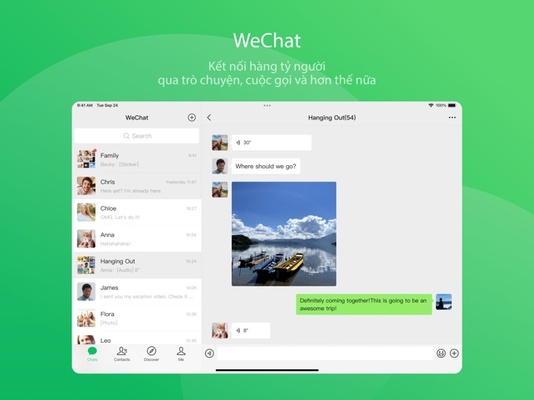
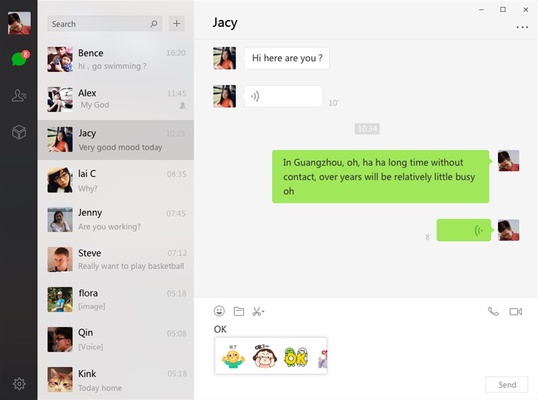
WeChat for Mac is the Mac version of this popular Asian messaging service designed to help you communicate with your contacts. With an interface that looks almost identical to the smartphone tool, in just a few moments, you can start a private thread or group chat with nothing more than an Internet connection on your computer.

Download the desktop version of WeChat for Mac

To use WeChat, you must first have the smartphone tool installed on your Android or iOS device. After that, simply scan the QR code that appears on your Mac's screen to quickly sync all your conversations. As with the desktop clients of other messaging apps, such as WhatsApp, any message you send through the computer will also appear on your other devices.

Make video calls with WeChat

Another interesting aspect of WeChat is the ability to make free video calls from your Mac. Thanks to this tool, you will not only be able to chat with a specific contact, but you will also have what you need to arrange video conferences. Of course, you can control all the options from the toolbar located on the left side of the screen, and you will need to have a camera on your computer in order to transmit video.

Share images and other multimedia content

As expected, WeChat also allows you to add various multimedia content to your conversations. By selecting each item, you can easily send photos, videos, audios, and other files to your contacts via chat windows, without having to use other tools.

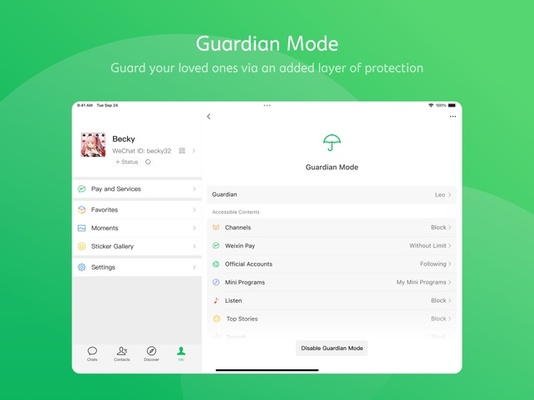
Download WeChat for Mac to take advantage of all the benefits offered by the official desktop client for this messaging app that's so widely used in Asian countries such as China. Whether through calls, chats, or messages, you can stay connected to the people you care about thanks to this tool's simple interface and wide range of features. Best of all, you can use the guardian mode for end-to-end encryption of your conversations, ensuring the protection of your data from trackers and third parties.

Information about WeChat

License Free
Op. System Mac
Category Internet
Language English 1 more
Author Tencent
permission icon Permissions Not applicable
Date 2026-06-03 01:55:17
Size 353.41 MB
File type DMG

Apps recommended for you

Dropbox icon
2 GB online shared storage system
Qutebrowser Mac icon
Florian Bruhin
Brave Browser for Mac icon
Load web pages 3x to 6x faster, better privacy and protection!
SABnzbd icon
Download Usenet files automatically
JDownloader icon
The best way to manage downloads from Mega, rapidshare and more
Cyberduck icon
FTP and SFTP client perfectly designed for Mac
Howard Email Notifier icon
Email notifications on your desktop
Transmit icon
One of the best FTP clients for Mac
Slack 4.50.140 for Mac icon
Team communication software for the 21st century
MailButler 10111 for Mac icon
The free email extension for Mac that does it all
KakaoTalk 26.5.0 for Mac icon
Offers a convenient sync between your Mac and mobile device
ivaldi 8.0.4033.48 for Mac icon
An advanced browser made with the power user in mind
Firefox 152.0 for Mac icon
One of the World's Most Popular Web Browsers for Mac
Opera GX 132.0.5905.43 for Mac icon
The Mac gaming browser built for gamers with RAM and CPU limiters!
Wavebox 10.149.2.92 for Mac icon
Join the wave of next generation web-desktop communication tools!
Microsoft Edge 149.0.4022.62 for Mac icon
A fast and secure way to get things done on the Web!
Cyberduck icon
FTP and SFTP client perfectly designed for Mac
Vivaldi icon
Stay organized while you work with this efficient browser
WhatsApp for Mac 26.23.15 icon
Quickly send and receive WhatsApp messages right from your Mac
BitComet icon
Download torrent files in this popular P2P manager
Discord icon
The leading VoIP platform for online communities
Opera icon
Much more than just a web browser
QQ Browser icon
A fast and secure browser for Mac
Transmit icon
One of the best FTP clients for Mac