Vivaldi is a customizable web browser for Mac designed for users who want more control over their browsing experience. Built on Chromium, it combines broad website and Chrome extension compatibility with advanced customization, tab management, privacy features, and built-in productivity tools.
Vivaldi lets you customize the browser layout, tabs, toolbars, keyboard shortcuts, mouse gestures, and other interface elements. It also includes features such as Workspaces, Tab Stacks, Web Panels, Notes, built-in translation, screen capture, and synchronization.
What's New
Recent Vivaldi updates include improvements to tab management, Workspaces, performance, synchronization, privacy controls, built-in tools, and Chromium compatibility. Updates may also include refinements to the browser interface and security.
Key Features
-
Highly customizable browser interface
-
Tab Stacks for organizing multiple tabs
-
Workspaces for managing different browsing sessions
-
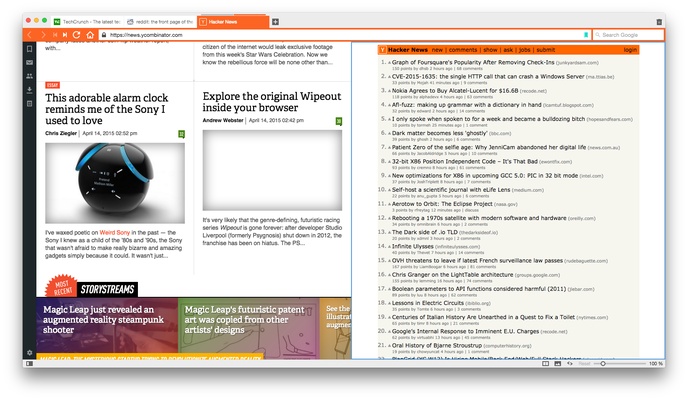
Split-screen tab tiling
-
Custom keyboard shortcuts
-
Mouse gestures
-
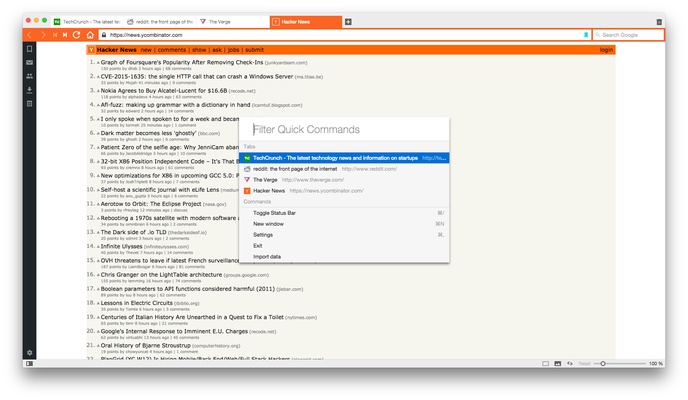
Quick Commands for fast browser control
-
Web Panels for quick access to websites
-
Built-in Notes and screenshot tools
-
Built-in page translation
-
Private synchronization across devices
-
Built-in ad and tracker blocking
-
Chrome extension compatibility
-
Custom themes, icons, toolbars, and layouts
-
Built-in Mail, Calendar, and Feed features
User Interface
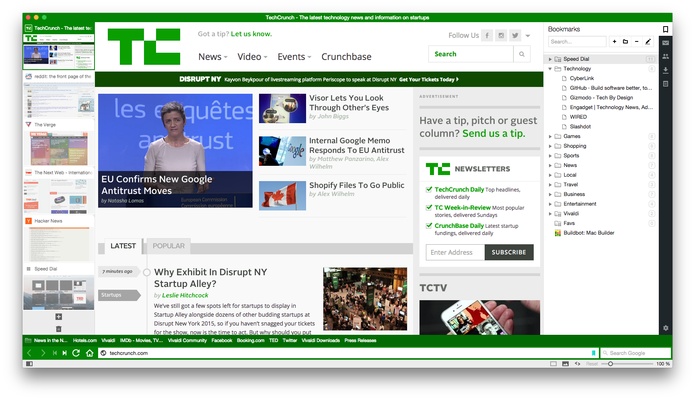
Vivaldi provides an interface that can be customized extensively. Users can change the position of tabs and toolbars, adjust themes, configure menus, and create personalized keyboard shortcuts.
Its sidebar provides quick access to features such as Web Panels, Notes, bookmarks, downloads, history, and other tools. Tab Stacks and Workspaces make it easier to organize large numbers of open tabs.
Installation and Setup
-
Download the Vivaldi installer for Mac.
-
Open the downloaded installer.
-
Follow the on-screen instructions to complete the installation.
-
Launch Vivaldi from the Applications folder.
-
Import bookmarks and other browser data if needed.
-
Choose a theme and configure the browser layout.
-
Sign in to your Vivaldi account if you want to use Sync.
How to Use
-
Customize the browser interface from Settings.
-
Group related tabs using Tab Stacks.
-
Use Workspaces to separate different browsing tasks.
-
Open frequently used websites through Web Panels.
-
Use Quick Commands to search tabs, bookmarks, history, and settings.
-
Create custom keyboard shortcuts and mouse gestures.
-
Use Notes to save information while browsing.
-
Capture screenshots directly from the browser.
-
Enable built-in ad and tracker blocking for additional privacy.
-
Use Sync to keep supported browser data available across devices.
FAQ
Is Vivaldi based on Chrome?
Vivaldi is based on Chromium, the open-source browser project that also powers Google Chrome. This provides broad compatibility with modern websites and Chrome extensions.
Can Vivaldi use Chrome extensions?
Yes. Vivaldi supports Chrome Web Store extensions because it is based on Chromium.
Is Vivaldi free?
Yes. Vivaldi is free to download and use.
Does Vivaldi have an ad blocker?
Yes. Vivaldi includes built-in ad and tracker blocking that can be configured according to your preferences.
Can Vivaldi sync data between devices?
Yes. Vivaldi Sync can synchronize supported browser data such as bookmarks, passwords, settings, and other information across compatible devices.
Is Vivaldi available for mobile devices?
Yes. Vivaldi also offers mobile versions for supported Android and iOS devices.
Alternatives
Popular alternatives to Vivaldi include Chrome, Firefox, Opera, Safari, Microsoft Edge, and Brave. Vivaldi is particularly suitable for users who prioritize customization and advanced browser features.
Pricing
Vivaldi is free to download and use. The browser does not require a subscription for its core browsing and customization features.
System Requirements
-
macOS
-
Compatible Intel or Apple Silicon Mac
-
Sufficient free disk space for installation
-
Internet connection for downloading, updates, synchronization, and online services
Pros
-
Extensive customization options
-
Advanced tab management
-
Workspaces and Tab Stacks
-
Built-in productivity tools
-
Chrome extension compatibility
-
Built-in ad and tracker blocking
-
Custom keyboard shortcuts and mouse gestures
-
Free to use
Cons
-
Can feel overwhelming for new users
-
More resource-intensive than some minimalist browsers
-
Large number of features may require time to learn
-
Interface customization can make setup more complicated
Conclusion
Vivaldi is a powerful and flexible Mac browser for users who want more control over how they browse the web. Its extensive customization options, advanced tab management, built-in productivity tools, privacy features, and Chromium compatibility make it a strong alternative to more traditional browsers.