


Tor Browser Portable is a privacy-focused web browser based on Mozilla Firefox. It routes internet traffic through the Tor network to help protect your identity and reduce online tracking. The portable Windows version can run without a traditional installation, making it convenient for use from a local folder or removable drive.
What's New
-
Updated Firefox ESR base for improved compatibility and performance.
-
Improved anti-fingerprinting protections.
-
Latest security and stability updates.
-
Refined Tor connection and bridge configuration options.
-
Improved support for onion services.
-
Updated NoScript integration.
-
Performance improvements when browsing through the Tor network.
-
Various bug fixes and general improvements.
Key Features
Privacy-Focused Browsing: Routes web traffic through the Tor network to help hide your IP address and reduce online tracking.
Anti-Tracking Protection: Includes built-in protections against cookies, scripts, fingerprinting, and other common tracking techniques.
Multiple Security Levels: Allows users to choose different security levels to balance privacy, security, and website compatibility.
Onion Services Support: Provides access to websites and services available through the .onion network.
Portable Version: The Windows portable build can be used without a traditional installation and can be run from removable storage.
Cross-Platform: Available for Windows, macOS, Linux, and Android.
User Interface
Tor Browser uses a Firefox-based interface, making it familiar to users who have used Mozilla Firefox. It includes standard browser features such as tabs, bookmarks, and browsing history, along with Tor-specific privacy and connection controls.
Users can quickly access security settings, connection options, and information about the current Tor circuit from the browser interface.
Installation and Setup
Download Tor Browser Portable for your operating system and extract the package if required. On Windows, the portable version does not require a traditional installation and can be launched directly from its folder.
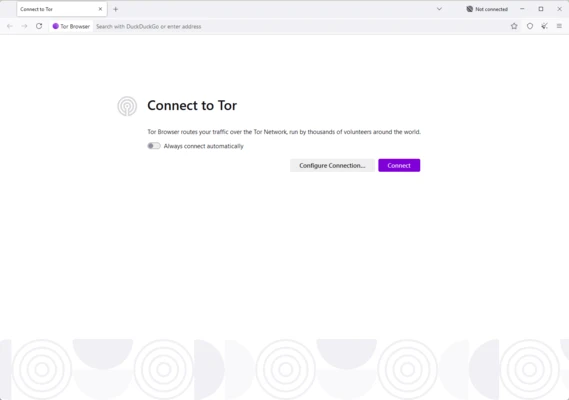
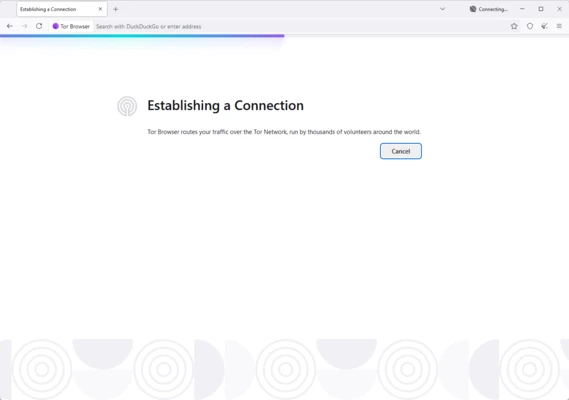
When starting the browser for the first time, connect to the Tor network using the connection screen. If Tor is restricted on your network, you can configure a bridge through the connection settings.
How to Use
-
Download Tor Browser Portable.
-
Extract the files if required.
-
Launch the browser.
-
Connect to the Tor network.
-
Adjust the security level if necessary.
-
Start browsing the web.
FAQ
Is Tor Browser Portable free?
Yes. Tor Browser is free and open-source software.
Is Tor Browser Portable legal?
Tor Browser is legal to use in many countries, but laws regarding Tor and anonymous communication vary by region. Users should check the regulations that apply to them.
Is Tor Browser slower than a regular browser?
Usually, yes. Traffic is routed through multiple Tor relays, which can increase latency and make browsing slower than using a conventional browser.
Can I use Tor Browser for streaming?
Yes, but streaming performance may be limited. Tor is primarily designed for privacy and anonymity rather than high-speed media streaming.
Can I download torrents through Tor Browser?
Tor Browser is not designed for BitTorrent or other torrent applications. Using torrent software over Tor can also introduce privacy and security risks.
Can Tor Browser access normal websites?
Yes. Tor Browser can access most regular websites, although some websites may block or restrict connections from Tor exit nodes.
Is Tor Browser available for Android?
Yes. Tor Browser is available for Android devices in addition to desktop platforms.
Alternatives
Google Chrome Portable – A portable version of Google's popular browser with broad website compatibility.
Firefox Portable – A portable version of Mozilla Firefox with extensive customization and extension support.
Brave Portable – A privacy-focused browser with built-in ad and tracker blocking.
Opera Portable – A Chromium-based browser with built-in browsing and customization features.
DuckDuckGo Browser – A privacy-oriented browser with built-in tracking protection.
Pricing
Tor Browser is completely free to download and use.
System Requirements
-
Windows: Windows 10 and later
-
macOS: Supported recent versions of macOS
-
Linux: 64-bit Linux distributions
-
Android: Supported Android devices
Pros
-
Strong privacy and anti-tracking features
-
Free and open-source
-
Built-in Tor network integration
-
Supports onion services
-
Multiple security levels
-
Available on multiple platforms
-
Portable Windows version available
Cons
-
Slower than conventional browsers
-
Some websites may block Tor connections
-
Certain websites may not work correctly with higher security settings
-
Not recommended for torrent applications
Conclusion
Tor Browser Portable is a useful choice for users who prioritize online privacy and anonymity. Its Firefox-based interface is easy to use, while built-in Tor integration, anti-tracking protection, fingerprinting resistance, and adjustable security levels provide additional privacy controls.
Although it is generally slower than conventional browsers, Tor Browser remains one of the best-known privacy-focused browsers for users who want greater control over their online browsing activity.