All My Movies is a Windows movie cataloging application designed to help users organize and manage personal film collections. It can store information about movies, TV series, DVDs, Blu-rays, and digital video files in a searchable database.
The software can automatically retrieve movie information such as titles, cast, directors, genres, descriptions, ratings, and cover artwork from supported online databases. It also provides tools for searching, filtering, categorizing, lending, importing, and exporting collection data.
Key Features
-
Automatic Movie Information – Retrieve movie details, cast, crew, descriptions, ratings, and cover images from online databases.
-
Movie Collection Management – Organize physical and digital movie collections in a personal database.
-
TV Series Support – Catalog TV shows and retrieve episode information.
-
Advanced Search and Filters – Find movies by title, director, cast, genre, year, and other fields.
-
Digital File Scanning – Scan local drives for movie files and add them to the catalog.
-
DVD and Blu-ray Support – Add physical media using movie information or barcodes.
-
Custom Fields and Categories – Add personal tags, ratings, comments, and custom collection categories.
-
Loan Manager – Keep track of movies lent to friends or family members.
-
Collection Statistics – View statistics and reports about the movie collection.
-
Import and Export – Import collection data from formats such as CSV and Excel and export catalog information for other uses.
-
Mobile Export – Export collection information for viewing on compatible mobile devices.
-
Backup and Password Protection – Provides database backup and password protection options.
-
Network Support – Share the movie database across computers on a local network.
-
Built-in Media Playback – Play supported local video files directly from the catalog.
User Interface
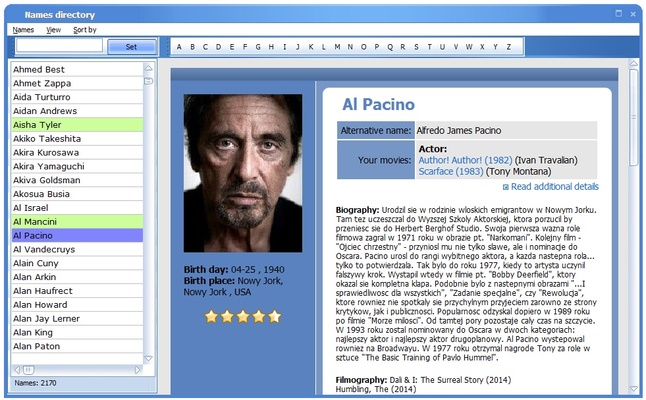
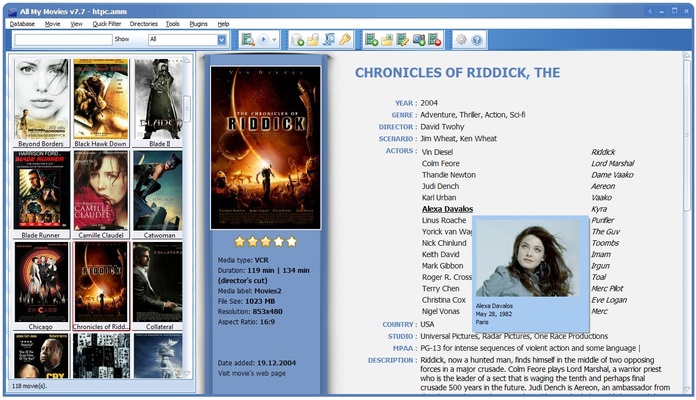
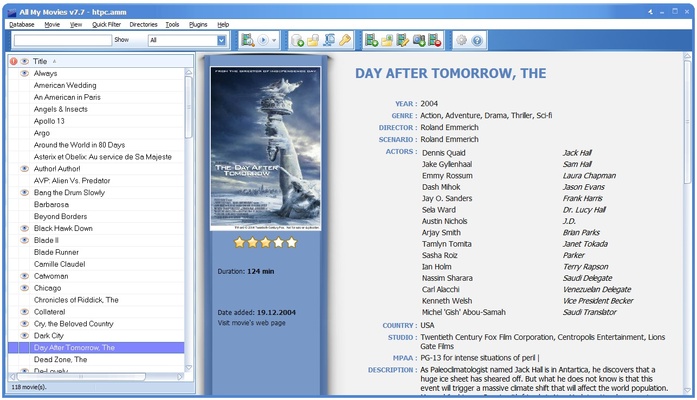
All My Movies uses a database-style interface for browsing and managing movie collections. The main window displays movie entries along with cover artwork and detailed information.
Search and filtering tools make it easy to navigate large collections, while the movie details panel provides access to information such as cast, director, genre, synopsis, notes, and technical details.
Installation and Setup
-
Download the All My Movies installer.
-
Run the setup file and follow the installation wizard.
-
Complete the installation and launch the application.
-
Create or open a movie database.
-
Configure the preferred data sources and collection settings.
-
Start adding movies manually or import existing collection data.
How to Use
-
Create a new movie database or open an existing one.
-
Add a movie by entering its title or scanning supported media files.
-
Let the software retrieve available information and artwork automatically.
-
Review and edit the imported details if necessary.
-
Organize movies using categories, tags, ratings, or custom fields.
-
Use search and filters to find specific titles.
-
Record borrowed movies with the Loan Manager when lending items.
-
Export or back up the database when needed.
Pros
-
Automatic movie information retrieval
-
Useful tools for managing large collections
-
Supports physical and digital media
-
Advanced search and filtering
-
Built-in loan tracking
-
Import and export options
-
Collection statistics and reporting
-
Database backup and password protection
Cons
-
Windows-focused application
-
Some features depend on external movie databases
-
Interface may feel dated compared with newer media cataloging apps
-
Mobile access is mainly based on exported collection data
Conclusion
All My Movies provides a practical way to catalog and organize personal movie collections on Windows. Its automatic metadata retrieval, advanced search tools, loan management, statistics, and import/export features make it suitable for users managing everything from a small film library to a large collection of physical and digital movies.